Dear eramba support,
We are using Version 3.31.0 Enterprise.
Context
Following the update of the Security incident module, we notice that the “Affected Asset” system field no longer appear in the “incident” form, even though it is still present in the CSV import form and the links between incidents and assets are correctly visible in the assets module.
Before the last update we had this field in the security incident form.
Step by step
Observation 1 - Security incident module
- click on security incident module
- click on customization
- the Affected asset system field doesn’t exist and cannot be added to our security incident form
Observation 2 - Security incident module
-
in the security incident module, click on Add item
-
click on CSV import
-
Download the CSV template
-
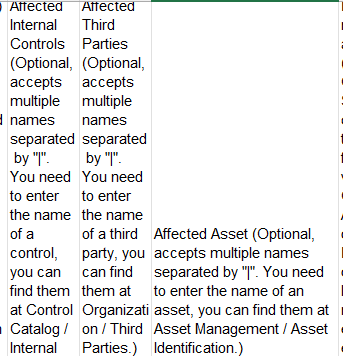
a column dedicated to the Affected asset system field still exists (from our previous customization) :
Observation 3 - Security incident module
- Information of Affected asset is available in the system after the import when we selected one incident and we click on view :

Observation 4 - Assets module
- Information of Affected asset is also available in the system after the import when we go to the Assets module :

Thank you for your help.