# Bug - Unable to generate pdf of policy
**URL:** https://discussions.eramba.org/t/bug-unable-to-generate-pdf-of-policy/9123
**Category:** Forum - Software
**Tags:** bug
**Created:** [October 13, 2026, 8:00am UTC](https://discussions.eramba.org/t/bug-unable-to-generate-pdf-of-policy/9123 "2026-10-13T08:00:34Z")
**Posts on this page:** 6
**Page:** 1
### Author:  [@svenja](https://discussions.eramba.org/u/svenja)
#### Post date: [October 13, 2026, 8:00am UTC](https://discussions.eramba.org/t/bug-unable-to-generate-pdf-of-policy/9123/1 "2026-10-13T08:00:34Z")
Hello Team 🙂
**Eramba Version** : Eramba Enterprise v. 3.31.0
**Issue:** I can no longer generate PDFs of policies since upgrading to version 3.31.0.
**Troubleshooting performed:**
- Searched the entire Policy module for the PDF export option. Checked both the policy record view (“View”) and the document view (“Document View”).
- Asked several colleagues to verify; they were unable to locate the option as well.
- Reviewed the system settings but could not find any configuration option to enable PDF exports.
Please find attached screenshots of the document view.
We do not use the Policy Portal. PDF generation was available in our previous Eramba version, so I do not believe the Policy Portal is related to the issue.
I look forward to hearing from you und thank you for your time!


---
### Author:  [@kisero](https://discussions.eramba.org/u/kisero)
#### Post date: [October 13, 2026, 10:43am UTC](https://discussions.eramba.org/t/bug-unable-to-generate-pdf-of-policy/9123/2 "2026-10-13T10:43:53Z")
Hi Svenja,
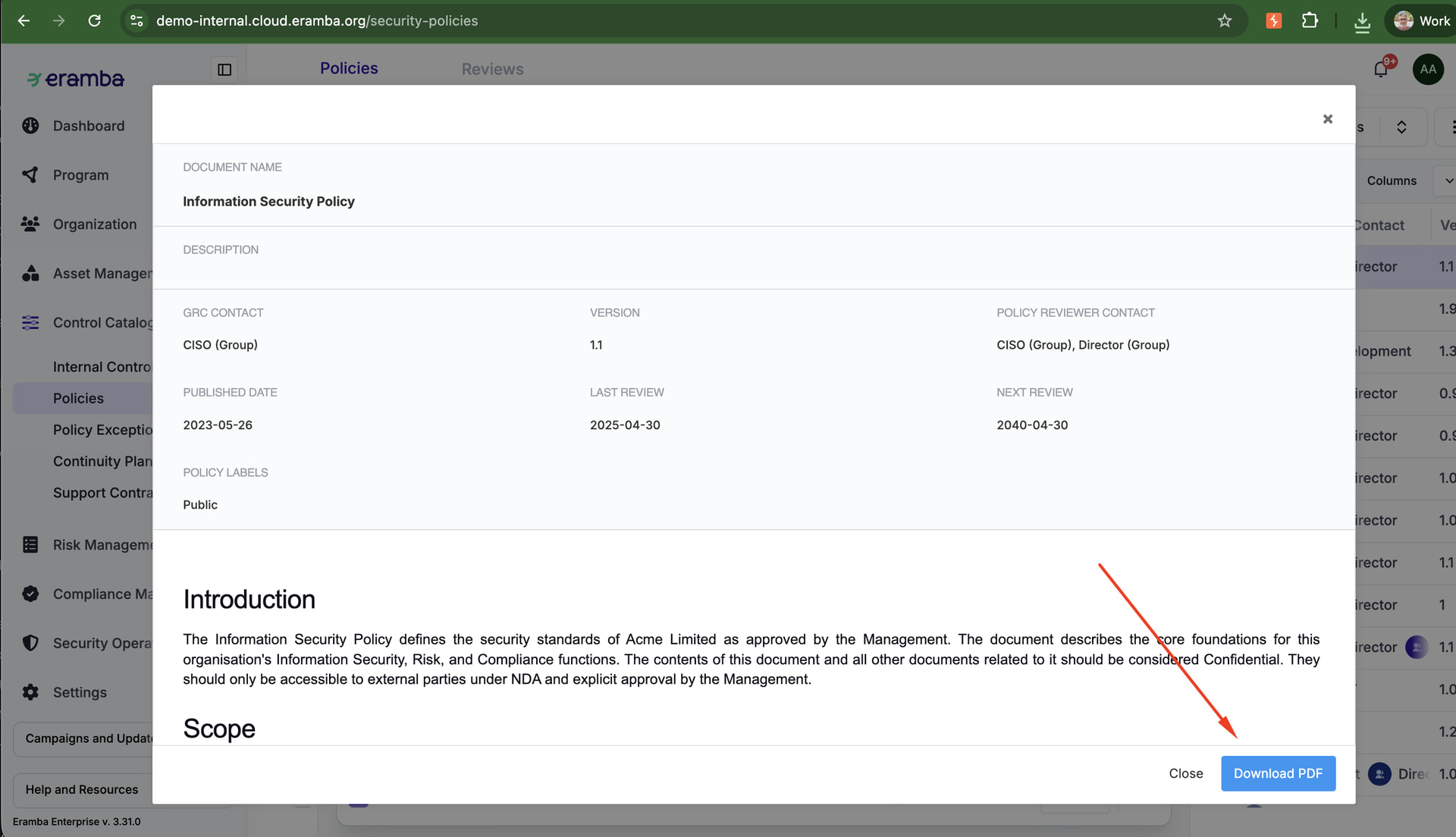
We tested this on 3.31 and couldn’t reproduce it. We used German and English UI, policies with content and with a URL, published, draft and private policies, and admin and non-admin users. In all cases the “PDF herunterladen” button is at the bottom right of the Document View and the PDF downloads.
Your screenshots don’t show the bottom of the window, where the button is. It may be something in your browser, so please try another browser or a private window. If it’s still missing, write us to [support@eramba.org](mailto:support@eramba.org)
---
### Author:  [@svenja](https://discussions.eramba.org/u/svenja)
#### Post date: [October 13, 2026, 12:29pm UTC](https://discussions.eramba.org/t/bug-unable-to-generate-pdf-of-policy/9123/3 "2026-10-13T12:29:37Z")
Thank you for your response.
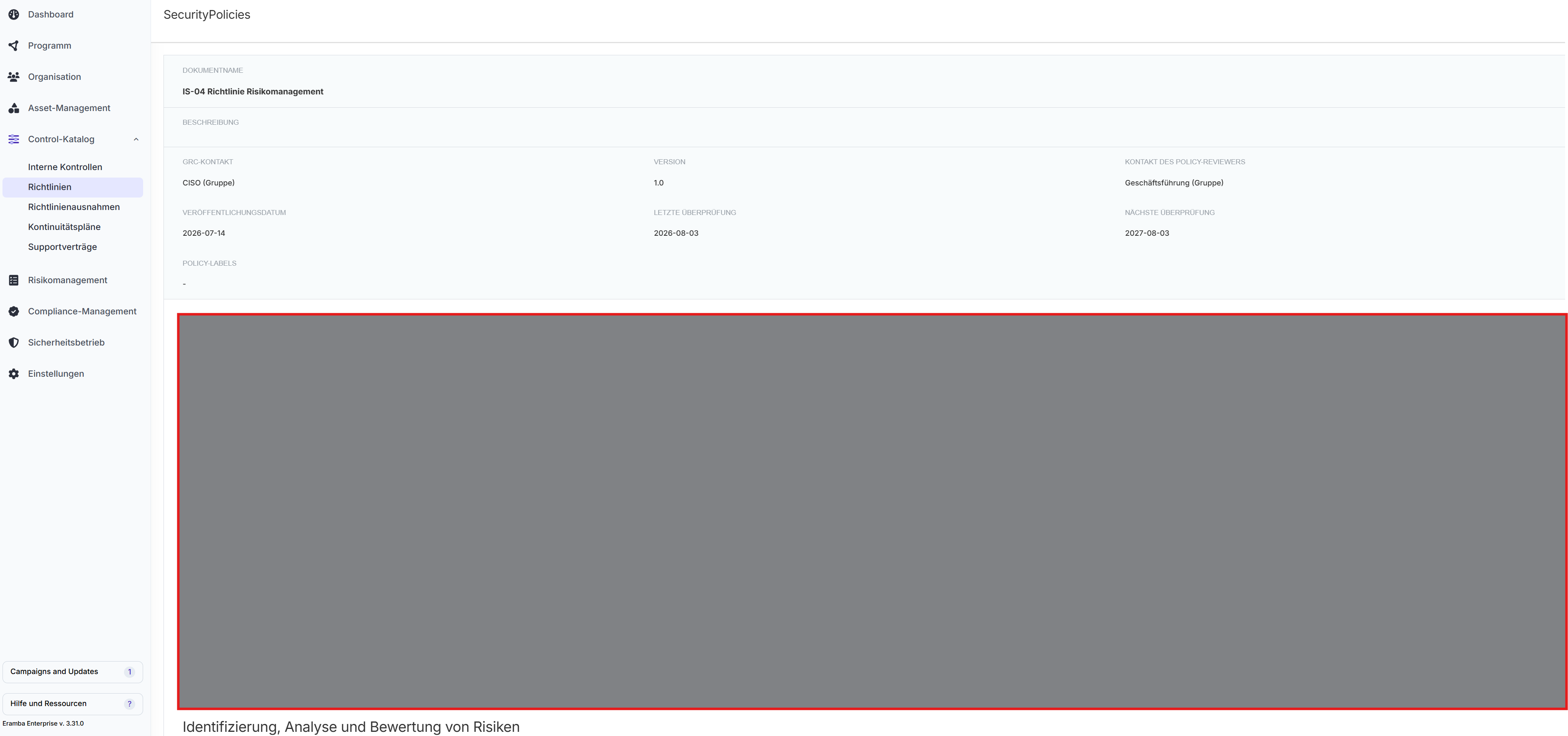
I noticed that the screenshot in your reply looks different from what I see in our environment. In your screenshot, the document view appears to be displayed differently, whereas in our system the document view opens as a full-page view within the normal Eramba interface.
Could this difference be related to the missing PDF export option?
In the attached photos you can see the path I took. So even though my Eramba is in German, you can see what I mean.
I’m posting this reply in the forum in case other users are experiencing the same issue.
I would also be happy to send an email if the difference in the document view is unrelated to the PDF generation functionality.

---
### Author:  [@sam](https://discussions.eramba.org/u/sam)
#### Post date: [October 14, 2026, 8:32am UTC](https://discussions.eramba.org/t/bug-unable-to-generate-pdf-of-policy/9123/4 "2026-10-14T08:32:30Z")
Hi Svenja,
Thanks, that explains it. The PDF button is only in the Document View popup window. Your screenshot shows the document opened as a full page, which happens when you open the document link directly (e.g. from a notification email). That page has no PDF button. We’ll log this as a bug.
Please open it from the list: Richtlinien \> select the policy (or use its menu) \> Dokumentansicht. It opens as a popup and “PDF herunterladen” should at the bottom right.
Can you confirm?
Int. ref.: [Linear](https://linear.app/eramba/issue/ERA-2203/policies-download-pdf-missing-when-document-view-opens-as-a-full-page)
---
### Author:  [@svenja](https://discussions.eramba.org/u/svenja)
#### Post date: [October 14, 2026, 9:23am UTC](https://discussions.eramba.org/t/bug-unable-to-generate-pdf-of-policy/9123/5 "2026-10-14T09:23:57Z")
Hi,
I cannot confirm.
The screenshot I provided was taken after opening the policy via **Richtlinien → select policy → Dokumentansicht** , not from a direct link in an email.
In our environment, this path still opens the document as a full page rather than a popup window.
Thank you for looking into this and for logging it as a bug. I appreciate you continuing to investigate the issue.
---
### Author:  [@Adrian](https://discussions.eramba.org/u/Adrian)
#### Post date: [October 14, 2026, 11:37am UTC](https://discussions.eramba.org/t/bug-unable-to-generate-pdf-of-policy/9123/6 "2026-10-14T11:37:29Z")
That button should open the document in a popup, and PDF download button is at the bottom of that popup. When it opens as a full page instead, it can mean that part of eramba’s JavaScript isn’t reaching your browser. We’ve seen this before with company firewalls, proxies or web filters that block some of the files eramba. In those cases it was related to these paths that need to be allowed:
- `https:///eramba-assets/*`
- `https:///vue_assets/*`
Could you help us confirm this?
1. Open the policy list in eramba.
2. Press F12 and go to the “Network” tab.
3. Type `YoonityJS` in the filter box.
4. Reload the page (F5).
If any of the lines show up in red or with an error, that’s what is being blocked.