# Feature - SCIM Connector
**URL:** https://discussions.eramba.org/t/feature-scim-connector/8765
**Category:** Forum - Software
**Created:** [June 4, 2026, 1:34pm UTC](https://discussions.eramba.org/t/feature-scim-connector/8765 "2026-06-04T13:34:00Z")
**Posts on this page:** 3
**Page:** 1
### Author:  [@sam](https://discussions.eramba.org/u/sam)
#### Post date: [June 4, 2026, 1:34pm UTC](https://discussions.eramba.org/t/feature-scim-connector/8765/1 "2026-06-04T13:34:00Z")
eramba exposes a standard SCIM 2.0 endpoint at `https:///scim/v2` (Users, Groups, discovery, Bulk, core schema only, nothing eramba-specific to configure on the IdP). Your IdP (Entra ID, Okta, …) is the source of truth: it creates, updates, deactivates and deletes users. Changes made in eramba to SCIM-managed attributes are overwritten on the next sync.
### Setup
1. **Create a service user** in eramba, add it to the built-in **SCIM User Management** group, and create a **Personal Access Token** for it. (Basic Auth works too, but a token doesn’t break when passwords rotate. The admin account cannot be used.)
2. In **Settings → Organization & Access → SCIM Connections** , switch the connection **ON** and copy the endpoint URL.
3. In your IdP, configure provisioning with the endpoint URL and the token, and **assign groups to the app** , not just individual users. Groups are the whole point: they are what carries permissions into eramba.
4. Back in eramba, each group pushed by the IdP shows up as **Pending** in the SCIM group mapping table. For each one, map it to one or more eramba groups (or hit **Create group** to make one from the IdP group name) and toggle its portal/API access: Main, Vendor Assessments, Account Reviews, Awareness, Policy, REST API.
5. Pick a **deprovisioning action** : **Disable** (default, user is deactivated and the record kept, reversible) or **Delete**. Delete first transfers the user’s ownerships and assignments to a user you select, then deletes the account. If the transfer or deletion can’t be completed, the user is kept and a SCIM error is returned and logged.
That’s it. From here on, adding and removing people in IdP groups drives their access in eramba automatically. Mapping or access changes re-apply to all existing members of that group, not just new ones.
### How Users Come In
- Provisioned users are **remote users** (no local account, no user template), flagged **SCIM Provisioned**. Mapped fields: `userName` → Login, given/family name → Name/Surname, primary email → Email, `active` → Status. If the IdP doesn’t send an email (Entra users without a mailbox have an empty `mail`), `userName` is used instead.
- **SCIM users remain fully editable in eramba** , there is no read-only lock. You can keep assigning them as owners, reviewers, auditors and so on like any other user. Just keep in mind that IdP-managed attributes (name, surname, email, login, active status) and mapping-derived group/portal access are re-applied on the next sync, so permanent changes to those belong in the IdP.
- A user in **no mapped group** (e.g. assigned directly to the app) is still created, **active** , in a minimal default state: No Allowed Permissions group, Policy and Awareness portals only. Nobody is rejected, so there are no IdP retry loops, and awareness/policy campaigns work for everyone out of the box.
- If the email matches an **existing local user** , that account is taken over as SCIM-managed instead of duplicated. Its current access is kept as a baseline and SCIM group access is added on top.
### Behavior at a Glance
| You do this in the IdP | eramba does this |
| --- | --- |
| Assign a user directly to the app | Created active in the default state (Policy and Awareness portals only) |
| Change user attributes | Updated on next sync |
| Add user to a mapped group | Gains permissions and portal access of the mapped eramba group(s) |
| Remove user from a group (still in others) | Recalculated, stays active with remaining access |
| Remove user from all mapped groups | Stays active, falls back to the default state |
| Unassign / soft-delete / hard-delete a user | Deprovisioning action applies (Disable, or Delete with item transfer) |
| Push a new group | Appears as Pending, grants nothing until mapped |
| Rename a group | Name updated, mapping and members preserved |
| Delete / unassign a group | IdP group record and mapping removed, eramba groups untouched, members recalculated |
| User’s email matches an existing local user | Taken over as SCIM-managed, local access kept, SCIM access added |
Every SCIM request is logged (SCIM Connections → **View logs** ): operation, resource, status, error type, payloads. That’s the first place to look when a user “didn’t show up”.
### Notes for Entra ID
- Incremental cycles run roughly every 40 minutes, use _Provision on demand_ for testing.
- Attributes eramba doesn’t support (`title`, `department`, `employeeId`, …) are ignored, not rejected. You can leave Entra’s default attribute mappings as they are.
- Nested groups are **not** flattened, use groups with direct members.
- On large tenants, scope provisioning to _Sync only assigned users and groups_.
- Toggling the connection OFF makes Entra error out (and eventually quarantine the app). Existing eramba data is untouched.
Out of scope: OAuth client-credentials, custom schema extensions, multiple SCIM connections per instance.
## UI
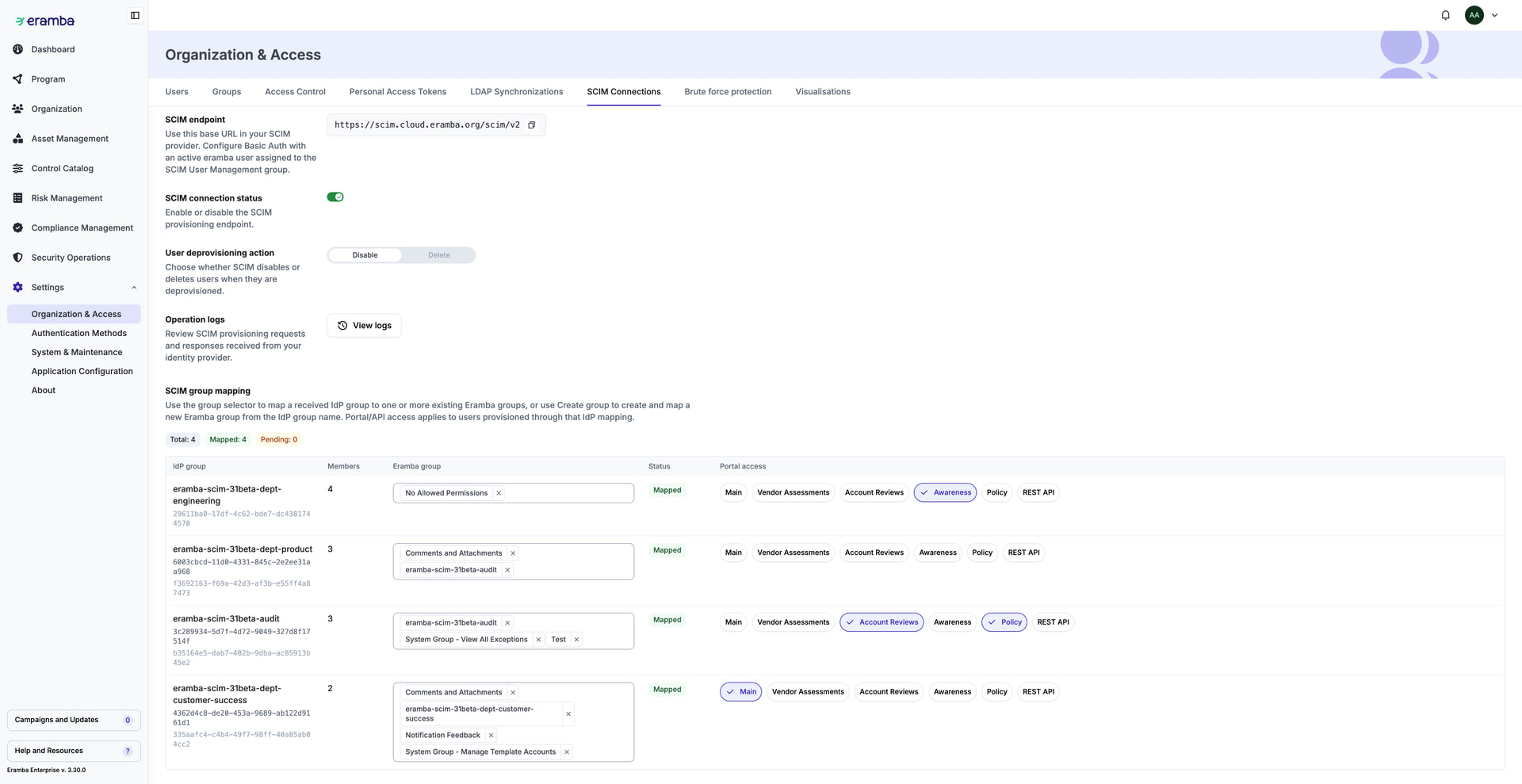
ref.: [Question - Auto-Provisioning Users via SCIM](https://discussions.eramba.org/t/question-auto-provisioning-users-via-scim/6285)
int. ref.: [https://eramba-team.atlassian.net/browse/ERB-1576](https://eramba-team.atlassian.net/browse/ERB-1576)
---
### Author:  [@sam](https://discussions.eramba.org/u/sam)
#### Post date: [May 28, 2026, 9:47am UTC](https://discussions.eramba.org/t/feature-scim-connector/8765/2 "2026-05-28T09:47:28Z")
---
### Author:  [@sam](https://discussions.eramba.org/u/sam)
#### Post date: [June 4, 2026, 1:32pm UTC](https://discussions.eramba.org/t/feature-scim-connector/8765/3 "2026-06-04T13:32:50Z")