# Guide - Migrating source code install to docker install
**URL:** https://discussions.eramba.org/t/guide-migrating-source-code-install-to-docker-install/8487
**Category:** Forum - Software
**Created:** [April 13, 2026, 11:51am UTC](https://discussions.eramba.org/t/guide-migrating-source-code-install-to-docker-install/8487 "2026-04-13T11:51:10Z")
**Posts on this page:** 3
**Page:** 1
### Author:  [@Adrian](https://discussions.eramba.org/u/Adrian)
#### Post date: [April 13, 2026, 11:51am UTC](https://discussions.eramba.org/t/guide-migrating-source-code-install-to-docker-install/8487/1 "2026-04-13T11:51:10Z")
With version 3.30 it comes the EOL of the eramba source code version. The only supported version moving forward will be docker.
This guide follow the steps to migrate from a source code install to docker install
## Step 1: Install eramba docker
Before installing eramba docker, it’s important to understand that in order to perform the migration, it has to be done with instances on the same version number. This means that if your source code installation is on version 3.29.1, you should have the same version number on eramba docker.
To install the eramba docker version you have two options:
### Docker:
> **[Install eramba on Docker: Step-by-Step Guide](https://www.eramba.org/learning/courses/98)**
>
> Install, configure, update and back up eramba on Docker. Server requirements, HTTPS setup, troubleshooting and migration, for Community and Enterprise.
When you reach the step **“Install - Enterprise”** you can download the matching enterprise docker image of your source code from the [downloads portal](https://downloads.eramba.org)
### VMWare:
VMware install is an Ubuntu 24 virtual machine with Docker and the eramba image downloaded.
The downloaded image gets updated regularly, so if at the time of migration the image there is a version that is not supported by the source code install you can download previous images from the [downloads portal](https://downloads.eramba.org).
> **[Install eramba on VMware: Full Setup Guide](https://www.eramba.org/learning/courses/13/episodes/278)**
>
> Deploy eramba on VMware step by step. Virtual machine requirements, network configuration, first login and post-install checks for on-premise use.
You’ll have to follow one of the previous guides to install eramba Docker.
Once you’re done, make sure that the installation is all good by checking `Settings > System & Maintenance > System Health`. Don’t worry about the licence; that will be added later.
## Step 2: Migrate database and files
To migrate the files and database, we can follow the same approach as in the migrating server guide.
> **[Install eramba on Docker: Step-by-Step Guide](https://www.eramba.org/learning/courses/98)**
>
> Install, configure, update and back up eramba on Docker. Server requirements, HTTPS setup, troubleshooting and migration, for Community and Enterprise.
- Export your backups from the source code install `(Settings>System & Maintenance>Backups and Restore)`
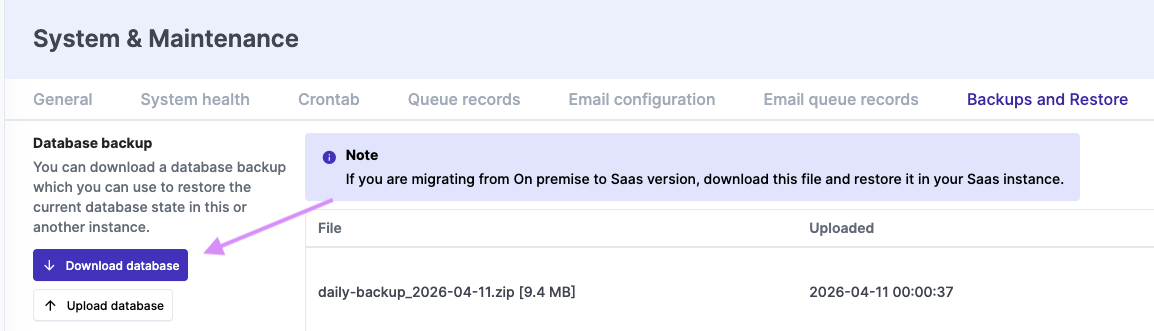

- Import the backups on your eramba docker install `(Settings>System & Maintenance>Backups and Restore)`
- Reset the application ID on the docker install `(System & Maintenance > Reset)`
- If you are using Enterprise go to the source code install and deactivate the license `(Settings > About)`
- Activate the license on the docker install
### Troubleshoot:
If you see a **WKHTMLTOPDF** error in **System Health** , you’ll need to update the path in the database to point to the correct `wkhtmltopdf` binary.
```auto
UPDATE `docker`.`settings`
SET `value` = '/usr/local/bin/wkhtmltopdf'
WHERE `name` = 'WKHTMLTOPDF path to bin file';
```
---
### Author:  [@Adrian](https://discussions.eramba.org/u/Adrian)
#### Post date: [April 13, 2026, 11:51am UTC](https://discussions.eramba.org/t/guide-migrating-source-code-install-to-docker-install/8487/2 "2026-04-13T11:51:15Z")
---
### Author:  [@Adrian](https://discussions.eramba.org/u/Adrian)
#### Post date: [April 13, 2026, 12:15pm UTC](https://discussions.eramba.org/t/guide-migrating-source-code-install-to-docker-install/8487/3 "2026-04-13T12:15:16Z")