Migration of form and views
Account Review Tab
Form:
- Form will have 1 tab. The feed tab will be merged into the general tab, and the portal setting tabs will be removed.
- The feeds will be all non-cas sensitive by default.
- Frequency fields should be similar to the internal controls audit, where you select the first date and then you select the frequency.
| Field |
Mandatory |
Hidden |
Notes |
| Title |
Yes |
|
|
| Description |
No |
|
|
| GRC Contact |
Yes |
|
|
| Reviewer Contact |
Yes |
|
|
| Type |
Yes |
|
|
| Feed |
Yes |
|
Feeds will be always non-case sensitive. |
| Exit feed |
Yes if “Feed” is set to “Exit” |
The field will be hidden unless “Feed” is set to “Exit” |
|
| Frequency |
Yes |
|
Same field as IC Audits (first audit date + frequency drop-down) |
| Assets |
No |
Yes |
|
| Tags |
No |
Yes |
|
Default View
| Field |
Description |
| Dynamic Status |
|
| Title |
|
| Latests Findings |
It will be displayed the number of findings from the latest pull. Once there is a new pull, if they were not reviewed, they go to the column, “Missing Reviews”. |
| Missing Review |
It will be displayed the number of findings that still weren’t reviewed from the previous pulls. |
| GRC Contact |
|
| Reviewer Contact |
|
| Last Pull |
Field with the date of the last pull. (is it all for trigger pull or only for scheduled pull?) |
| Next Pull |
Field with the date of the next pull. |
| Type |
|
| Feed |
The name of the feed being used. Both exit and regular if applicable |
Pinned Views
| View |
Description |
| All Items |
All Account reviews |
| Started |
All account reviews that are started. |
| Stopped |
All account reviews that are stopped. |
| Pending Reviews |
Pending reviews field > 0 |
| Reviewed |
Pending reviews <= 0 |
| Findings Open |
Findings =>1 |
Notifications
Report
Create report notification, every 7 days, pdf+csv for:
| View |
Recipient |
| Started |
Admin (TO BE REVIEWED) |
| Stopped |
Admin |
| Pending Reviews |
Admin |
| Reviewed |
Admin |
| Findings Open |
Admin |
Warning
| Name |
Recipients |
Conditions |
Variations |
Enabled |
| Item Created |
GRC Contact, Reviewer |
New item created. |
|
No |
| Item Edited |
GRC Contact, Reviewer |
Item has been added. |
|
No |
| Item Deleted |
GRC Contact, Reviewer |
Item has been deleted. |
|
No |
Comments & Attachments
| Name |
Recipients |
Conditions |
Variations |
Enabled |
| New Comment & Attachment |
GRC Contact, Reviewer |
New Comment & Attachment |
|
No |
Dynamic Status
| Name |
Description |
Variations |
Enabled |
| Finding expired |
At least one related Account Review Pull finding is expired and is still active. |
|
Yes |
| Open finding |
At least one related Account Review Pull finding is open and active. |
|
Yes |
| Latest pull failed |
Last pull failed or automation failed |
|
Yes |
| Pending Reviews |
Pull found accounts that are pending review (they are neither "Reviewed or “Not Reviewed” |
|
Yes |
| Reviewed |
All pull feedback has been marked as “Reviewed”. |
|
Yes |
| Not Reviewed |
1 or more account marked as not “Not Reviewed”. |
|
Yes |
| Started |
Account is started |
|
Yes |
| Stopped |
Account review is stopped |
|
Yes |
Action Bar
- The “trigger pull” button will be changed to “Trigger Review”.
- When the button is clicked, the warning modal will be shown with the following text:
By clicking **“Submit”**, the account review will be triggered immediately and the system will look for findings right away.

This manual trigger is independent of your configured account review periodicity, so it will run regardless of when the next scheduled review is due.

The “Latest Finding” column will be updated with the findings identified during this review. If there are any accounts currently listed there still requiring review, they will first be moved to the
“Missing Review” field before the new findings are recorded.
- The portal URL button will be changed to “Review Findings”.
- This button will go to the feedback tab (where do you do account reviews) with a filter applied will only the findings from the latest pull and from the account review that you are coming from to the account review that you are coming from.
Feeds
Form
| Field |
Mandatory |
Hidden |
Notes |
| Title |
Yes |
|
|
| Description |
No |
Yes |
|
| Source |
Yes |
|
1. For new install, only “Automation” will be shown. If possible, the field should be disabled. That way we don’t have a dropdown with only one option. 2. For previous installs we will still show file, aws, and LDAP, but there will be this message next to them. “This option is being deprecated. Please do not use it, as it will be removed soon.” |
The rest of the fields that show up based on the type of the source will remain the same.
Default View
| Field |
Description |
| Dynamic Status |
|
| Title |
|
| Source |
Type of sorce feed file,aws,automation… |
| Type |
List of current employees, List of accounts to be reviewed, List of former employees |
Pinned Views
| View |
Filter |
| All Items |
All feeds |
| List of current employees |
Type = List of current employees |
| List of accounts to be reviewed |
Type = accounts to be reviewed |
| List of current employees |
Type = current employees |
New “Test” Button
The form should include a Test button for the feed.
The feed is already tested when the form is saved, but we need a separate “Test” button that displays the feed output. If the feed is very large, only the first 10 rows should be shown.
If the feed has already been tested using Test button, then clicking Save again should not re-test the feed.
However, if the user clicks Save without testing the feed first, the Save button should still run the feed test before saving.
Action Bar
The download button will be removed, and it should be replaced by a test button. The test button should open a modal that will run the test and then show the output of the feed. Like testing the automation
Pulls And Audit trails (ON HOLD, DON’T DEVELOP YET)
These sections will be both merged into “Audit Trails”
Default View
| Field |
Description |
| Dynamic Status |
|
| Account Review |
Account review name |
| Type |
Pull failed, Pull succeeded, Reviewer Action |
| Accounts |
Real user, empty value, or clickable (see section below) |
| Logs |
Main result or action message (see section below) |
| Date |
Pull / audit trail date |
Row rules
| Case |
Accounts |
Logs |
Click behavior |
| Pull failed because automation failed |
Empty |
Automation Log (number) |
Clicking the number will open bottom drawer with automation logs, same as on feeds now |
| Pull succeeded |
Empty |
1 |
Clicking “1l” opens bottom drawer (see section below) |
| Reviewer action |
Reviewer name |
Reviewer action message |
NA |
| Pull failed for missing fil |
Empty |
The pull process failed because the feed file does not exist. |
NA |
Drawer for Pull Trail
Clicking Pull Trail will open bottom drawer and you will see the following columns.
Pinned Views
| View |
Filter |
| All Items |
All Account audit trails |
| Pull succeeded |
Type=Pull succeeded |
| Pull failed |
Type=Pull failed |
| Reviewer Action |
Type=Reviewer Action |
Feedbacks
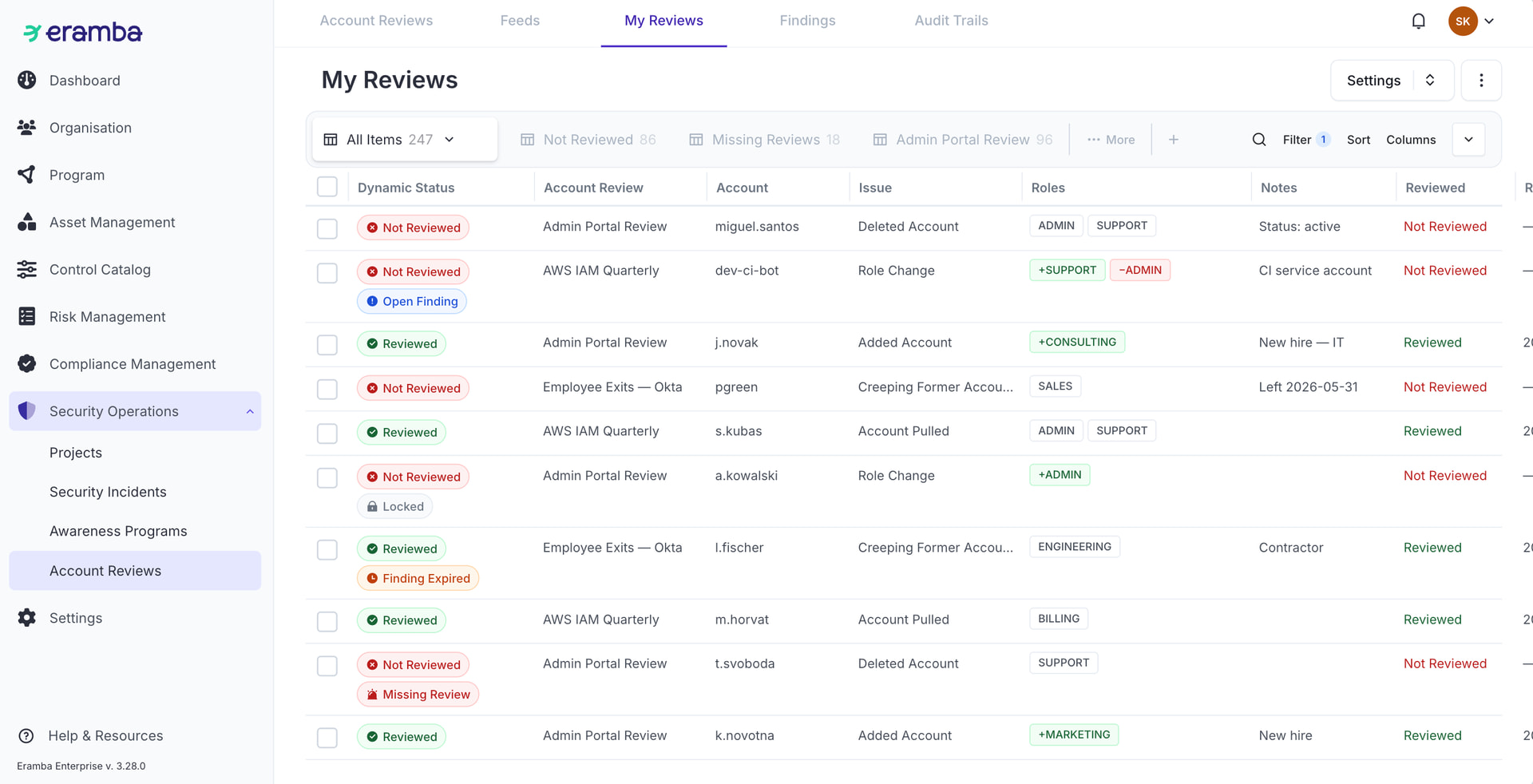
The account review portal will be removed, and all the reviewing of the accounts will be done on the feedback section. For each account review created will have its own dedicated view, similar to how Compliance Analysis and Compliance Packages currently work.
possible statuses:
Default View
| Field |
Description |
| Dynamic Status |
|
| Account Review |
The name of the account review that the the feedback belongs to |
| Account |
Name of the account found (ex: adrian.santa) |
| Issue |
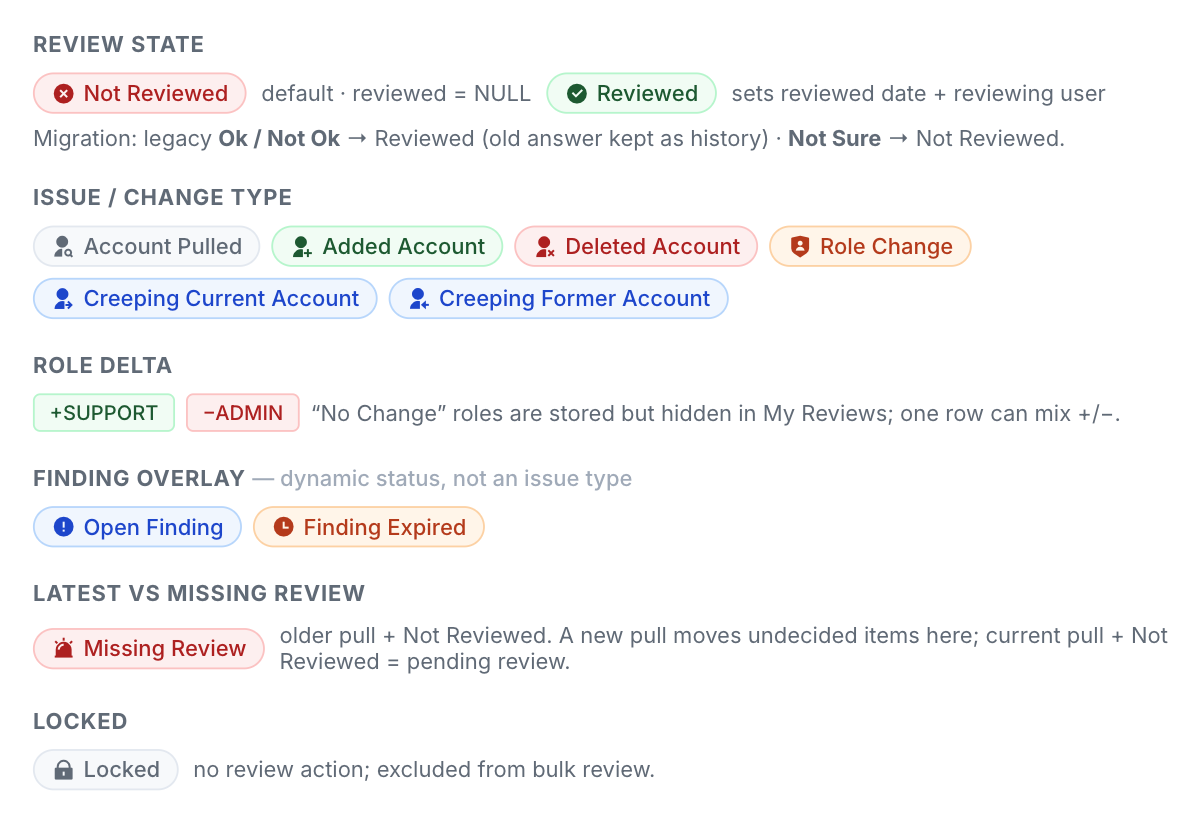
What was detected on the account, for example: Created, Deleted, Role Change, Creeping (Exit discrepancy) |
| Roles |
If there are role changes, then they will be displayed on this column, for example +Support, -Admin with colors if possible. (See Explicit visual differentiation for reviews. ) |
| Notes |
|
| Reviewed |
Reviewed/Not Reviewed |
| Reviewed Date |
|
Pinned Views
| View |
Filter |
| All Items |
All Account reviews feedbacks |
| Reviewed |
All feedbacks reviewed |
| Not Reviewed |
All feedbacks not reviewed |
| x (Account review Name) |
one view for every account review that filters for their feedback, like compliance packages and compliance analysis |
Dynamic Status
| Name |
Description |
Variations |
Enabled |
| Reviewed |
Reviewed = true |
|
Yes |
| Not Reviewed |
Not Reviewed = true |
|
Yes |
| Finding Expired |
Account Review Finding - Finding Expired Is active |
|
Yes |
| Open Finding |
Account Review Finding - Open Finding Is active |
|
Yes |
Notifications
Warning
| Name |
Recipients |
Conditions |
Variations |
Enabled |
| Accounts need to be reviewed on {$name} |
GRC Contact, Reviewer |
Latest pull found accounts. |
|
Yes |
| Accounts review overdue - {$name} |
GRC Contact, Reviewer |
Pull found accounts, but nobody has reviewed them yet. |
-1, -5, etc. Based on the date of the pull. |
No — since there is no deadline for account reviews, this notification should not be enabled by default. |
Comments & Attachments
| Name |
Recipients |
Conditions |
Variations |
Enabled |
| New Comment & Attachment |
GRC Contact, Reviewer |
New Comment & Attachment |
|
No |
Explicit visual differentiation for reviews
We should introduce colors on the view column to clearly differentiate review-related changes.
Adding colors to the view is very hard and will take a lot of time. Then we will handle it with simply plus-minus, for example: +SUPPORT -CONSULTING
Edit Modal
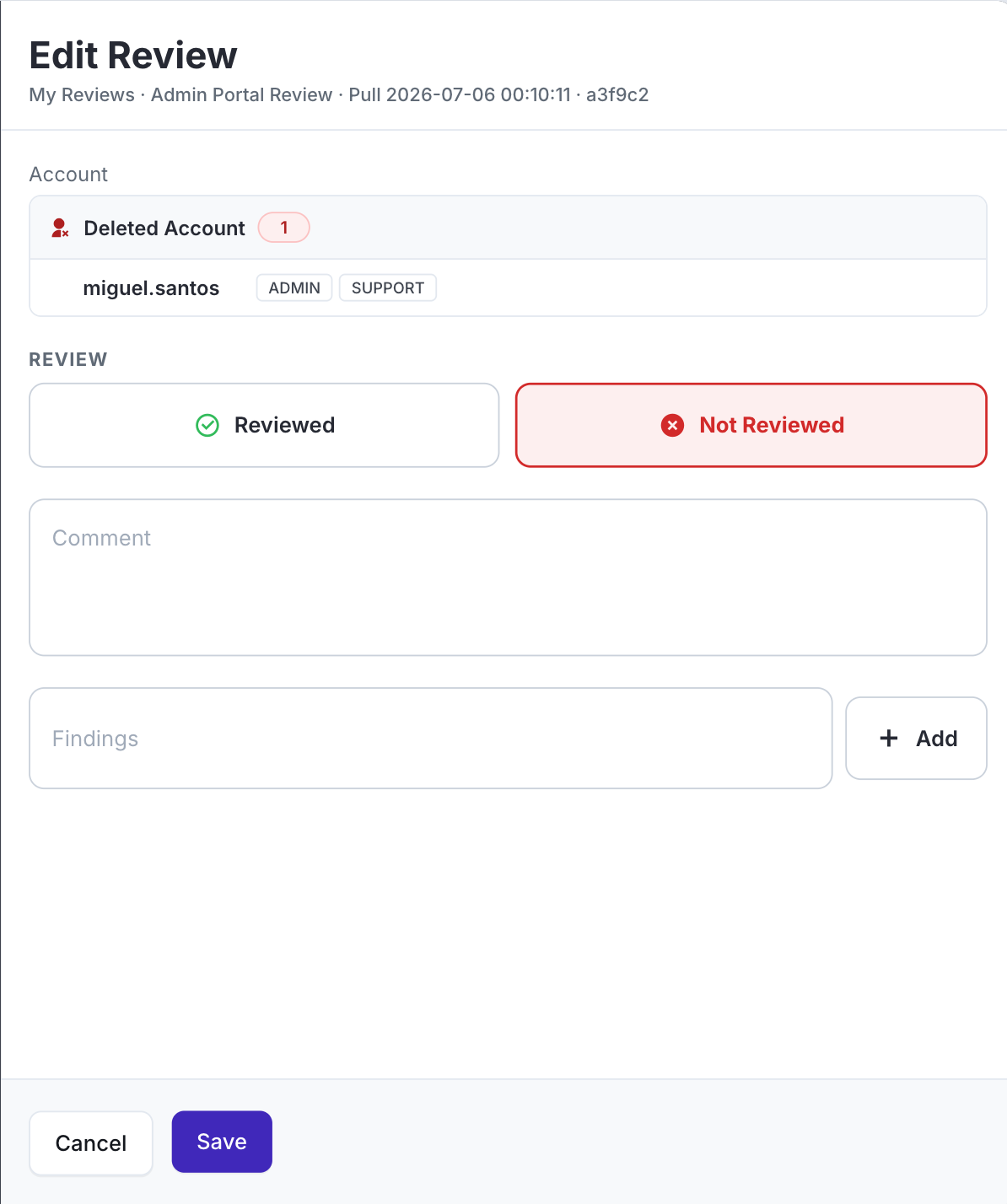
Account reviews will be done on this section, and they will be done through the edit button.
| Field |
Mandatory |
Information |
| Account |
NA |
This field will have the Name of the account found, Issue and Roles displayed together like the picture below. |
| Review |
Yes |
Reviewed/Not Reviewed (remove not sure) |
| Comment |
No |
|
| Create Finding |
No |
Button to create finding on this. On this create finding, you will need to set the deadline date and the title because the other information already comes from the account review. |
You will only be able to select a decision: Reviewed / Not Reviewed. “Not sure” will be deleted.
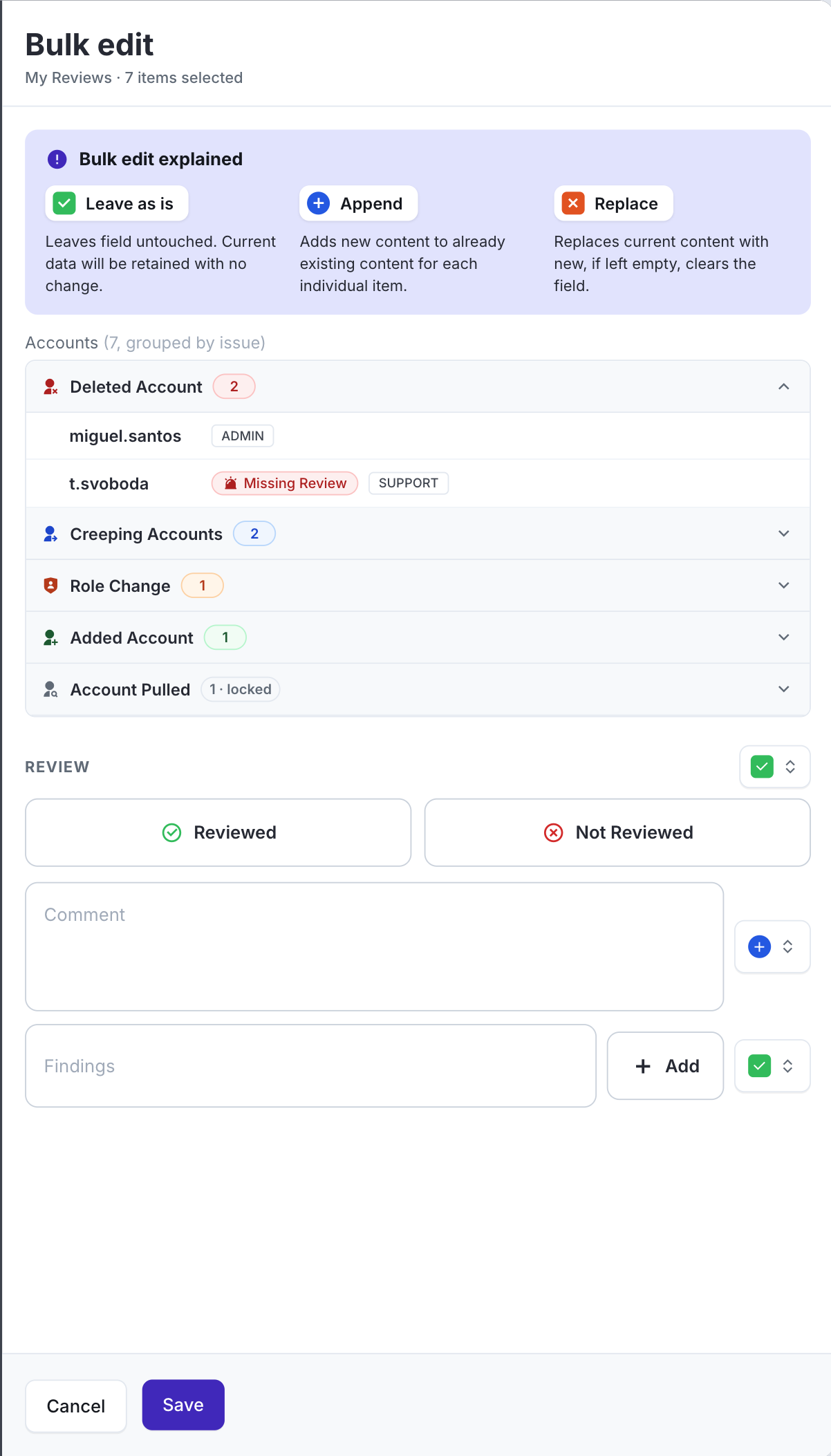
Bulk actions should also be supported to apply Reviewed / Not Reviewed decisions across multiple rows using bulk edits. When creating a finding on bulk edit, there will be only 1 finding assigned to the accounts selected, so the relationship is one to many.
Findings
Finding will be open by default, and once closed, you need to put the date, and you won’t be able to edit it anymore. Very very similar behavior as compliance exceptions.
Form
It will have only one tab.
| Field |
Mandatory |
Hidden |
Notes |
| Name |
Yes |
|
|
| Description |
No |
Yes |
|
| GRC Contact |
Yes |
No |
|
| Reviewer Contact |
Yes |
No |
|
| Status |
Yes* |
No |
*It will be “Open” by default and disabled. |
| Expiration Date |
Yes |
No |
Previously named “Deadline”, rename it to "Expiration Date " |
| Account Review Pull |
Yes |
No |
This will show the list of pulls in the following format: Account Review Name , Pulled Date (add HH:MM:SS), Latest (this will only be displayed if it is the latest pull), hash |
| Accounts |
Yes |
No |
|
Default View
| Field |
Information |
| Dynamic Status |
|
| Name |
Name of the finding |
| Status |
Open/Closed |
| GRC Contact |
|
| Reviewer Contact |
|
| Start Date |
The date the finding was created |
| Expiration Date |
Expiration date set on finding creation |
| Closure Date |
The date the finding status was changed to “Close” |
| Account Review |
Account review name associated |
| Accounts |
Accounts Name (ex. adrian.santa) it can be more than one. |
Pinned Views
| View |
Filter |
| All Items |
All findings |
| Open Findings |
Open status = true. |
| Closed Findings |
Close status = true. |
| Expired Findings |
Expiration date has passed. |
| Findings Expiring In 30 Days |
Status is not Closed and Expiration Date Before Actual Date 30 |
Not Pinned Views
| View |
Filter |
| Findings Expiring In 14 Days |
Status is not Closed and Expiration Date Before Actual Date 14 |
Dynamic Status
| Name |
Description |
Variations |
Enabled |
| Open Findings |
Open status = true. |
|
Yes |
| Closed Findings |
Close status = true. |
|
Yes |
| Expired Findings |
Status is not Closed and Expiration Date Before Actual Date |
|
Yes |
Notifications
Report
| Name |
Recipients |
Description |
Variations |
Enabled |
| Open Findings Report |
Admin |
|
Open Findings |
No |
| Closed Findings Report |
Admin |
|
Closed Findings |
No |
| Expired Findings Report |
Admin |
|
Expired Findings |
No |
Warning
| Name |
Recipients |
Conditions |
Variations |
Enabled |
| Item Created |
GRC Contact, Reviewer |
New item created. |
|
No |
| Item Edited |
GRC Contact, Reviewer |
Item has been added. |
|
No |
| Item Deleted |
GRC Contact, Reviewer |
Item has been deleted. |
|
No |
| Finding Due in x Day |
GRC Contact, Reviewer |
|
1 / 10 / 30 days |
No |
| Expired Finding |
GRC Contact, Reviewer |
|
|
|
Comments & Attachments
| Name |
Recipients |
Conditions |
Variations |
Enabled |
| New Comment & Attachment |
GRC Contact, Reviewer |
New Comment & Attachment |
|
No |
Migration Considerations
- The feedback that is currently marked as “Not Sure” will count as items Not Reviewed, They will be displayed on the accounts review column of “missing review”.
- The portal button on the top right side will be removed.
- All the notification macros And any reference to the portal. should now redirect to the feedback tab instead of the portal.
Not Contemplated (WILL NOT BE DEVELOP NOW)
Feed based on SCIM user synchronization
This would reduce CSV/API/automation scripting and make Eramba easier to connect with Entra ID, Okta, Google Workspace, etc. Use that as a current list of employees, for example.
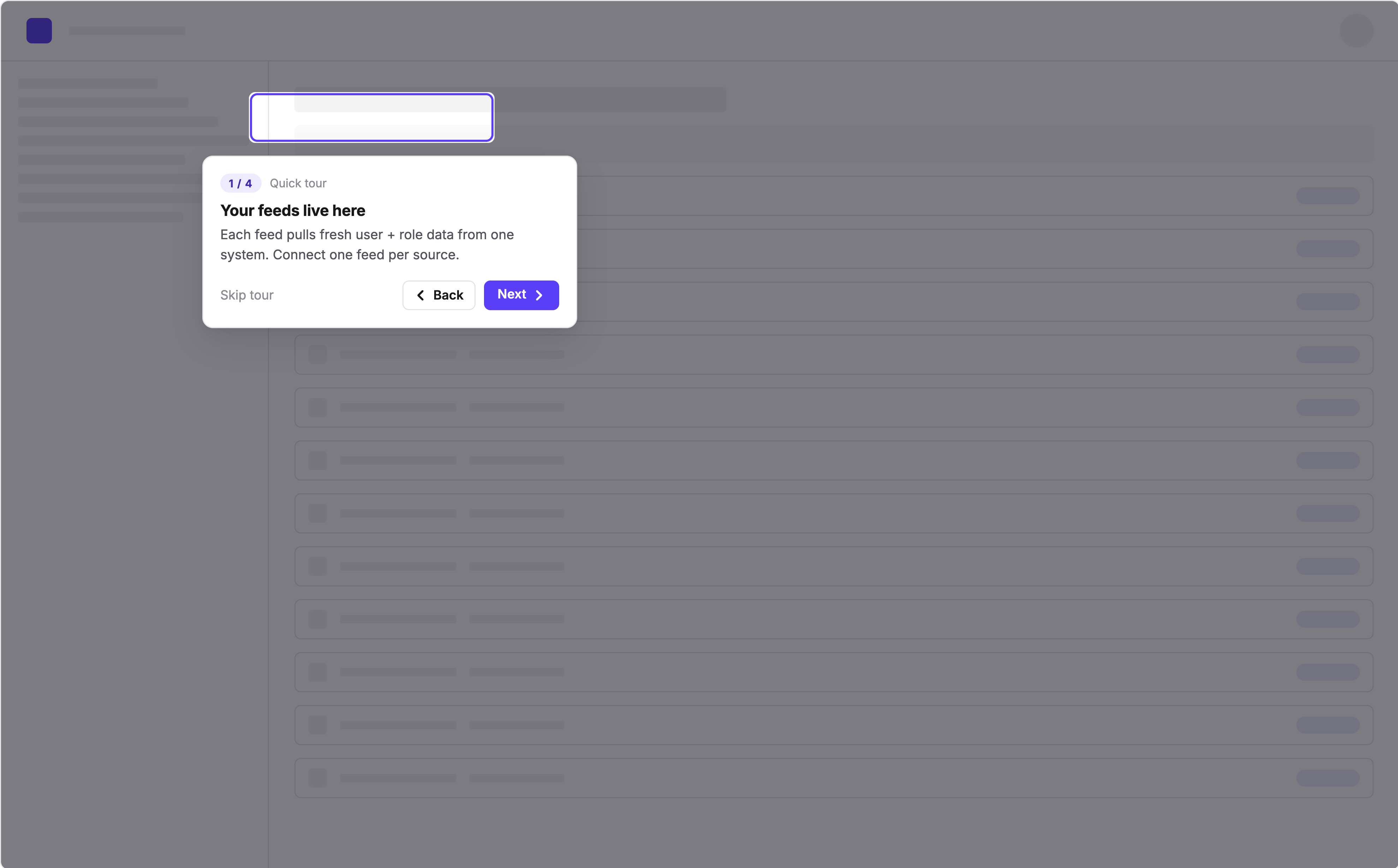
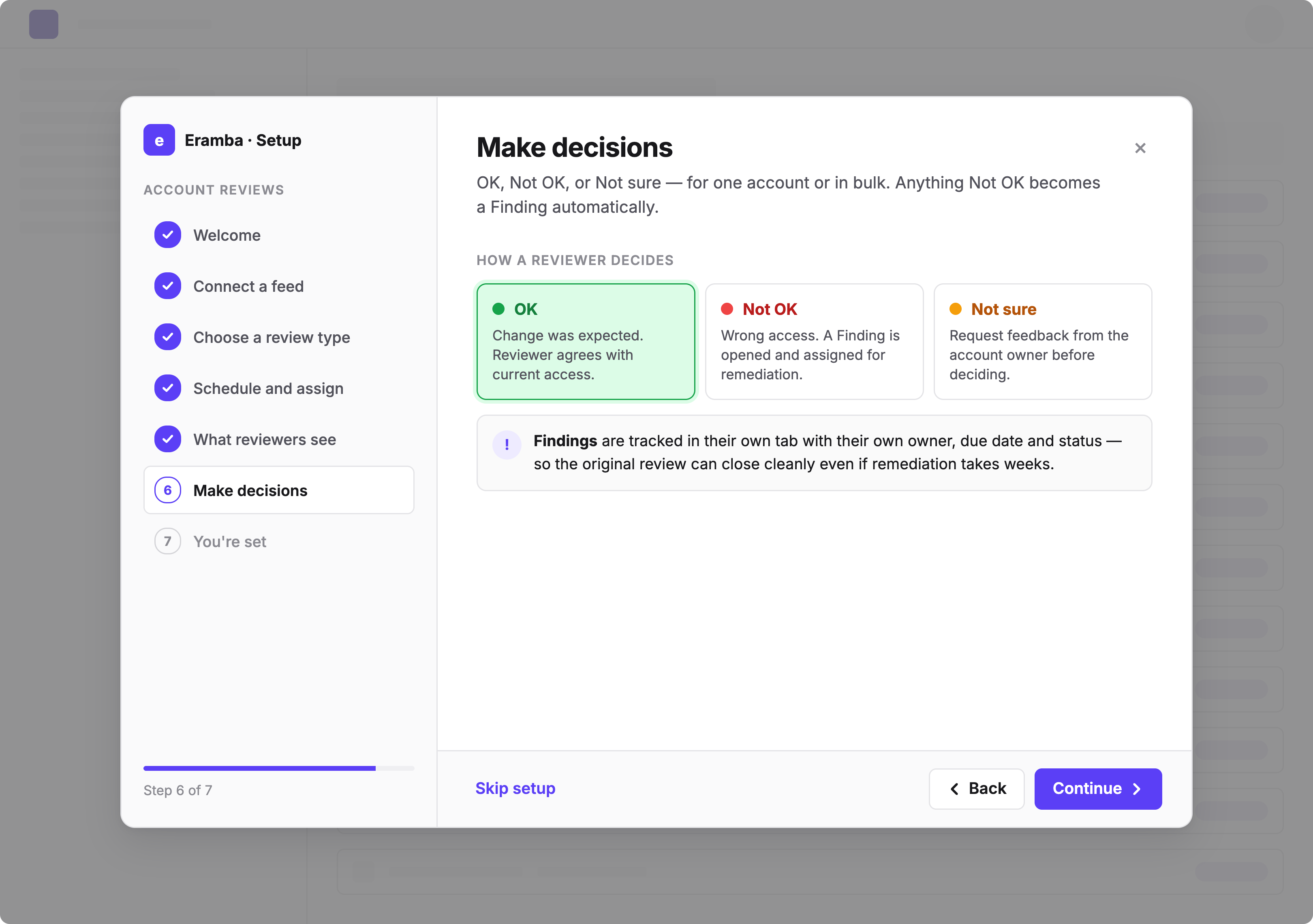
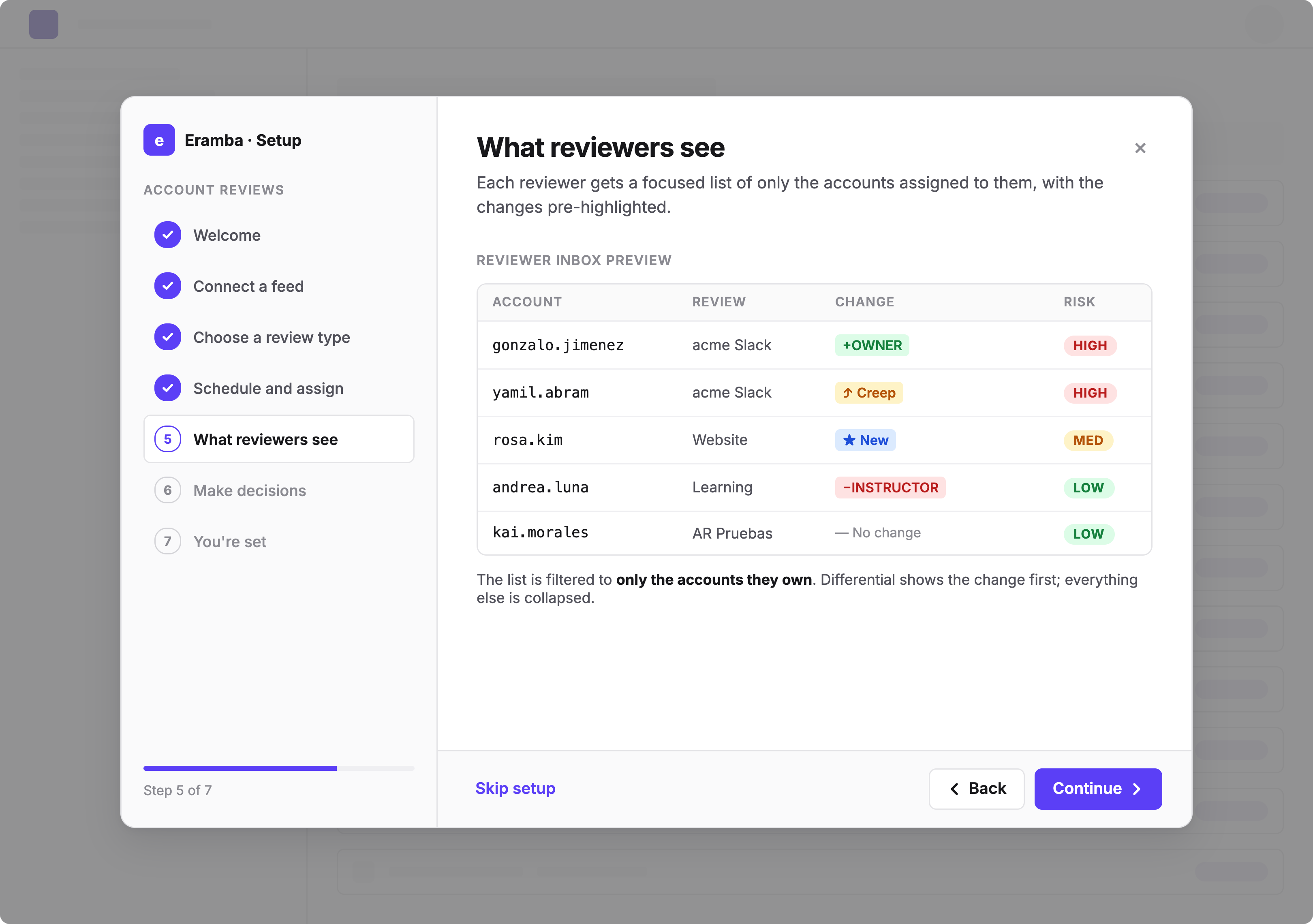
Onboarding wizard:
-
Create a helper wizard that appears the first time a user creates an account review. The wizard would guide the user through creating a feed, testing it, creating the account review, configuring notifications, and triggering the first pull.
-
This would make the feature much easier to understand, as its current usage is relatively low.
Option 1: Simple where to click options
Option 2: Guidance with an actual form and more in-depth steps and descriptions
Outbound provisioning / deprovisioning
Add the ability to automatically deprovision “Not OK” accounts.
This could probably be implemented using automations.
Templates
Account reviews are highly company-dependent, so templates are not really applicable.
AI recommendations
For AI to provide meaningful recommendations during an account review, it would require a significant amount of context about the organization, employees, departments, and internal processes. Because of that, it is very difficult to make reliable recommendations in a generic way.