Introduction
The objective of this feature is to pre-populate eramba installs (new and existing) with a set of templates that users can adjust and use. This feature will be public for community and enterprise users.
Right next after this feature is built we will deploy an AI assistant that will actually improve templates with a slightly different approach.
Scope
The following sections will include templates (in order of priority):
- Compliance Packages
- Internal Controls
- Policies
- Risks
Definitions
- Templates are items (Controls, Policies, etc)
- Templates will have a unique ID that will never change, like rodne cislo of sorts
- Template items might or not have pre-defined relationships with other Items, when these relationships exists we refer to them as “Suggestions”. For example: a control might have a “Suggested” policy, a “Compliance Package Item” might have a “Suggested” policy.
- These “Suggestions” will be visible to the user in two places: forms, filters (views) with a very distinctive colour and shape
- The user can disable these “Suggestions” to be shown on the View or the Form (two settings) on every module (user setting, not global to all users).
- Templates can not be deleted by users, they can only be cloned for them to become “Real” items.
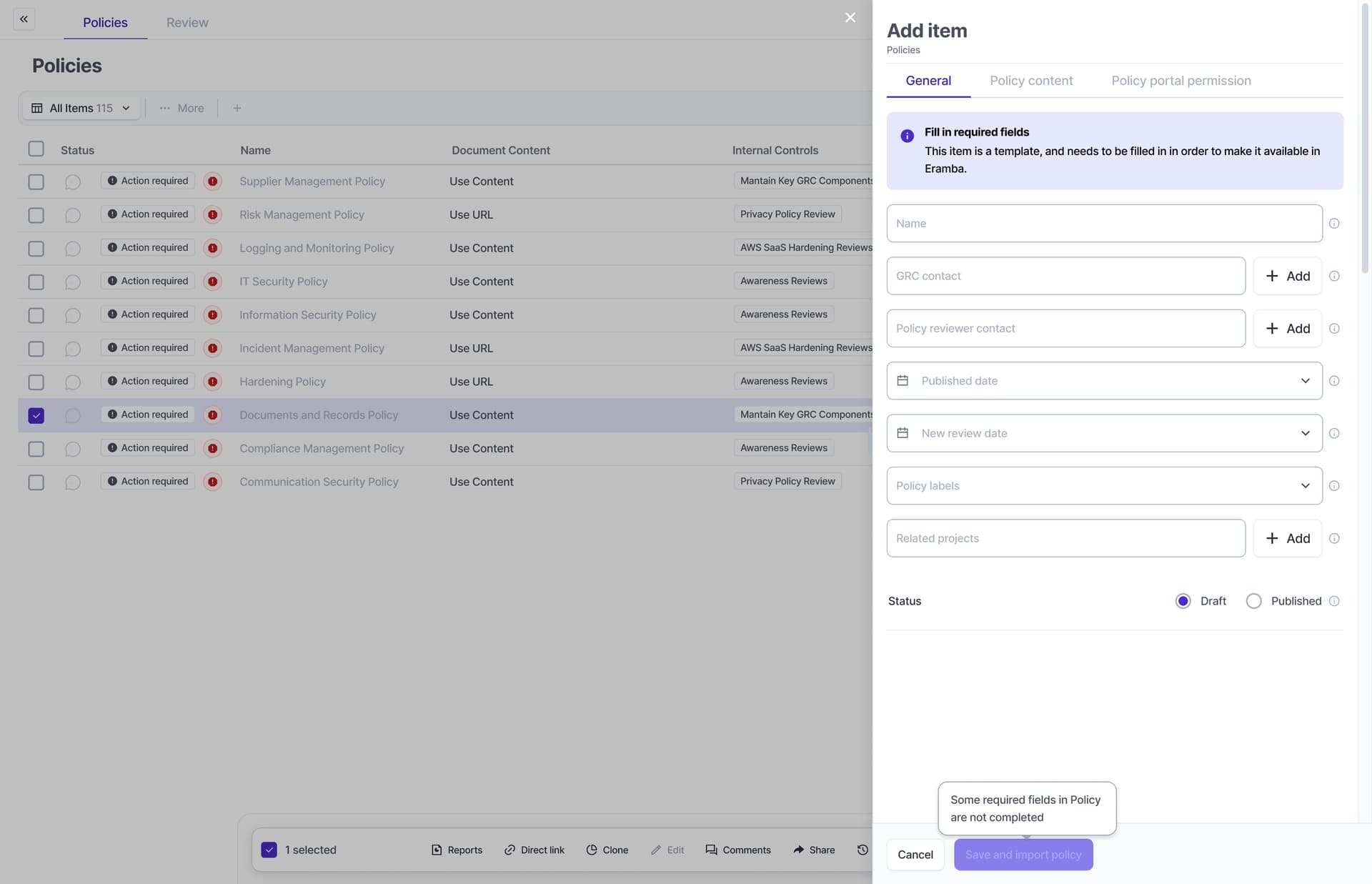
- When a user clones a template item (when they click on a suggestion), they must “Adjust” the fields of the item to whatever they think is best (owner, description, title, etc). Whatever change they made is irrelevant to the rodne cislo of the item, it will always stay with that cloned item. Once they save the item becomes “real”.
- Templates will be pre-loaded to eramba and updated by eramba core team from a central eramba instance. This instance will deploy changes to customers only when eramba admins say so, not automatically.
- When a user clones a Template and that Template gets updated, we will let the user know (this is why, among other reasons, the rodne cislo of a template is important)
Compliance Management
The process by which the user will implement the compliance management module in eramba using templates is defined by the following flow:
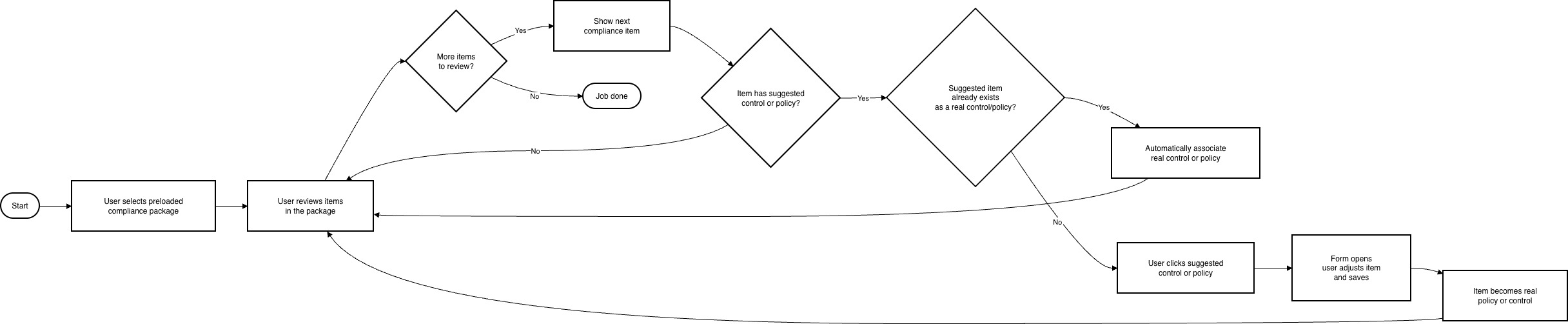
The “Templates” involved in this diagram (and the type of relationship) is described in this module relationship:

- there might be “Automations” linked to" “InternalControls” in the future.
Policies Templates
- We need to start implementing templates on this module because it has no dependencies
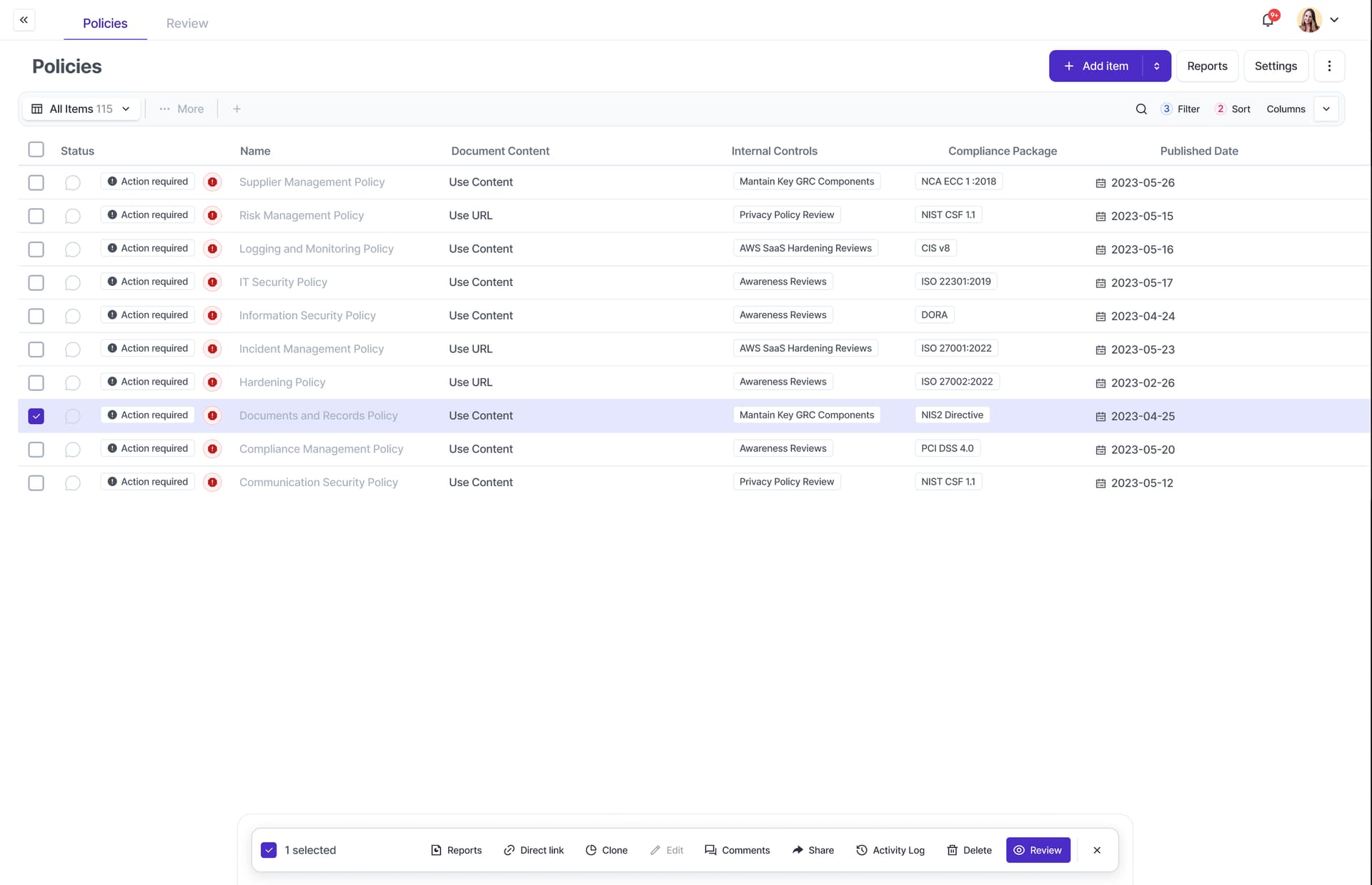
- A Policy template will include the following completed fields: title, description, version, content, document type, status
- All other fields will need to be completed by the user
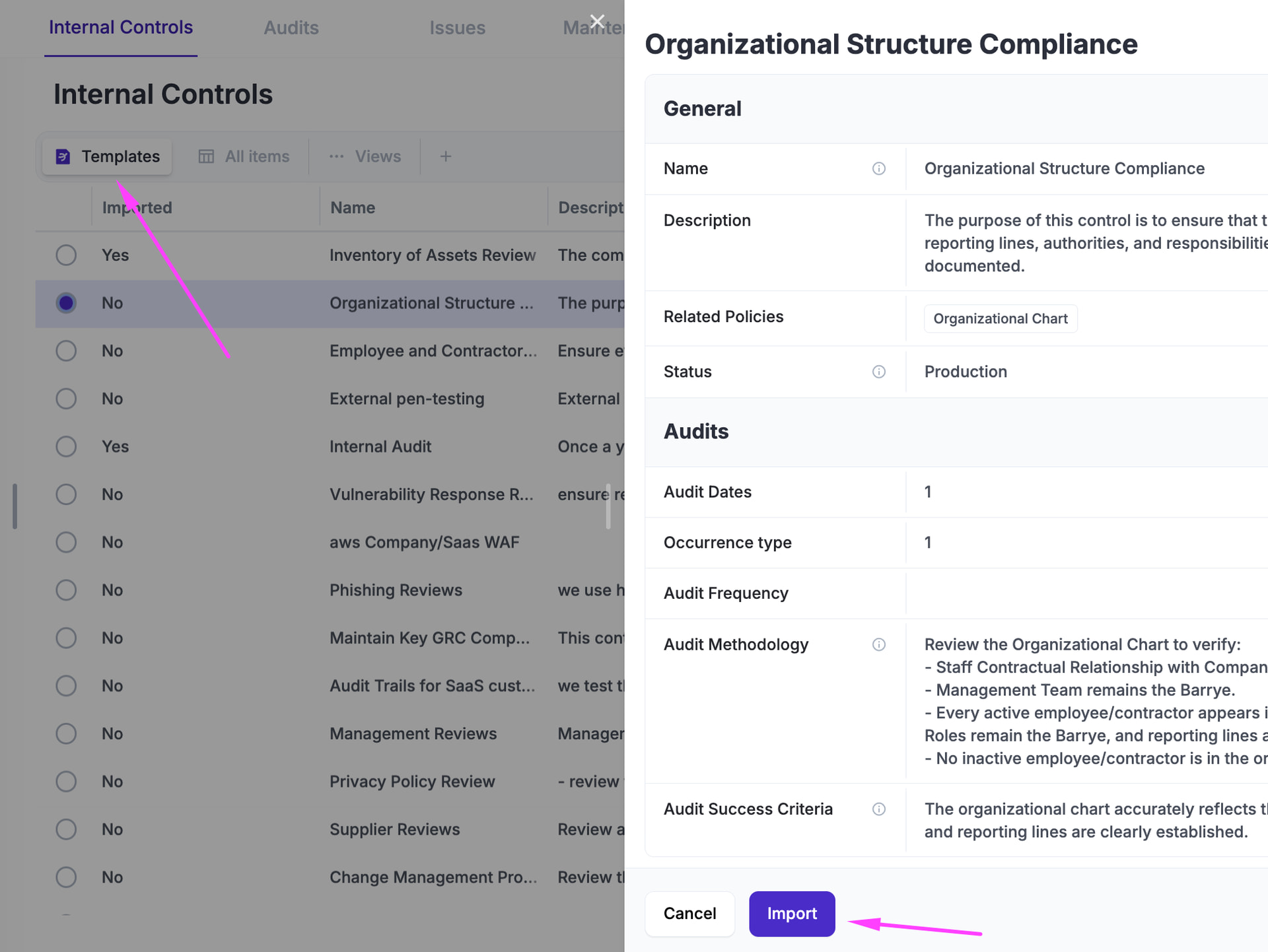
Internal Control Templates
- An internal control template will include the following fields completed: title, objective, one or more policy (suggested), status=production, audit dates, audit methodology, audit success criteria, maintenance=null
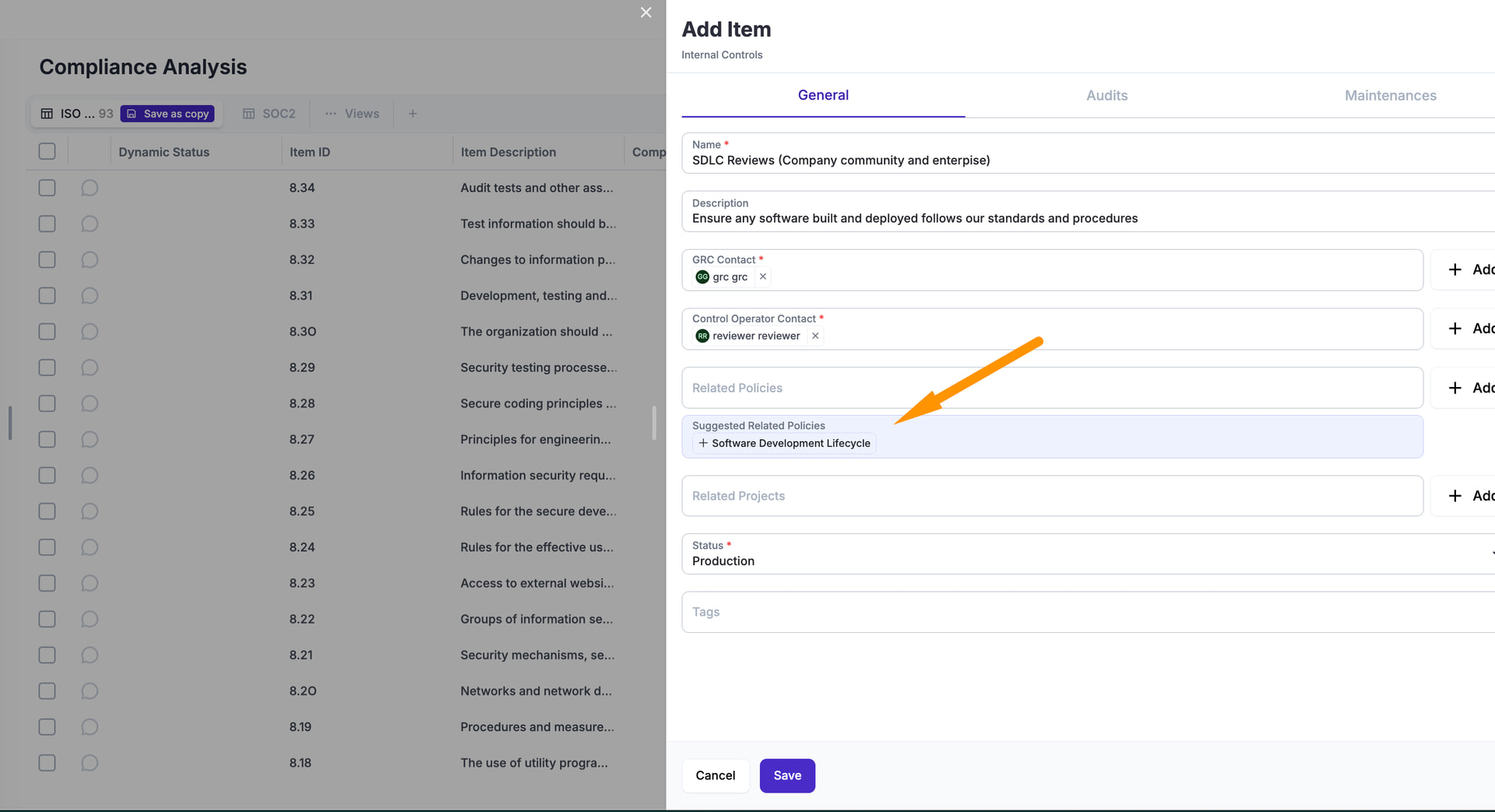
- When the user clicks on the item to “Clone” it and make it “Real”, they will need to adjust the fields mentioned above plus the following empty fields: GRC Contact, Control Operator Contact, Audit Owner, Audit Evidence Owner. There is a chance we might link Automation scripts, leaving the option to the user to use manual or automated testing (both will need to be adjusted).
- The form will have one or more suggested Policy templates, if the policy exists already on the system, it will be automatically associated. If the policy does not exist, since is optional, will be shown as a suggestion that requires clicking.
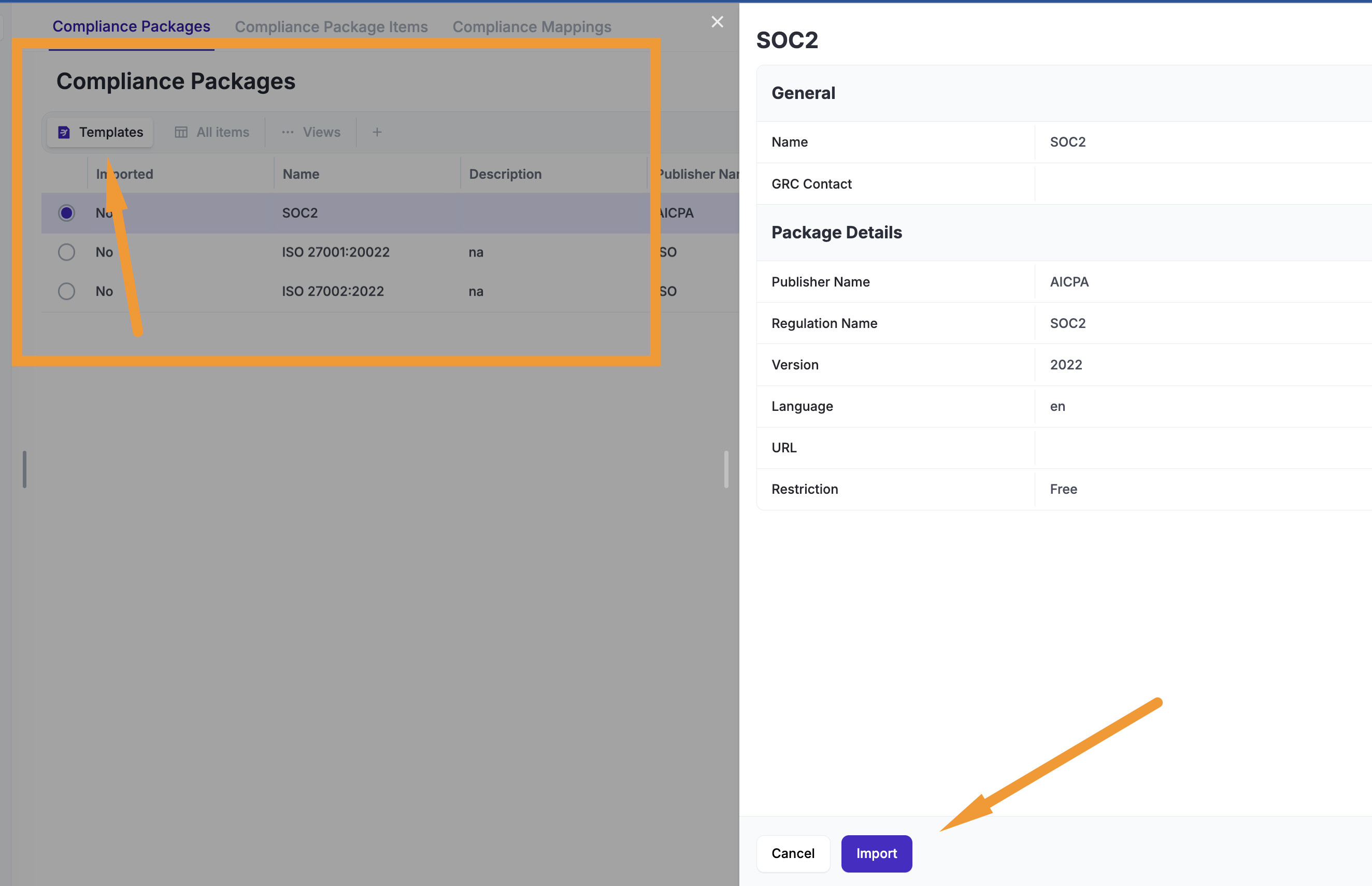
Compliance Package Templates
- Compliance Packages will be managed from a central server, they will no longer be public as CSV files. The CSV functionality will still be available for customers.
- Our server will have all packages loaded, the links to controls, policies etc will be the suggestions for customers.
- Paid packages (ISO, etc) will be listed as any other template, the difference is the button “Import” will be called “Validate License”, this will show a message to the user “Provide your ISO purchase to support@eramba.org and the following ID: $application_Id for us to let you import this”. Once the customer application_id is validated in support, the button changes to “Import”.
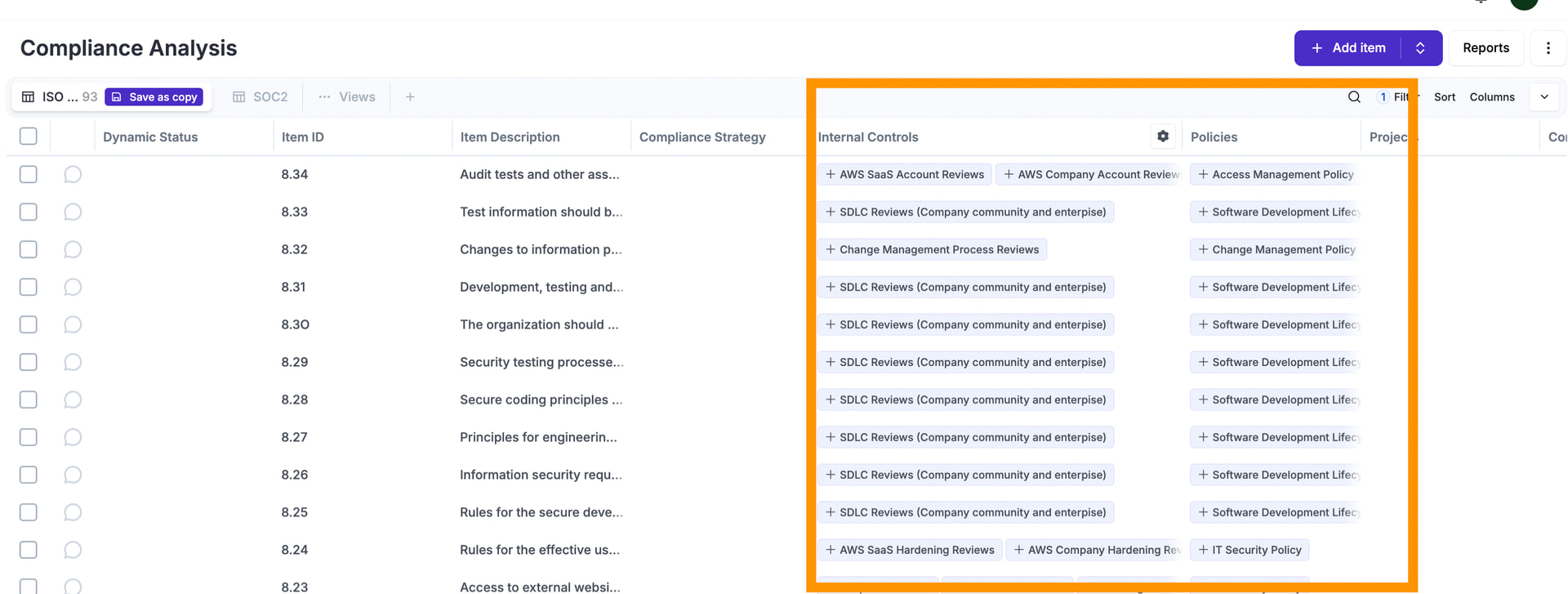
- We display templates in the “Compliance Package” module. Once imported, they replicate in “Compliance Analysis” as usual. Remember that in the Compliance Management Analysis module, we will display suggestions as per the rules defined in this post.
- The CRUD process is somewhat special:
- C: is as described, nothing special
- D: if we delete something from the server, we simply stop showing the template to the customer.
- U: if we update a compliance package (or its relation to suggestions) then we need to notify the user with a dynamic status and a report notification. The user might want to “import” those fixes, for this we need on the template a button that says “Update Imported Item”, when clicked, the user is shown a confirmation box, if continues, we:
- Update the package attributes as needed (name, description, etc)
- Add/Edit (no delete) compliance package items as needed, the idea is that the user will delete whatever we document on the template on their own
- Add/Edit/Delete compliance package item suggestions as needed
Compliance Package/Analysis - Form Updates
Current Compliance Mappings
As of today (r27) we have source/destination mappings (limited to two packages) that force a syncronization of solutions from the source to the destination.
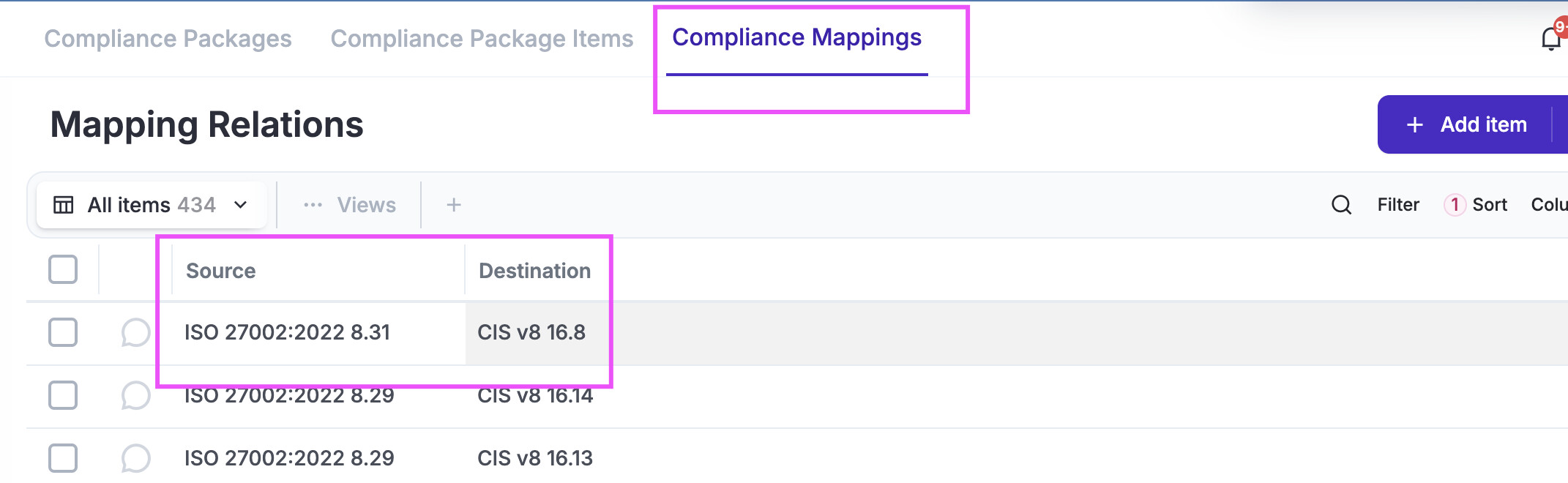
- when you create a mapping the sync is forced
- when you delete a mapping, what was sync is left synced
- when you edit a mapping (?)
Templates work by suggesting things on the index/form, not forcing you to associate or create things. So in principle, both features could work together.
We want to improve compliance mappings to work with multiple frameworks, for this reason the feature show not work any longer, we need to cancel the “Add” option and display a message “This feature has been replaced by Advanced Mappings, please migrate your mappings to that feature”
New (Advanced) Compliance Mappings
The new feature will become a new tab under Compliance Packages / Advanced Compliance Mappings
In there, the user can define:
- Mapping label: mandatory, just a string
- Affected compliance items: mandatory, this is one or more compliance package items selected in a multiple dropdown. since we are talking about maybe 10 compliance packages each with 500 items, perhaps is best to load one multiple select per package to not overkill this feature. as items are selected you need to summarise what is actively selected somewhere in the form.
when the user saves the mapping:
- whatever “solutions” are in any of those items is shared across all other items. this can be a big snowball (many-to-many closure / propagation chaos).
when the user removes the mapping:
- whatever item is removed from the mapping, is left with the items it had inhertied before.
when the user edits a compliance item that belongs to the mapping:
- we notify this item belongs to a mapping (and which ones are those items) and whatever solution item is included or removed will affect all other related mapped items
Template Database
- Controls and Policy templates will be shown as a View, we’ll create this view early so is visible by users (but they won’t be able to do anything with it until the entire feature is released).
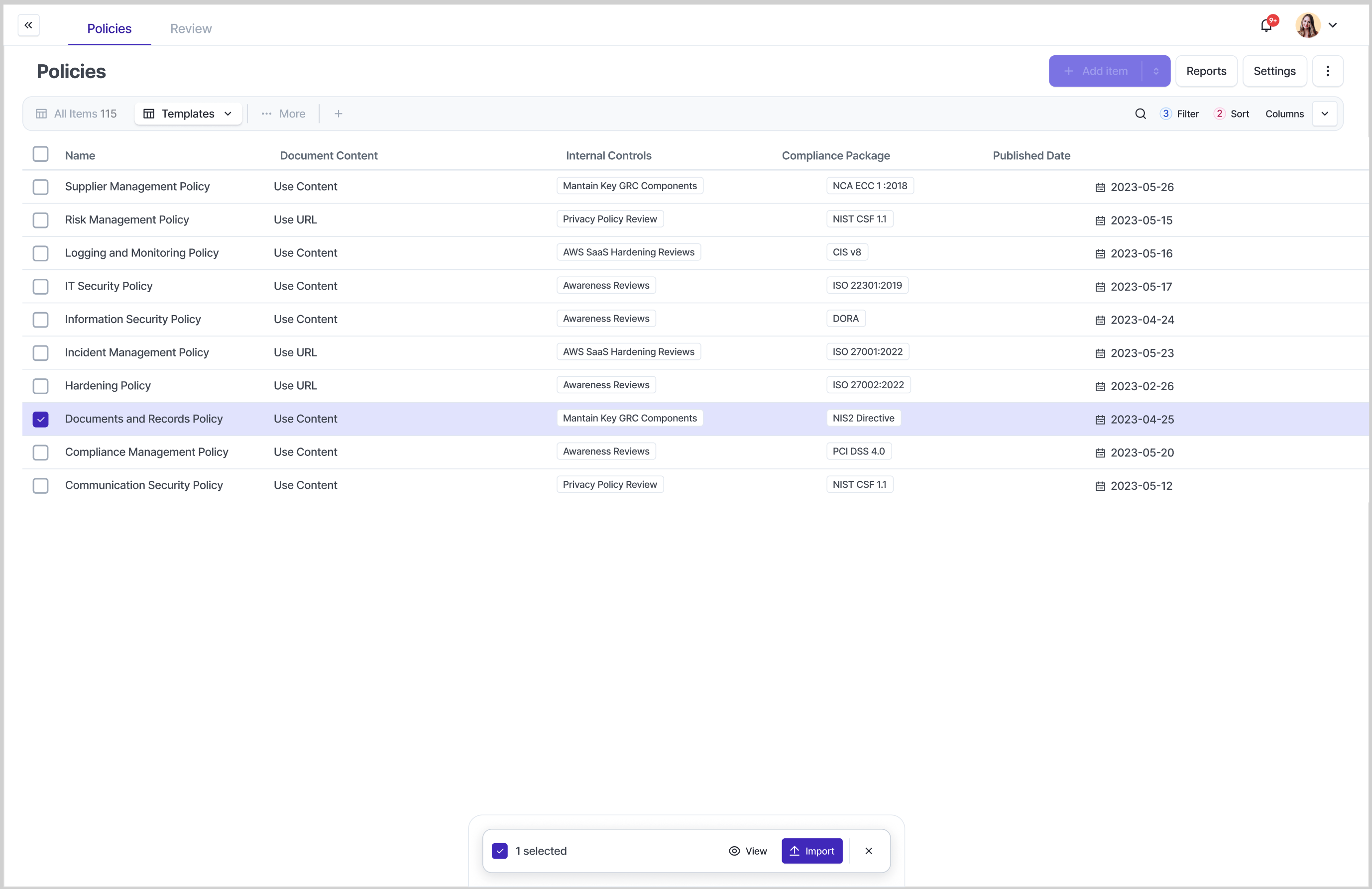
- The user can access the view, filter, sort, etc.
- The user can also create an Internal Control, Policy, etc from a template to a “Real” item without the need of compliance packages, but this action makes little sense so we’ll discourage it somehow.
Template Updates
We will be managing the database of templates, this implies creation, updating and deletion:
- Create: eramba creates the template, the template shows up on the customer, displays a dynamic status for 7 days (since the update).
- Update: eramba updates an existing template, the user gets the updated template, displays a dynamic status 7 days (since the update).. If the user has already cloned that template, the cloned item also gets a dynamic status to let the user know about the updated template.
- Deleted: we just delete the item, no notifications or anything sent to the user.
We need a “Report” notification sent daily with a View of updated, created items to be sent to the admin of the system.
Template Suggestions
- Suggestions will be displayed based on the relationship of these templates (rodne cislos) and displayed on the Views with some distinctive mark.

- Under the “…” menu (right), we need a “Template” setting where the user can “Disable” or “Enable” template suggestions for this module. This option affects this user alone.
- On forms, when the user edits an item, we might also need to show suggestions. These will also be highlighted with some colour or mark.
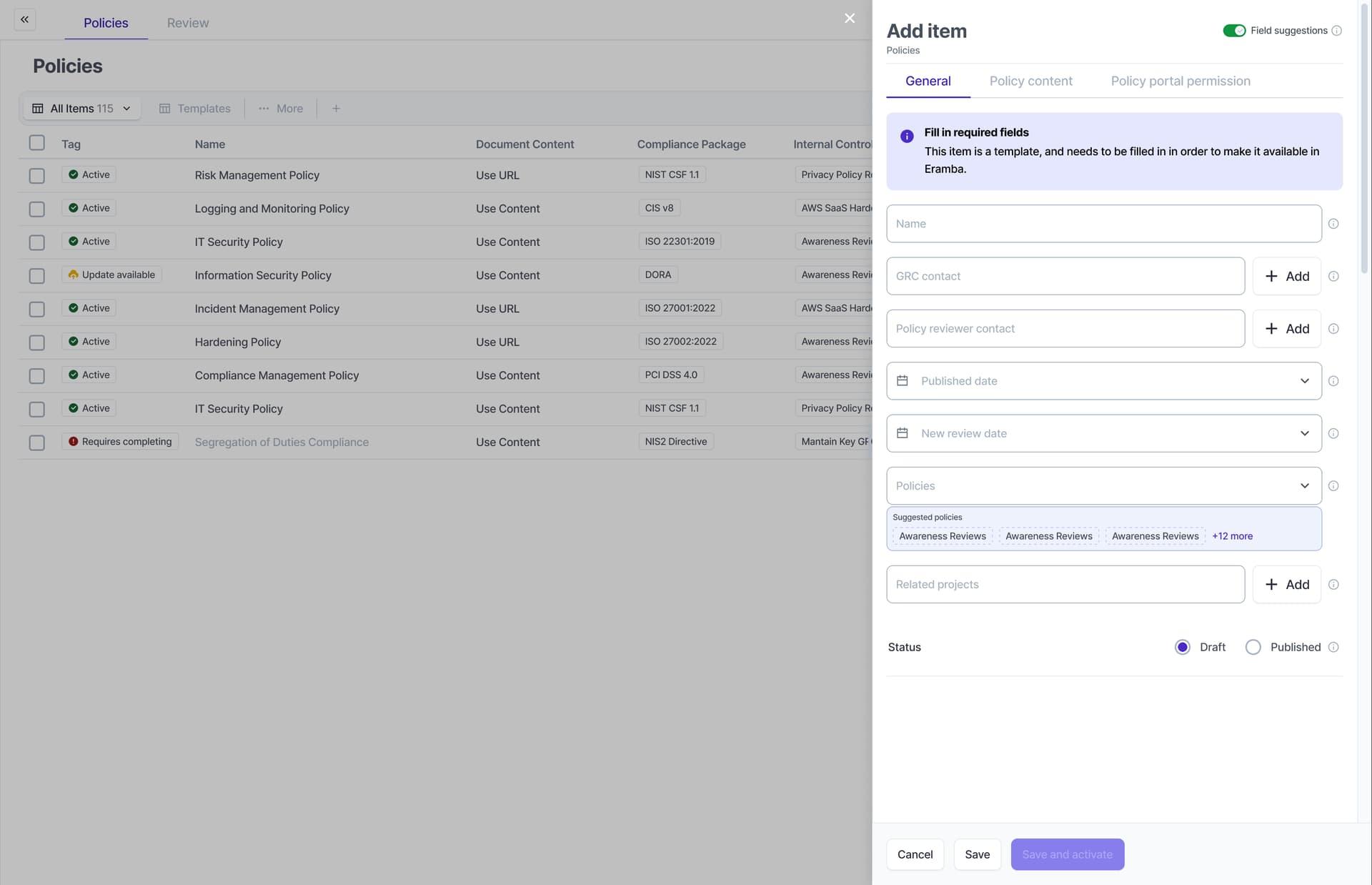
- There is a common issue when working with suggestions when they are in the same tab, this is obvious on the risk module assets, threats, vulnerabilities. We need to handle this more elegantly.
Left Over Questions
- what to do when user import template that he imported before but deleted
- clear rules for customised items - probably some kind of reset will be available all the time with option to reset back to original template
Drawings
Audit_Maintenance Logic (2).drawio (41.7 KB)