The current implementation has a number of well-known problems. This post outlines the planned rework.
Problems:
- delayed delivery - waiting for hourly cron
- test notifications missing - fire on demand
- form reconfiguration - single unified card
- lack of modern integrations - slack integration
- unclear handling of edge cases - deleted user, non existing view/filter
Questions:
- do we need robust editor as we have for policy content?
- are we letting users to have multiple delivery methods? Slack + Email?
- in first version do we want to upload files (reports) into Slack?
- what audit/logging do we need (sent, failed)?
- removing free-hand email as a recipient?
Slack integration
- Feature idea - Slack interactions (mark as reviewed, mark as read)
This will probably be another delivery method alongside existing Email and Webhooks.
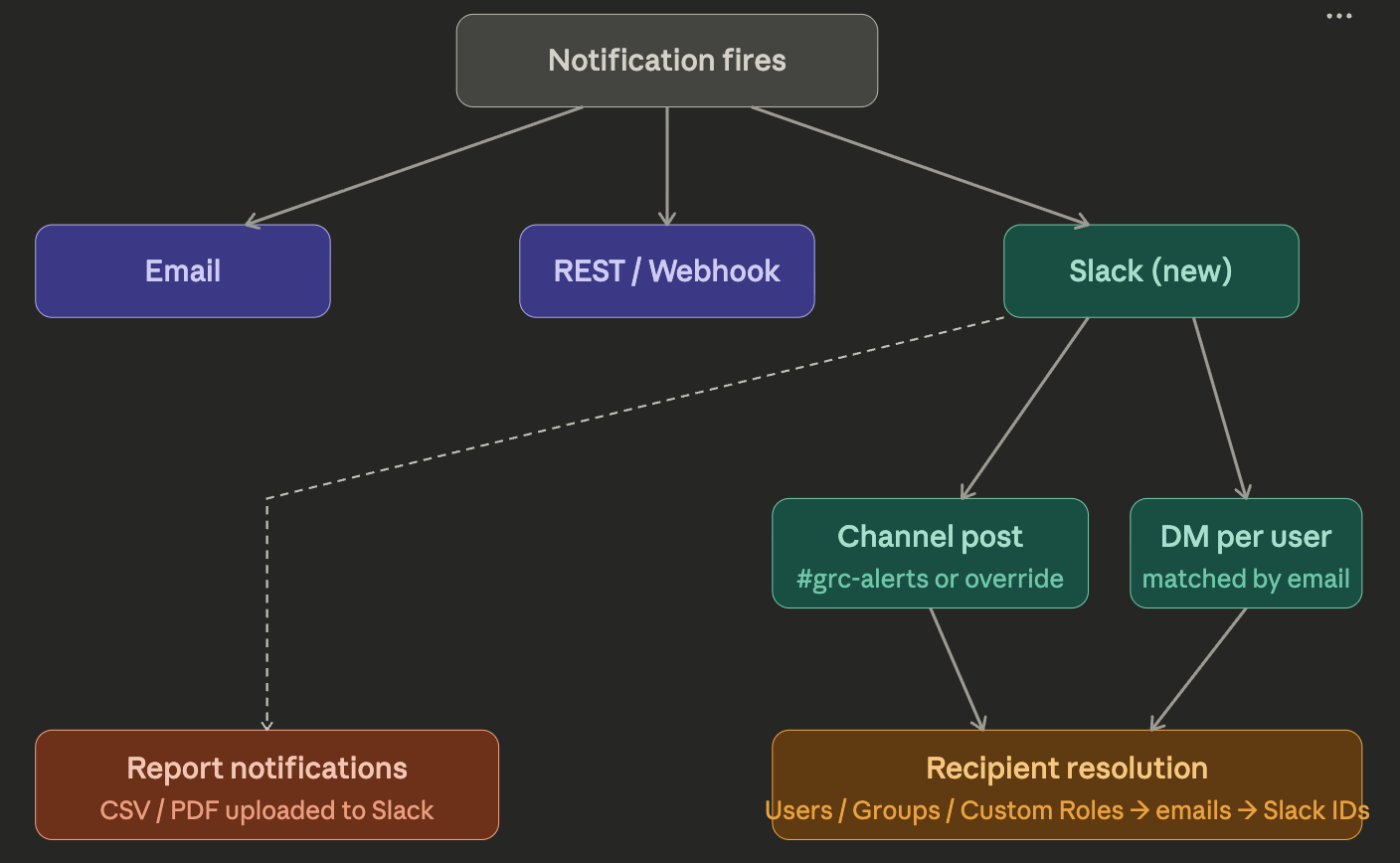
A new “Slack” section under Settings where user configures the workspace connection once:
- Incoming Webhook URL
- Default Channel - the fallback channel (e.g.
#grc-alerts) - Test button - sends a test message to the default channel to confirm the connection works.
- Dissconect button
- single button add to slack
- approve the requested permissions
- eramba receives a Bot Token scoped to that workspace. The token is stored per eramba instance. This works identically for cloud and self-hosted deployments — the only requirement is that the eramba instance has outbound access to
api.slack.com
Notification modal
- user will have another delivery method Slack
- if this is enabled, on recipients card there will be additional method where usr can select channel OR custom roles AND Users/Groups
- Mapping of Users - this will msot probably be done by emails
- The notification body field is reused as the Slack message text. Macros work exactly as they do for email
- Recipients and email body will be on the same page to follow writing an email design
Test notification button
The goal is to let users see exactly how a notification will look before saving it - with the body, macros, and chosen delivery method all rendered the way the recipient will see them.
- Lives in the notification edit modal, with a quick-action shortcut from the bottom drawer
- Requires picking a test item (e.g. a specific risk, control, asset) so macros resolve to real values. If no item is selected, fall back to placeholders.
- Works for all delivery methods - Email, Slack, Webhook
- Open question: does the test fire to the actual configured recipients, or only to the user clicking the button (or to a free-hand address entered in the modal)?
Attachment for item triggered notification
Both filter and report
Item-triggered notifications should be able to ship a report alongside the message body.
- Item/Section report
- Supported on both delivery methods - attached to the email, uploaded into the Slack channel
- Configured per notification, on the same page as recipients and body
- Open question: size / format limits?
Remove awareness type of notifications
- Reason: low usage, hard to understand, hard to explain
- Existing awareness notifications remain active for now - full removal is TBD
- No direct replacement planned
- What will happen with already setup notification
Change hardcoded values to slider
It would be nice to finally remove the hardcoded values (30, -10, +1, +10, etc.) and replace them with a slider.
Name of the attached files
For example, a report attached to a notification should have the same name as the report has in the system.
Triggering notifications immediately
Users don’t want to wait for cron.
Update - clarifications on discussed points
A few clarifications based on recent discussion:
1. Threshold value — variable, not slider
We dropped the slider idea. Instead the threshold will be a plain numeric value field that the user types in. It’s a cleaner solution and avoids the UX issues we ran into with the slider.
2. Attachment filenames
Attachment filenames are generated automatically based on section + report/view + date. We’ll use the UI section names (as shown in the interface), not the URL slugs.
Example: liabilities-active-2026-05-12.pdf
3. Test notification
Test notifications will not be sent to the configured recipients. The user simply enters a test email address and the notification is sent only there, so testing doesn’t spam the real recipient list.