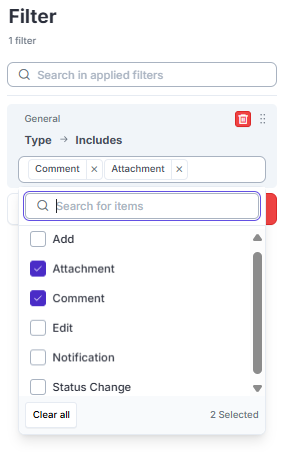
Hi, in the new UI (v3.28.0) the Item’s Comments & Attachments were merged with the Activity Log, so when the user clicks on the item’s message icon to enter their feedback (comment & attachment), they now see a lot of info: Item details plus Activity Log with all Type of updates. Some stakeholders don’t easily find the the small text box at the bottom right corner.
Is it possible to set all item’s Activity Log to show just the Comment and AttachmentType of update by default?. Thank you
Second this. Few comments are buried in many log items.
Another reason is, that we removed the dynamic status from many views, as we do not use these actively at the moment.
With the activity log they are pretty “in your face” again, and since they are mostly red (because we do not maintain them) it gives a rather unpleasant feeling.
Thank you for the valuable feedback. Yes, after clicking on Comments andAttachments icon, we should filter only comments and attachments. Other information from the history should be available only in the detailed view.
@vidaktobyl, what do you mean by “removed dynamic status” in this case? Are they enabled but not visible? If they are completely removed, they should not be there at all.
We removed them from most views (without disabling them altogether), to keep discussions, interviews, audits, etc. on track.
For GRC Team-internal purposes we start looking at the different status, hence we did not entirely disable them.
Now with the new (and super useful!) “View” capability, the status are highly visible again.
If the standard filter would be “Comments and Attachmetns”, as you suggested, that would be fine for us!