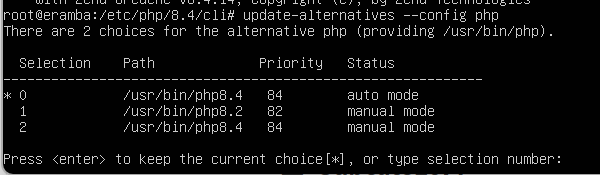
I have updated to 3.27.0 and followed the process to update PHP on my VMware Ubuntu installation.
The process seemed to go without issue and when I checked php -v I get 8.4.14 but the Eramba system health claims I’m running 8.2.27 still and is “not ok”
Anyone encountered this? Eramba seemingly functions totally fine, I just can’t update now due to the health check.
It could be that the php_module is symlinked and is pointing to a generic or old version rather than the specific one that’s required.
Run the below to confirm which version is actually loaded: ls -l /etc/apache2/mods-enabled/php*.load
You should see something like this: /etc/apache2/mods-available/php8.4.load. If it points to another php version, then apache is still linked to an older version.
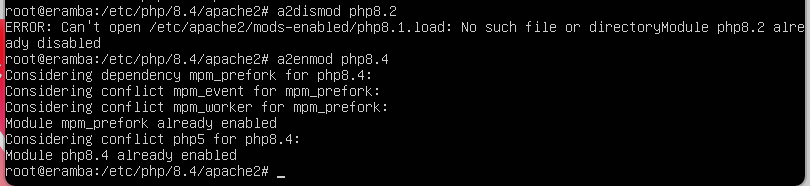
If the symlink doesn’t point to php8.4 try running the below as an example to disable any other versions that are showing: sudo a2dismod php8.1 php8.2 php8.3 sudo a2enmod php8.4 sudo systemctl restart apache2
As for the error message, you can run the below to clean it up:
I’m back! I cannot get the version to fix so I just backed up and then spun up a new and updated Eramba, but I cant restore due to the DB mismatch. Any way to maybe avoid it?
Backups are not compatible on later versions. This means that if your backup is from version 3.27.0 and you try to import it into a later version, it won’t work because the database change with updates and new features.
You will need to install eramba with the same version as the backup (If you are using the Enterprise, previous images available on the download portal.) Once installed, you can import the backup and then perform the updates through the UI to the latest version.
The OVF is essentially an Ubuntu environment with the image pre-downloaded, so you can use the current OVF and change the image before composing the first time.
On community you can simply pull the 3.27.0 image, remove the pre-downloaded one, and tag the 3.27.0 as latest, then run compose again.
docker pull ghcr.io/eramba/eramba:3.27.0-8
docker image rm ghcr.io/eramba/eramba:latest
docker tag ghcr.io/eramba/eramba:3.27.0-8 ghcr.io/eramba/eramba:latest
docker compose -f docker-compose.simple-install.yml up -d
As you mentioned, if this is not a fresh install and you already have eramba running with the latest image, you will need to stop it and remove all volumes (this will delete the data on eramba) to ensure a clean installation, and then follow the steps above.
On Enterprise, the process is very similar. Just replace the docker pull command step with downloading the image from the Downloads Portal. And remember to use the Docker Compose command for Enterprise.
I fixed the PHP issue! I threw a lot of stuff at the problem so I’m not entirely sure what stuck but essentially I think the docker image or the compose. Either way, I got the alerts to go away and updated my existing VM! I’m relieved.