We are begining a facelift for the Online Assessment module:
Phase One Changes (completed)
New UI for the Portal
the portal needs a new look and feel, it has been already designed and it will look more or less along the following lines.
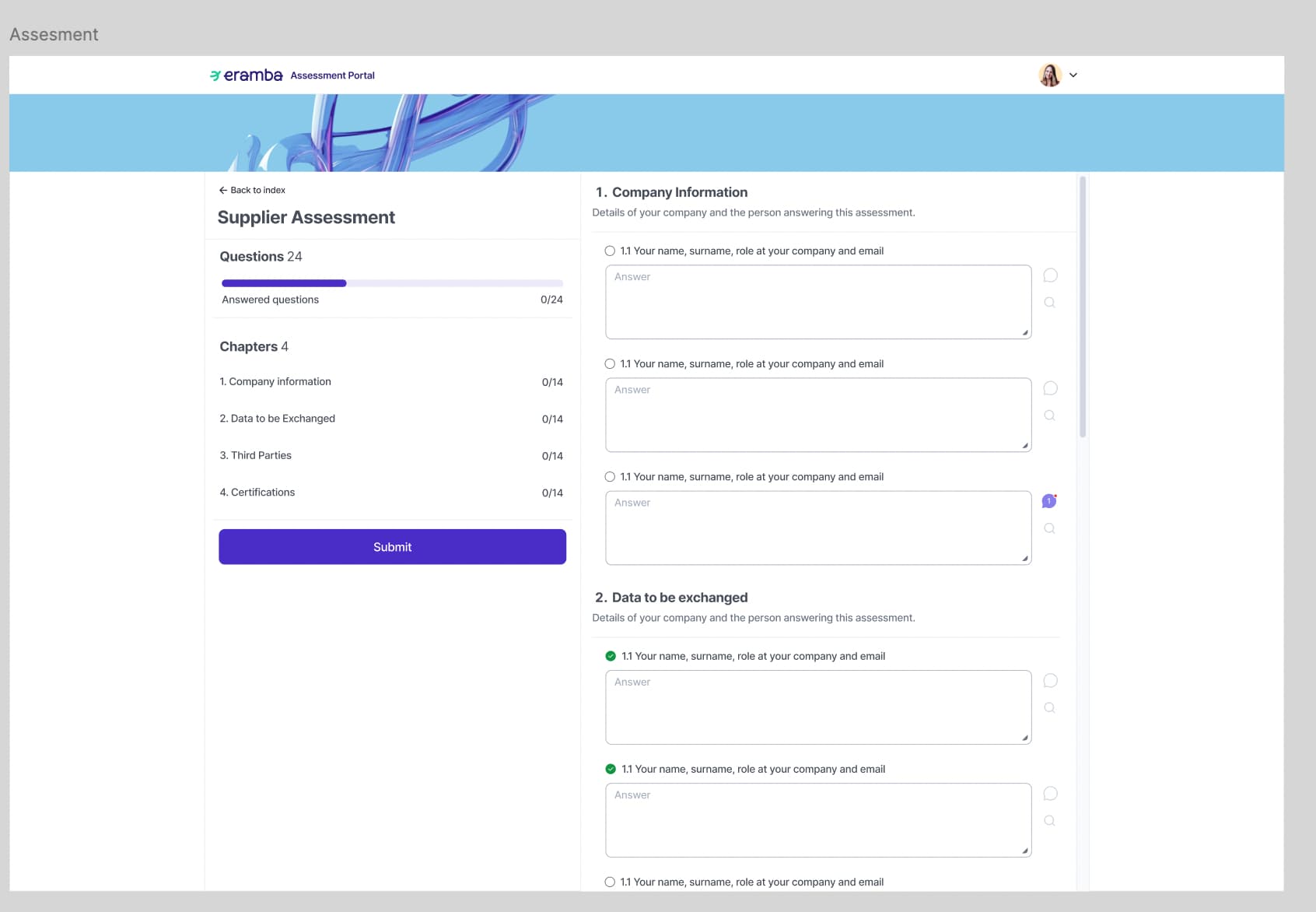
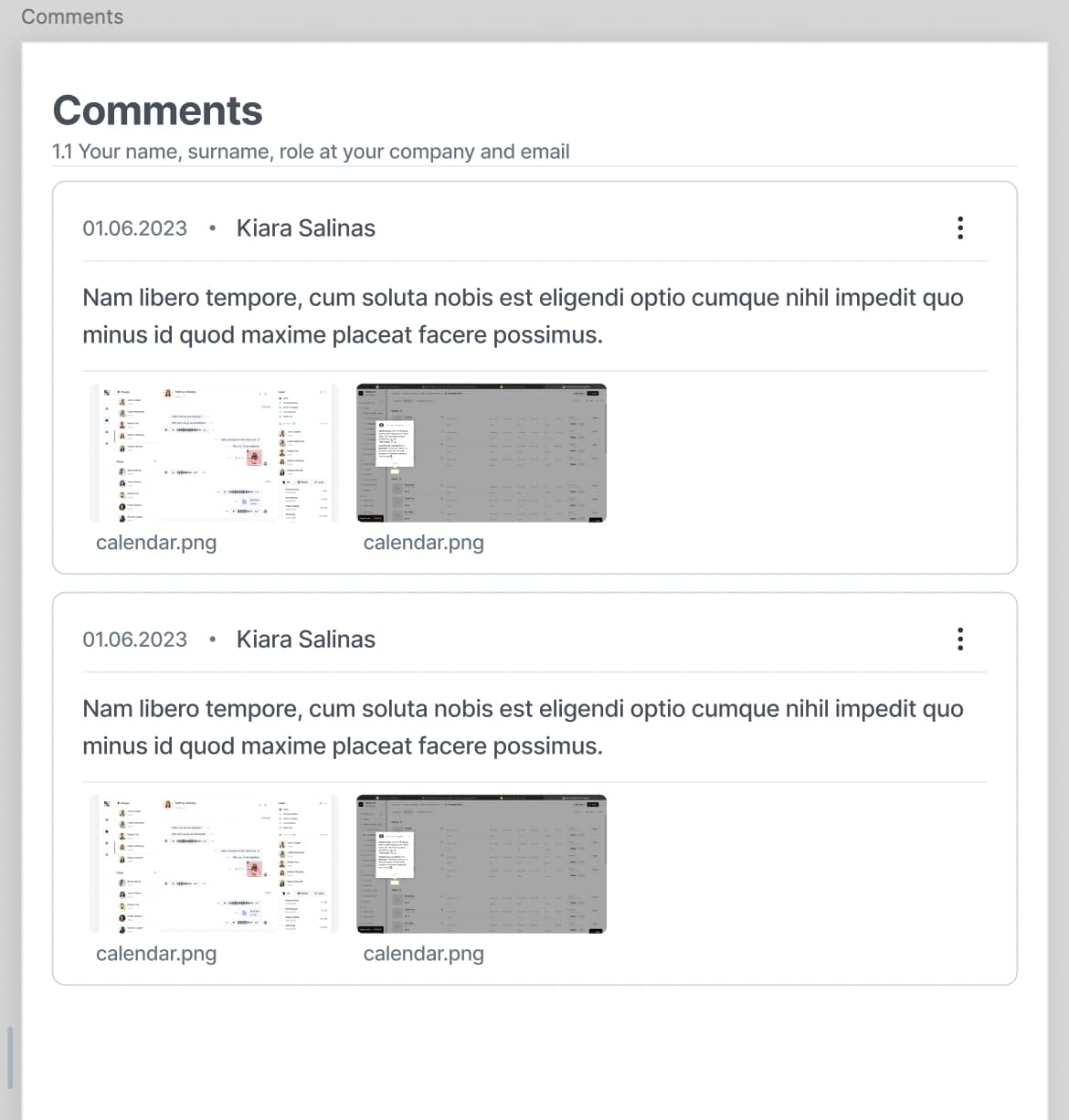
NOTE: the portal is missing showing the score (Current Vs Max) in the case scoring is enabled.
Questionnaires must support Multiple Choice as answers
questionnaires must now support multiple choice answers, so the “Predefined” answers option must have an alternative, “PredefinedMultipleChoice” which lets the user select more than one answer.
this option should disable the possibility of having:
- Scoring (column K, L)
- Warnings (column J)
- Conditional Answers being Displayed (M,N)
On the index this type of answer will be displayed as a typicall cell with multiple objects:
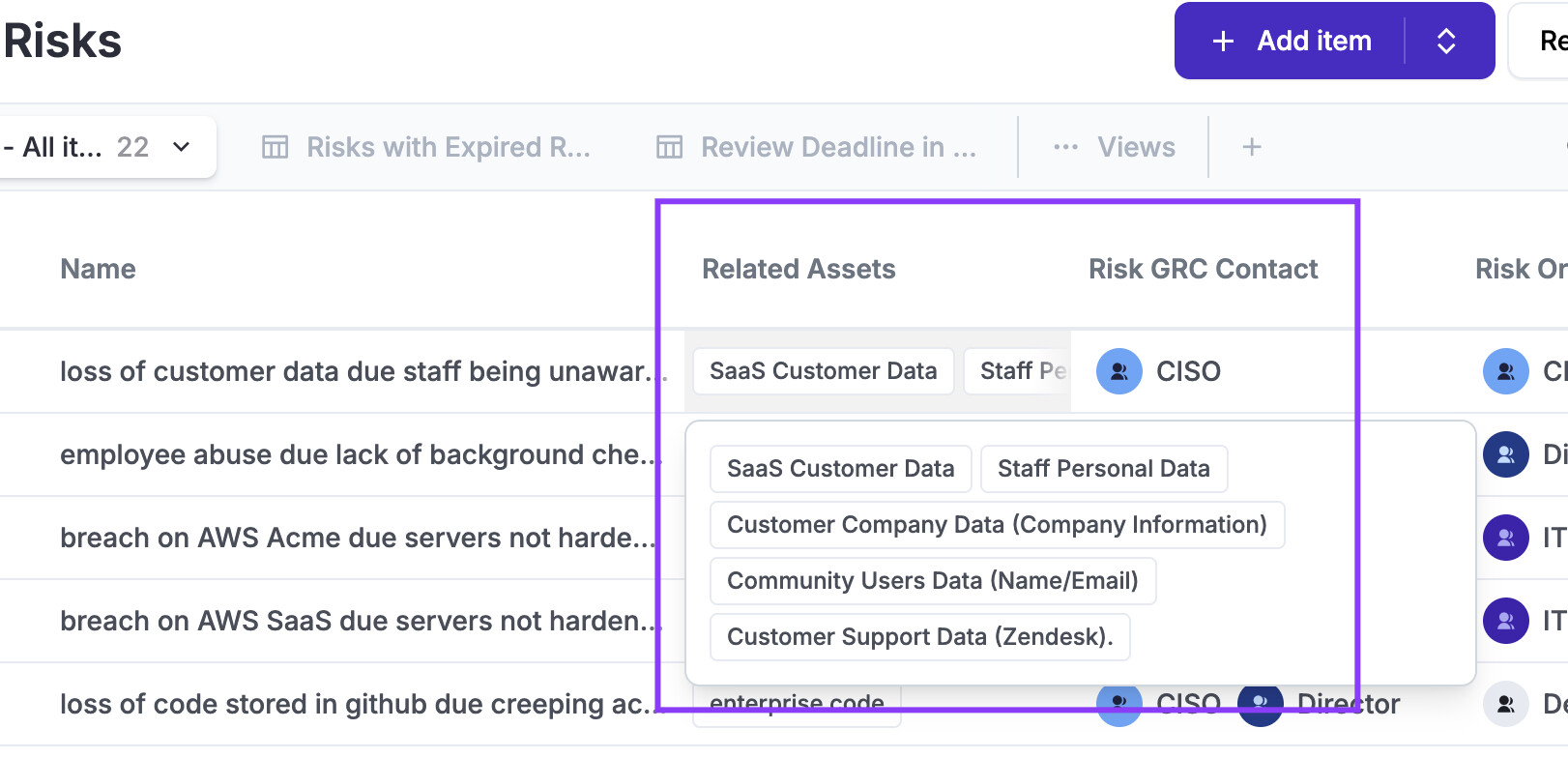
And the filter should let people choose one or more items.
Questionnaires must support Dates as answers
Questionaires must have an option to add “Date”, the date provided by the recipient of the OA can be anytime (present, past or future). When date is selected as a possible answer the following columns are not applicable: I,J,K,L
In the old implementation, users had the option to provide both answer types — open and select. Now, we are introducing two new answer types: multiselect and date. Will it still be possible to combine different types of answers (e.g., multiselect and open answer)? How would this be defined in the CSV — multiselect|open|date?
>> good question, today we have the following options (column G): PredefinedAnswers, OpenAnswer, Both.
>> the new option is “PredefinedMultipleChoice” , make sense we give users the option to use this in combination with openanswers, so we need PredefinedMultipleChoiceAndOpen to allow both options.
>> to be consistent, we need to change “Both” to “PredefinedAnswersAndOpen”
>> date for the time being will be left alone, without the option to combine them with open answers.
Will we sum the answers from a multiselect, or will this not be possible with multiselect?
>> is very complicated, we leave it as explained in section 2a from this post.
CSV import language is really bad
the CSV import file is a disaster, the language is terrilble it needs to be re-written completely.
Manage Questionnaires from Web UI not just CSV
we miss a way to edit questionaires using the UI, this requires a proper UI implementation so whatever you do in CSVs can be done on the web interface. in particular the conditionals (if the answer is this then show or hide that question)
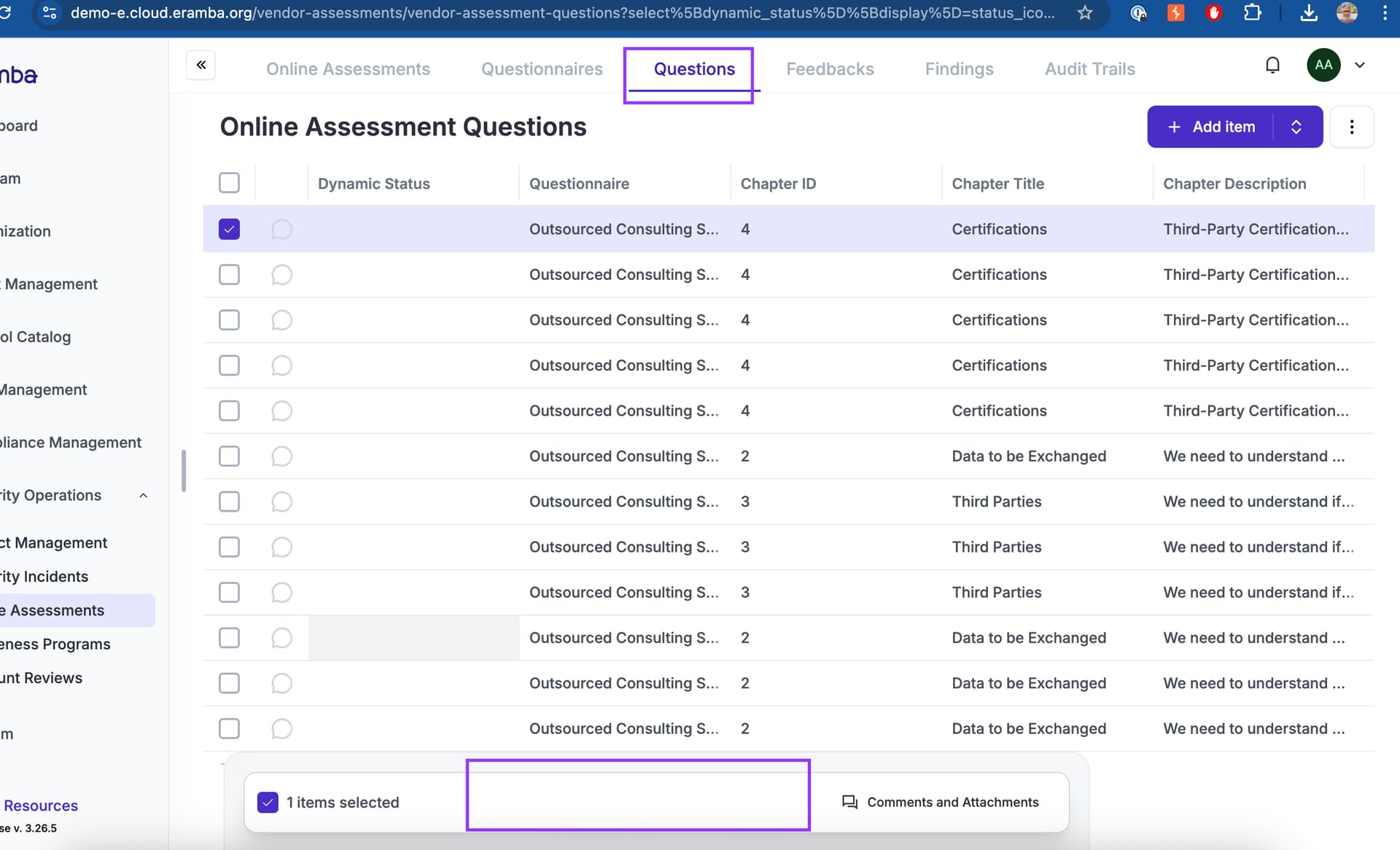
What if we implement it in the same way as compliance analysis? That is, you upload a questionnaire, and in the questions index, views are automatically created with questionnaires (similar to compliance packages and compliance analysis). Would it also be possible to filter and sort in the question index (currently this is not possible)?
as discussed we need to simplify the ux as much as possible because one must assume the user might upload an outrageous number of questions. this suggestion works well, every row must be of course editable and the form we load must be “very friendly” in order to support the logic of field types, etc.
Phase Two Updates
Bug Fixing
There are some bugs that need to be corrected in the OA module before we do anything, they relate to the Review process.
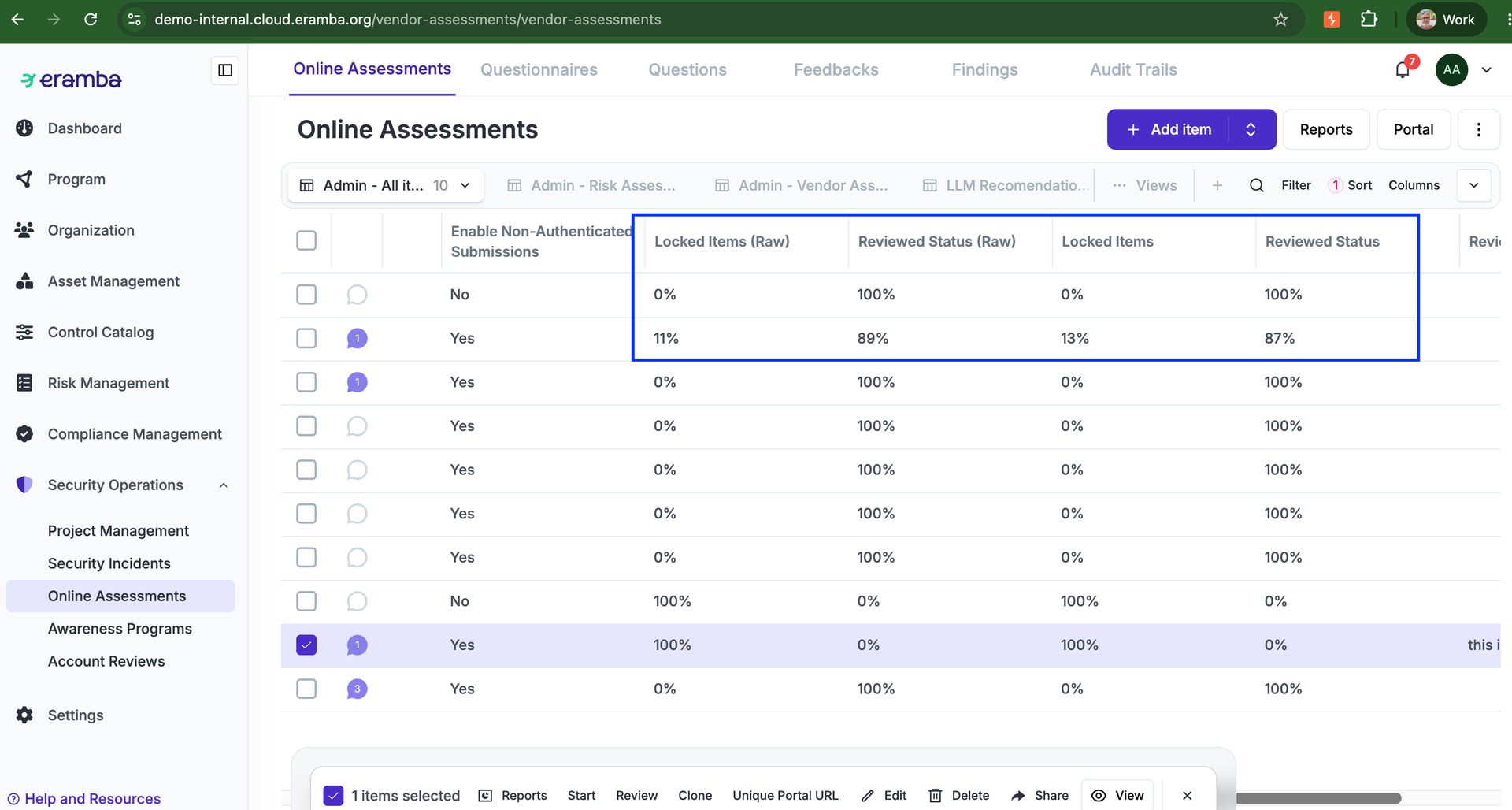
Problem: The “locked” was migrated to a “Review” status, but i still see both type of columns, strangely they show different numbers.
Fix: required: we need to remove the “locked” columns. Validate why they have different values and remove both locked columns and leave review ones (make sure calculation is correct)
Problem: You can complete a review only when the Oa has been “Submitted”, which is fine. Once submited, you can complete the review multiple times, the “Date” field is fixed (i guess to today date) and the notes field is a variable that can be changed anytime.
Should we let people “Review” a OA multiple times? i guess yes, they can change their mind. The one thing we need to change if someone wants to provide a new review is that the date field on the top updates every time they click on “Review”, i have the feeling that field is stuck to the original date when the review was done. It can remain disabled but updated.
Fix required: Every time you click on “Review” the date must be todays date. both values stored on the db.
I created an OA on the 6th june and start date to 6th june but it never started, im guessing because it runs at midnight and when that happened it was already 7th of June, please confirm.
Fix required: we need to make sure the OA starts and stops on the Start and End Date.
Problem: Recurrence is in my view not working, i created on internal-demo one OA that ends 7th june with a daily recurrence, meaning on the 8th it should clone itself and run again. But the logic seems broken as on the 8th when the original OA is cloned due to the recurrence, what will be the end date of that new cloned OA?
Fix required: The new UI should be like this: Start Date, we need a “Toggle” where we call this “Start after Saving” by default is “On”, if they switch it “Off” then you show the components below, where they choose a “Time after Saving” , “Period”. the vlaues should be 1,2, 3 ..and the period. on that date the OA is supposed to “Start”.
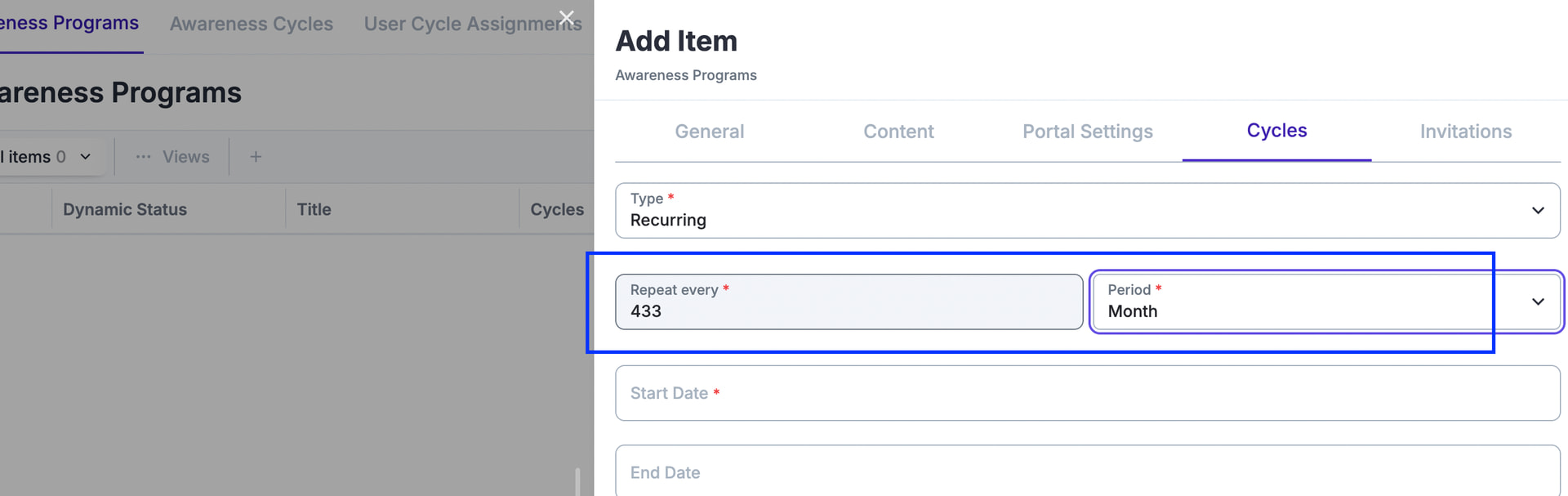
The “End Date” is the same Integer + Period, “Time after Start” and “Period” and on that date you “Stop” the OA.
Then if the customer enables “Recurrence”, the current setting “Periodicity” tells you when the OA will clone itself from the “End Date”, and the end date of the cloned OA will be calculated using the fields above (End Date).
For example Start Date: 6th July 2026, End Date: 10th July 2027. If recurrence is set to 1 month, the “Start Date” of this “CLONED OA” will be 10th August 2027 and the “End Date” will be (Start Date - End Date) which in this case is 13th of August.
The question is how we migrate existing customers, have already set start and end date in specific dates so im not sure how this works out for them. Use LLM to figure this out and let me know the result → First explain me the logic.
Problem: the “Auto-Stop” option makes no sense, the OA should stop automatically on the end date,
Fix Required: we need to remove that and make sure the OA is stopped on the “end Date”.
Problem: the notifications (warning) links seem to have two links in there, one for non-authenticated and the otehr for authenticated, we need the notification to have one or the other depending on the type of OA ..
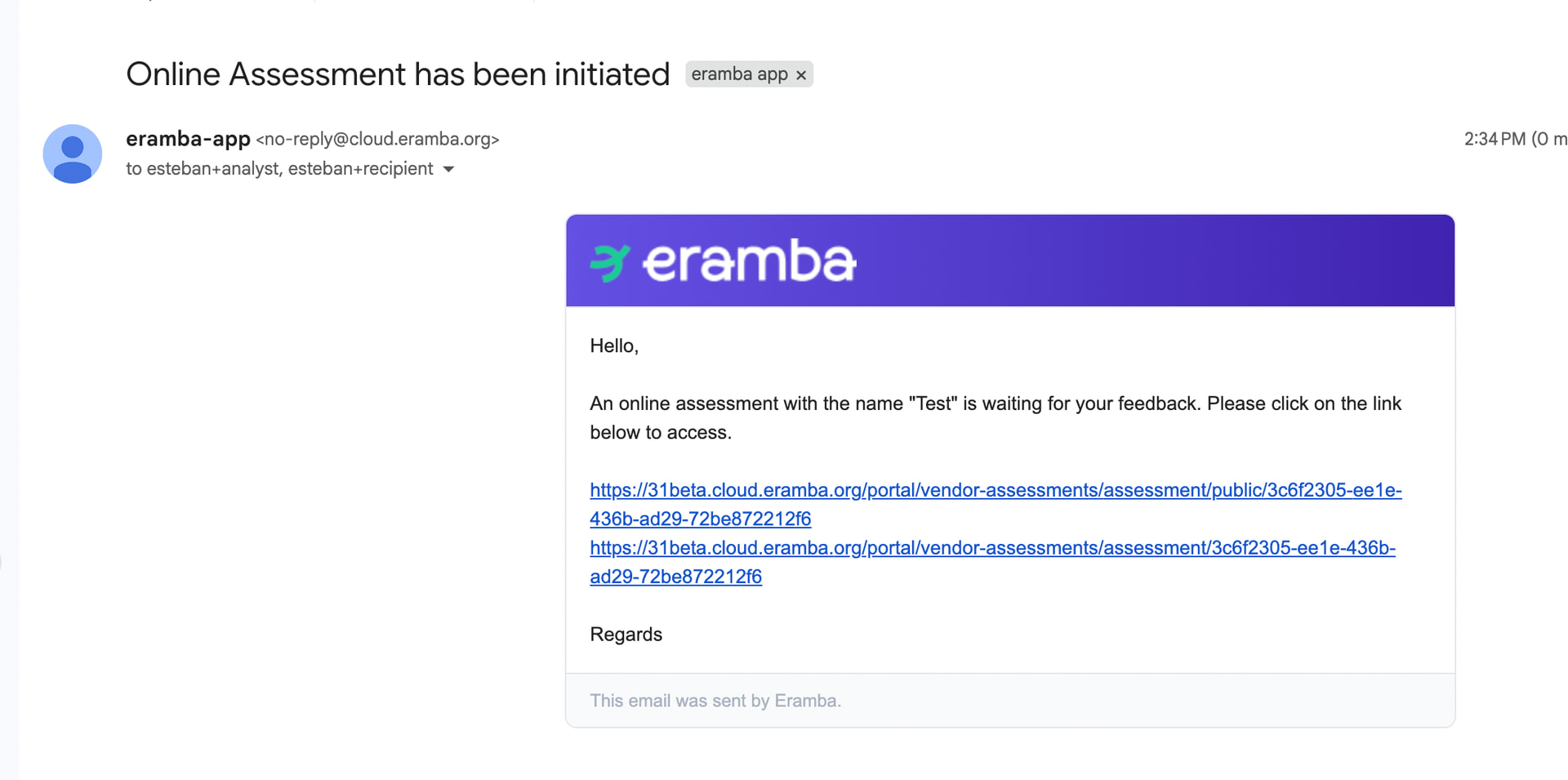
Fix Required: i would say the easiest thing to do is to duplicate warning notifications for “Non-Authenticated” and “Authenticated”.. so both can be active but they only trigger when applicable with the right. link
Problem: when i create a commnet and attachment i can not see it, i used an account that only has the group “No allowed permissions” , so is. not allowed to put comments and attachments
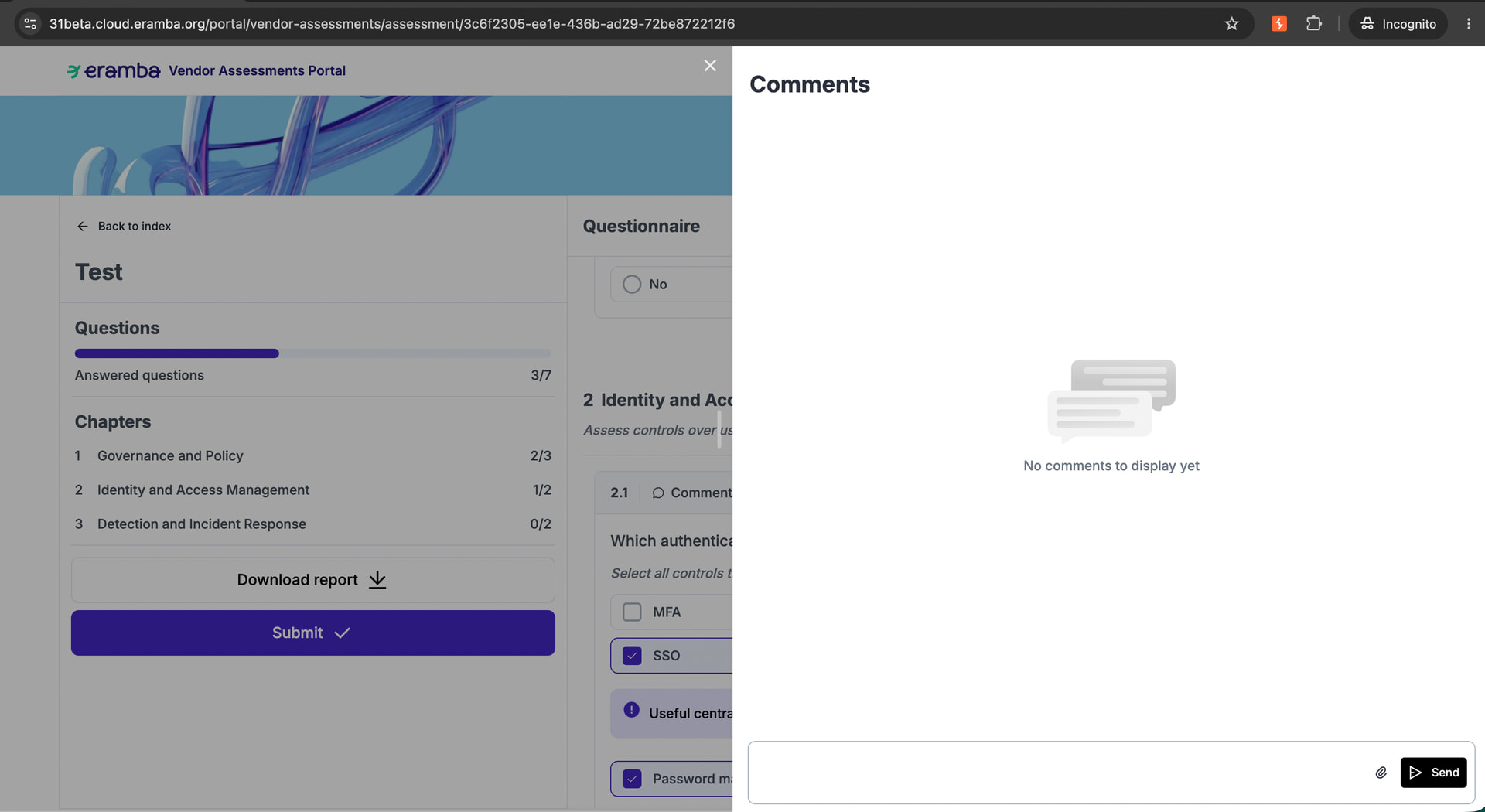
Required Fix: i think the OA portal should allow comments creation (no edition or deletion) by default without any specific ACL.
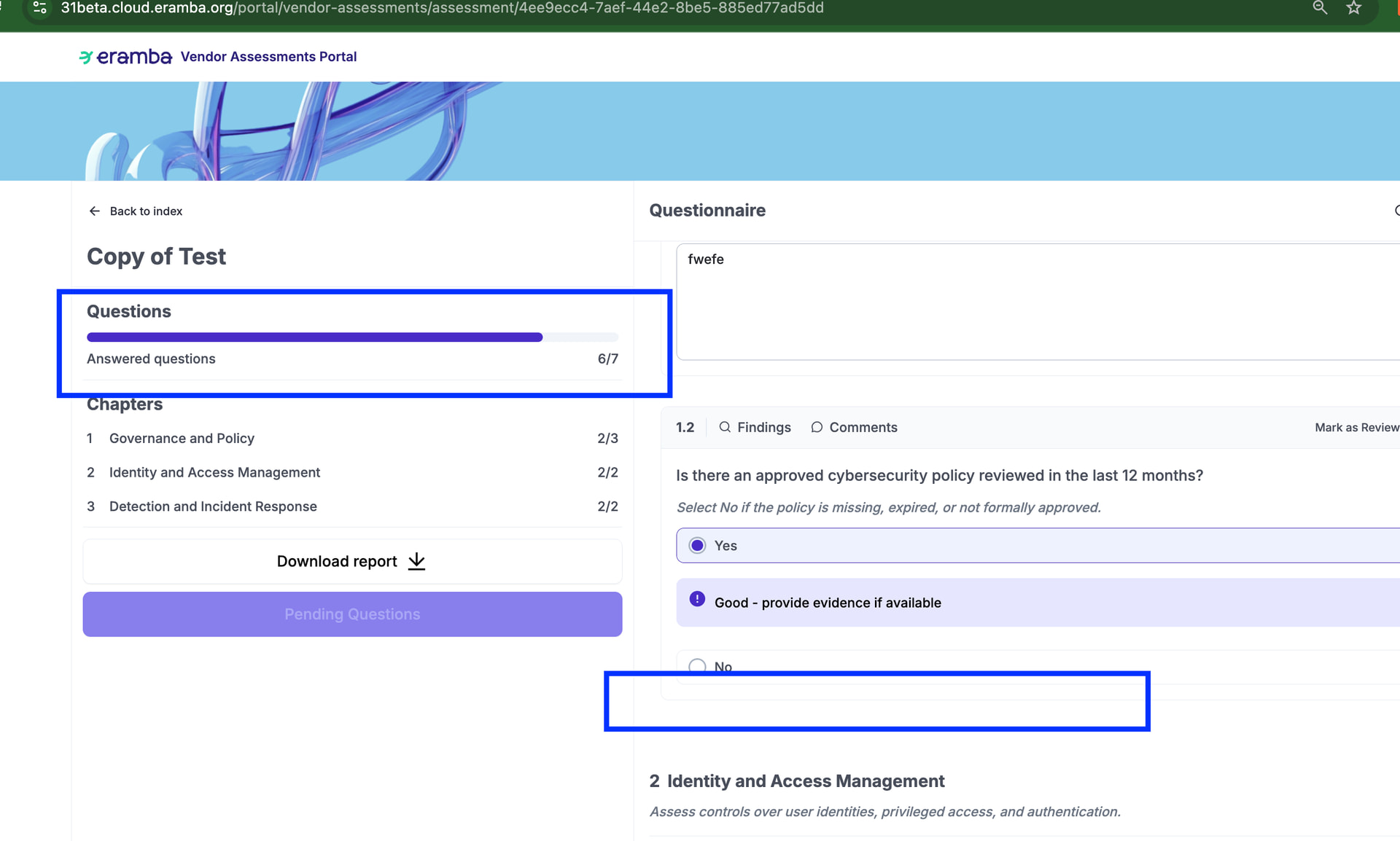
Problem: i used the attached questionarire (CSV) but for some reason is impossible to answer all questions, if you answer yes on the first one the second one is hidden, but that affectes the counter of missing answers and the submit option. The counter on the index does seem to be correct.
export_Test_2026_06_07.pdf (104.2 KB)
cybersecurity_oa_questionnaire.csv (4.2 KB)
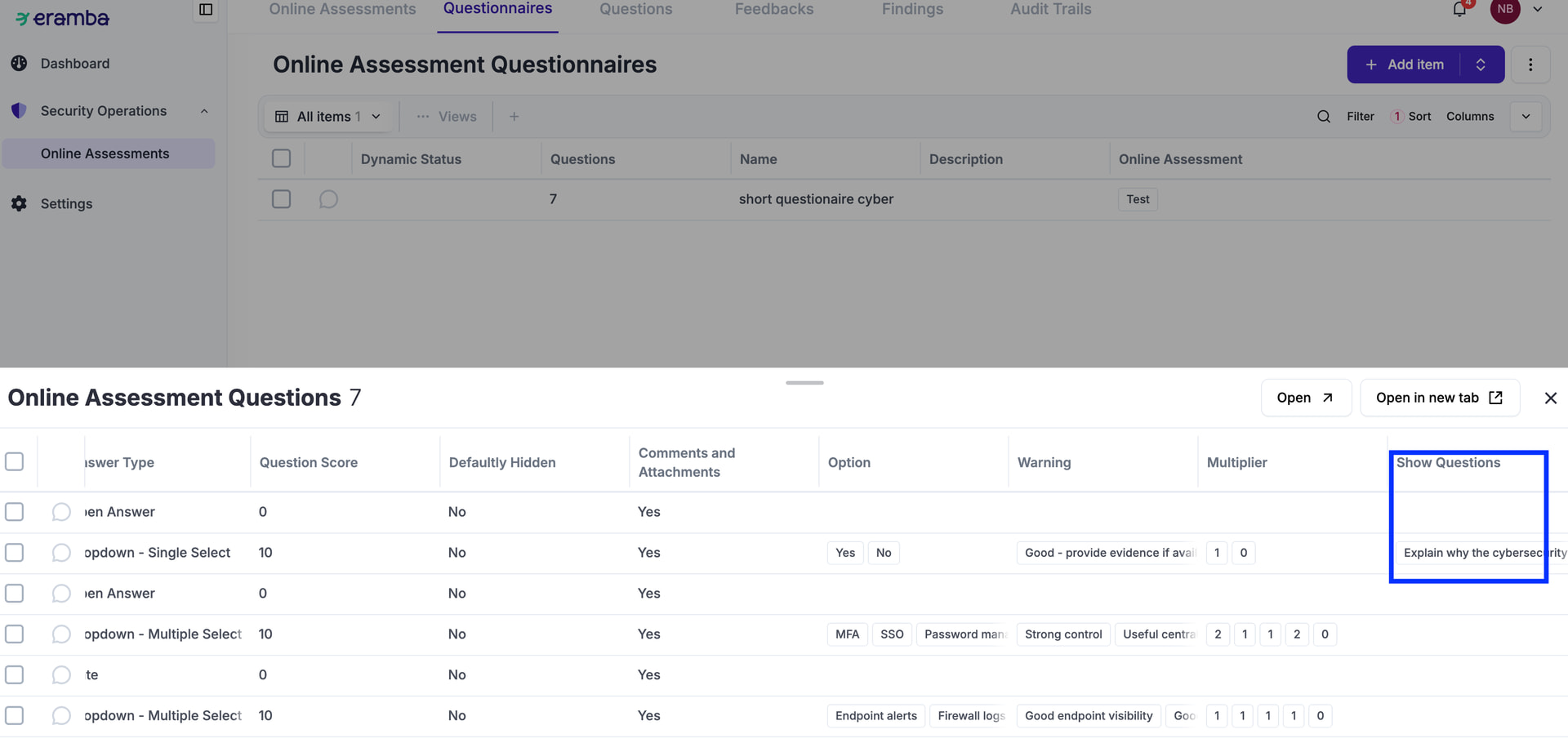
Problem: this label is wrong, but also i think this always will be “No” so perhaps we do not need this at all?
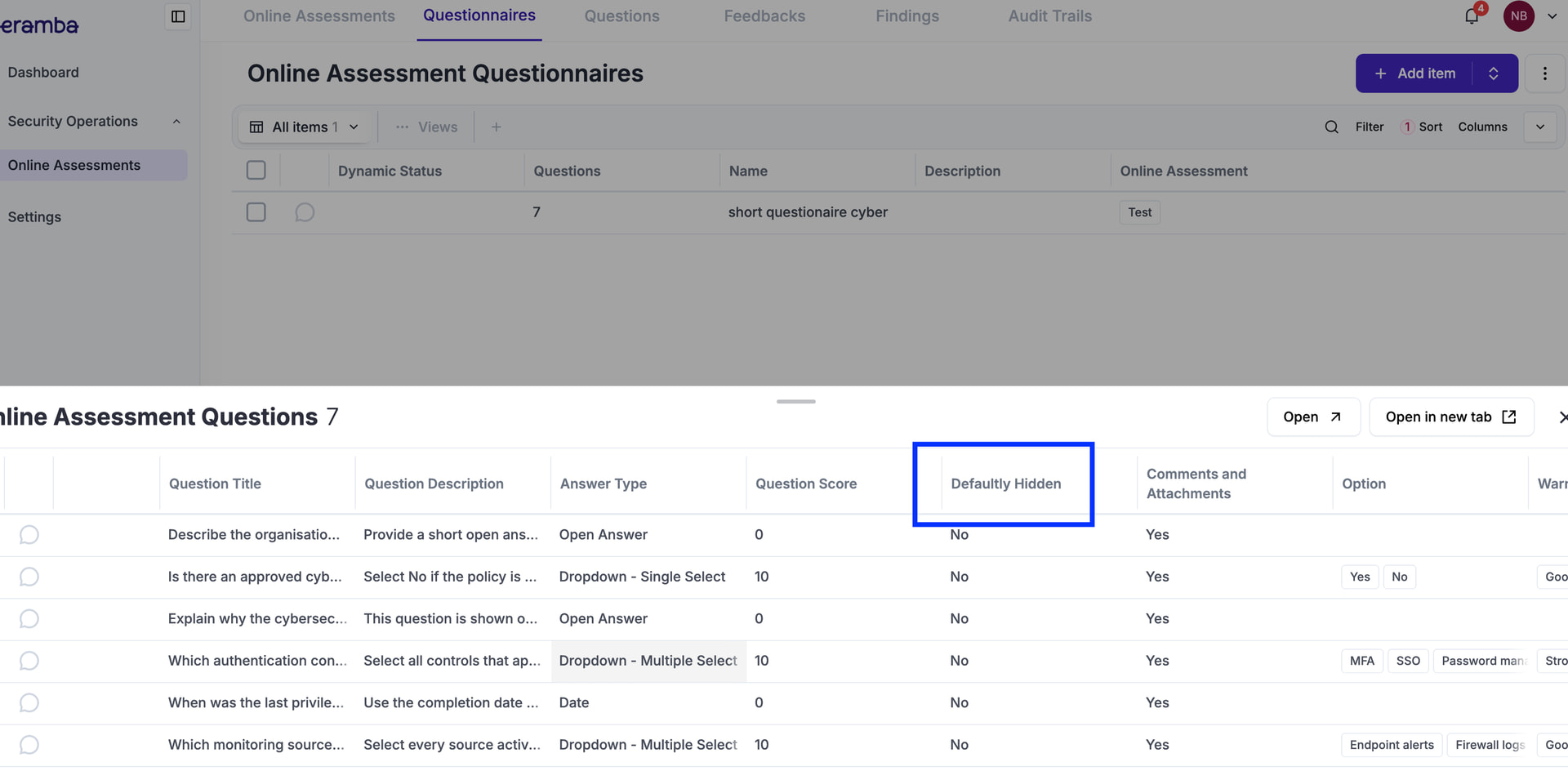
Fix Required: calle it everywhere “Initially Hidden” or if my theory that is not required simply remove it from everywhere.
Problem: i think when you clone an OA , the cloned OA has by default all its “Feedback” items set to “Reviewed” = Yes by default
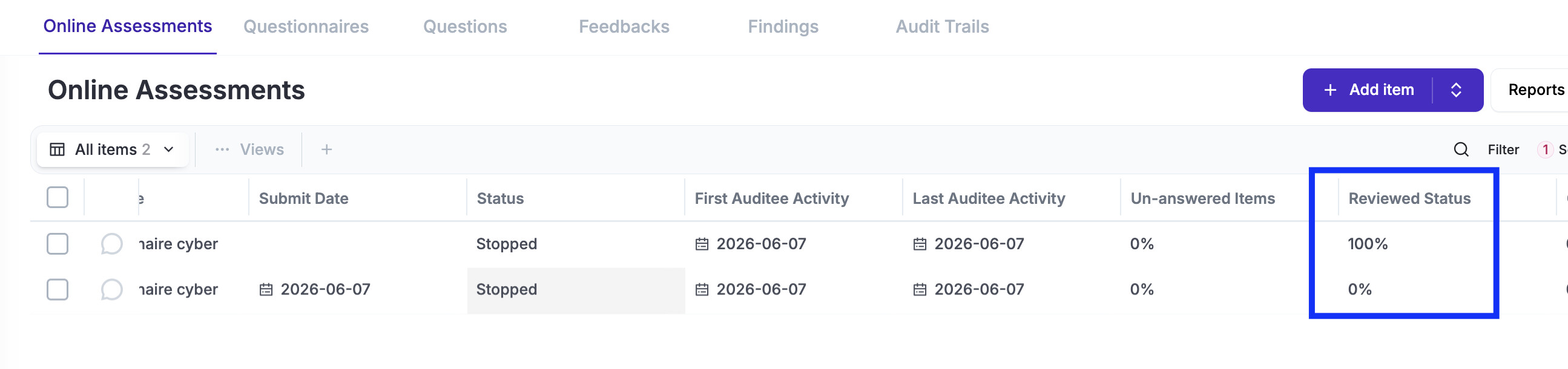
Fix Requirement: when you clone an OA, no matter if the feedback you are cloning is “reviewed” yes, it should always be set to “no” on the cloned items.
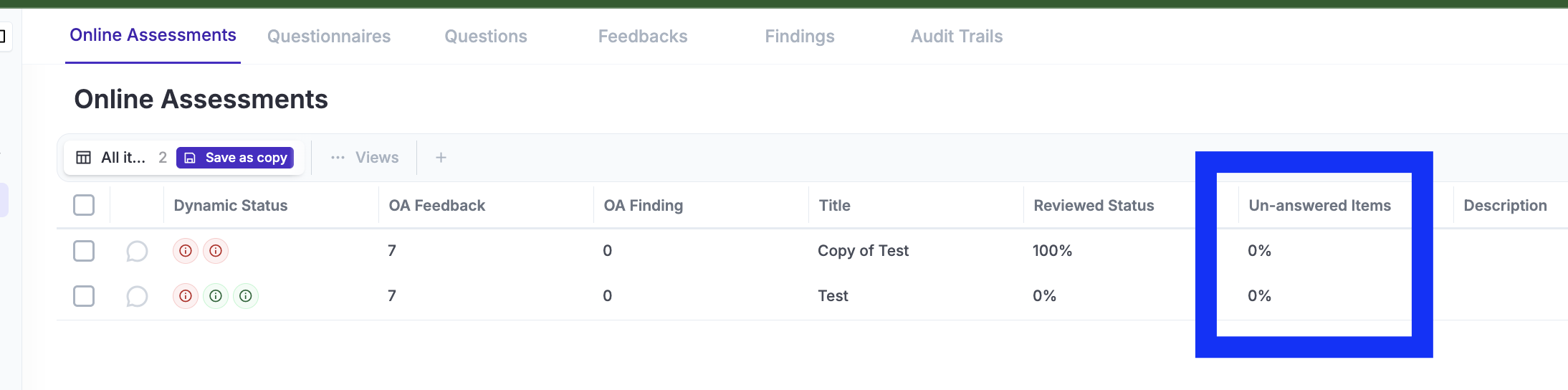
Problem: the review status statistic seem wrong to me, see the screenshot below
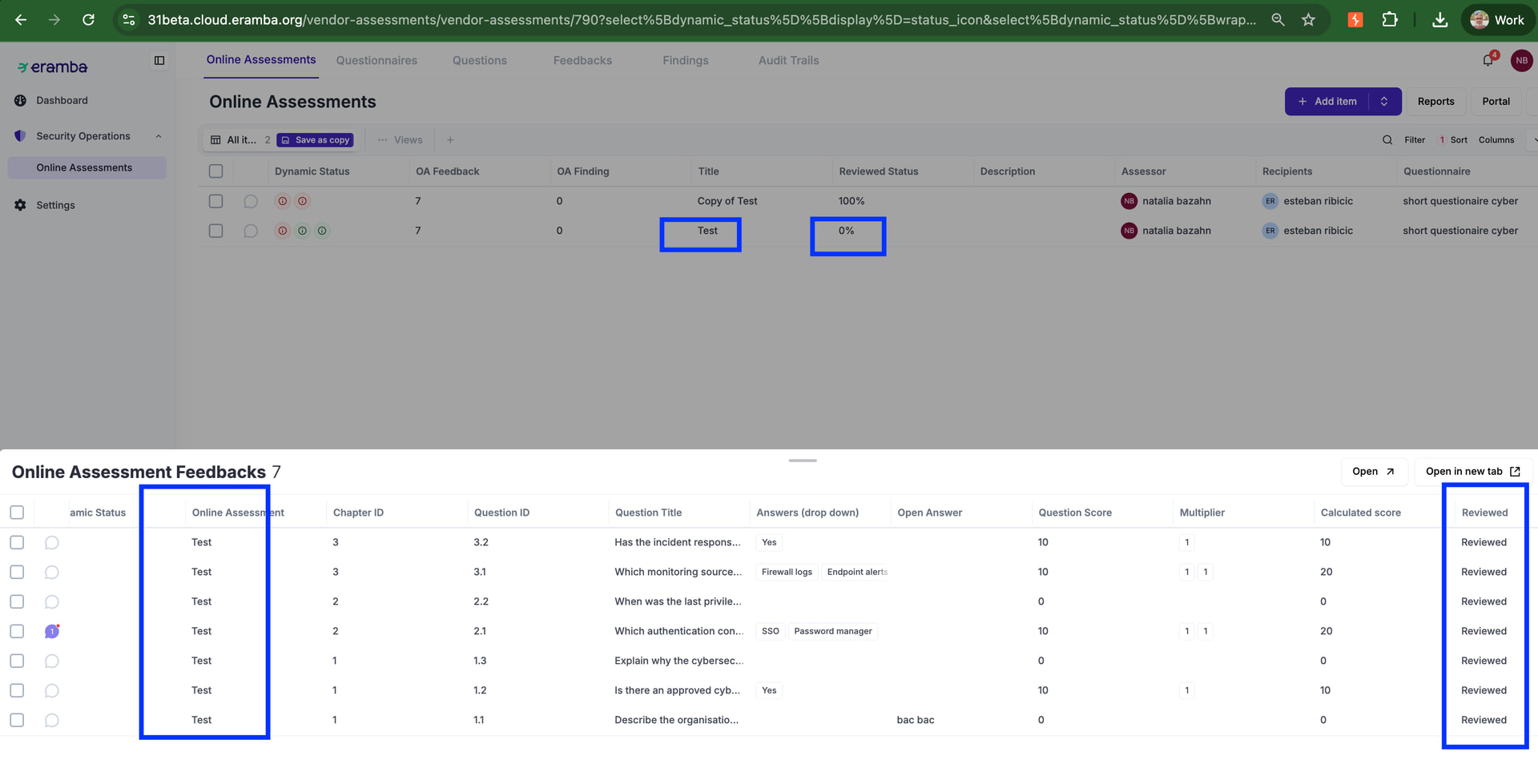
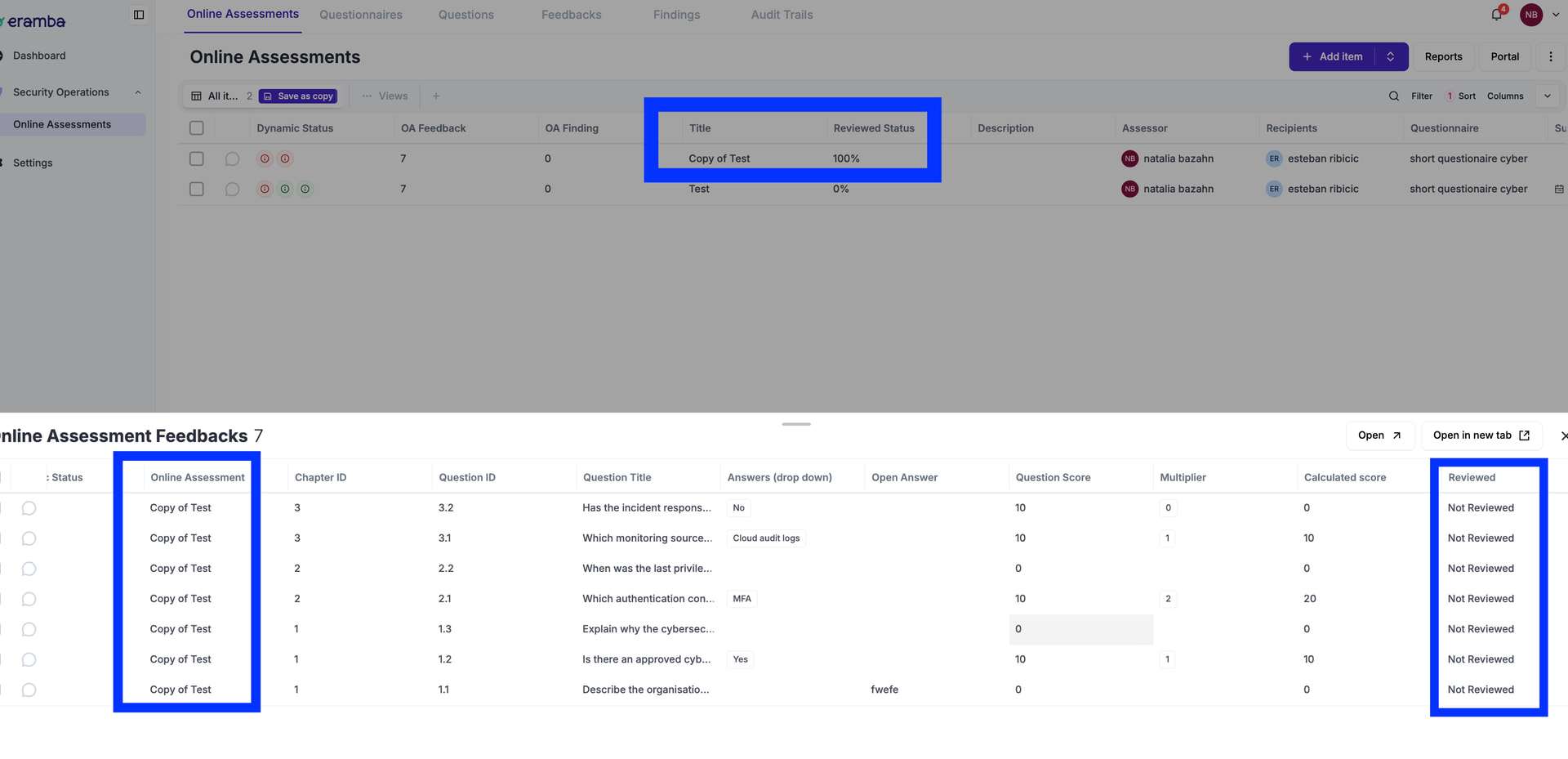
Required Fix: in this instance the review status should be “%100” right?
Problem: im using an account with full access to the OA module, but the “Review” button at the bottom is not showing, i think is because we miss an ACL that allows access to this button
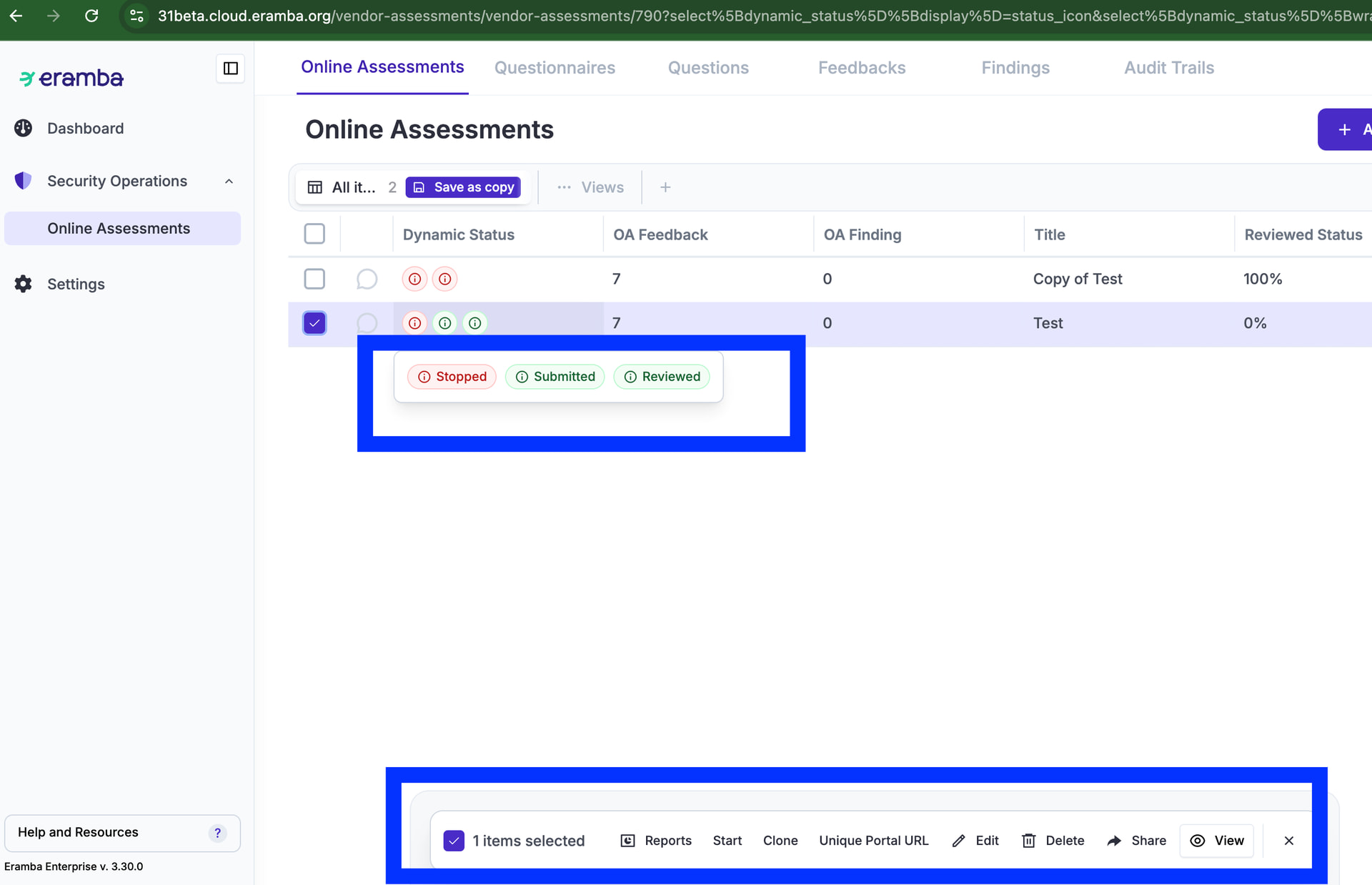
Fix Required: the review button should be displayed on the bottom , maybe the issue is an acl maybe something else. i dont know.
New Feature: OA Template:
- Online Assessments
- Third Parties, Assets, Risks, Policies, Etc
- Workflows / Reviews
The idea is that the OA module will become a “Supporting Module” instead of a Use Case. A Third Party, Asset, Risk, etc when created, will have the option to be “Reviewed” (this feature comes from Workflows/Reviews) every time it is “published” (a workflow status). This “Review” can take place in three different ways:
- Manual (as it is today, an email goes to the reviewer, they give feedback, the GRC owner completes the review)
- OA (this is new, the Review will be done by triggering an OA, until the OA is not completed and reviewed the TP review can not be completed by the GRC person)
- LLM (this is a future option that will prompt an LLM to the reviewer)
The key is a workflow, by which the review can not be “Completed” until the “Feedback” phase has been completed.
The diagram below shows the logic on how these would work on the TP, Asset, Risk, Policy, Etc module.
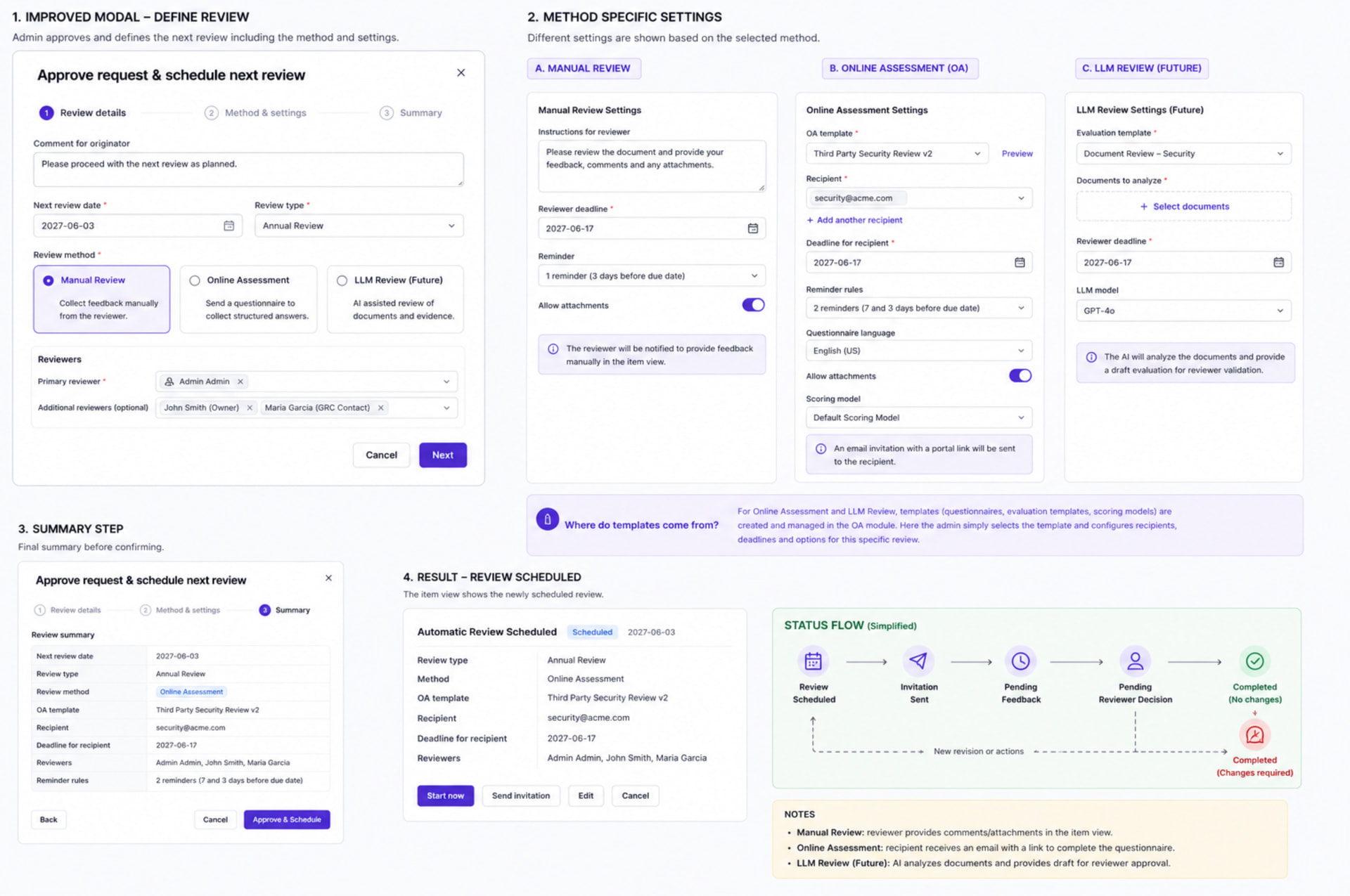
What we miss is to adjust the OA module so the OA Review can be created directly from a TP, Asset, Etc. For this we need:
OA Templates
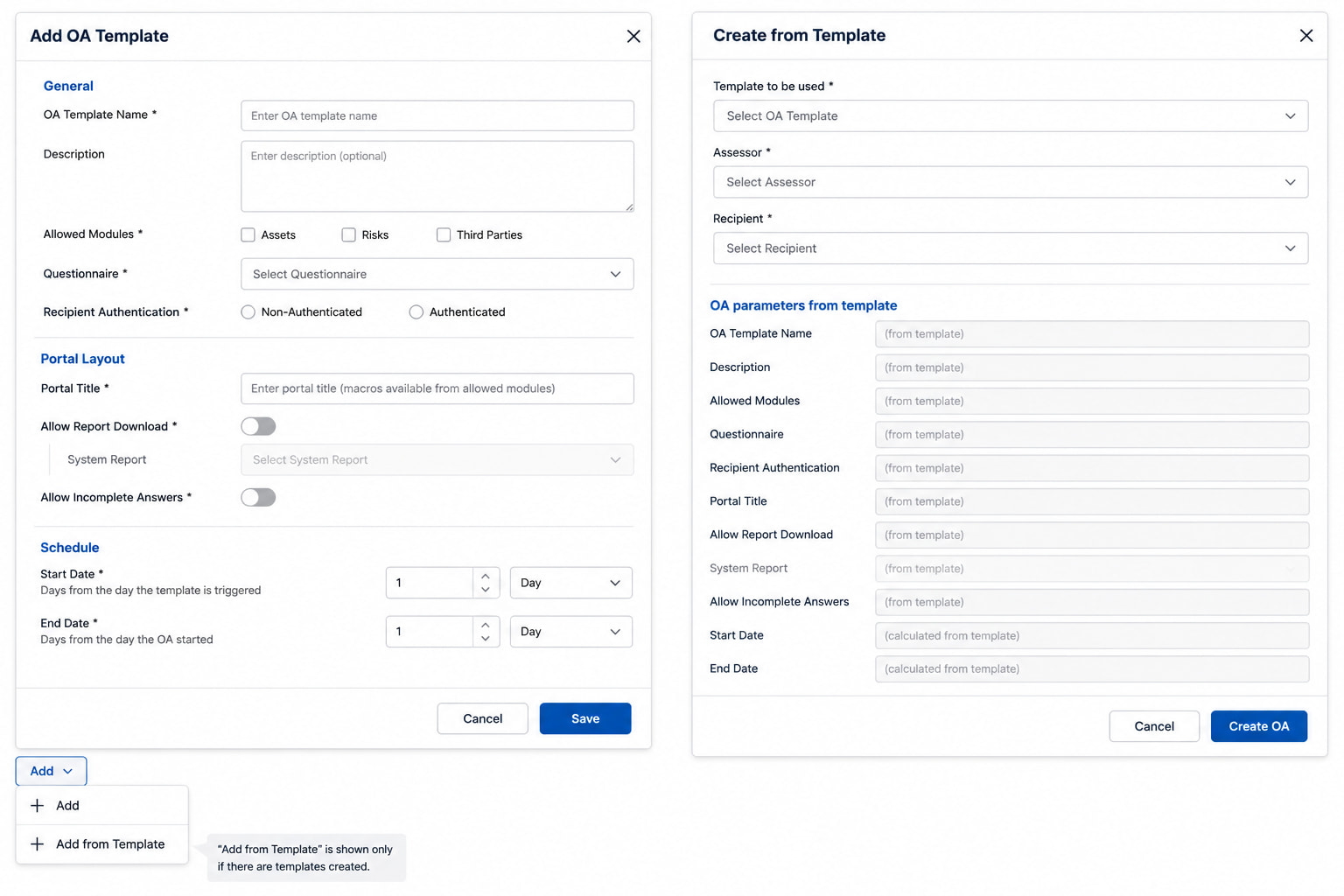
The OA template is user defined and simplifies the process of creating an OA from the TP, Asset, Risk, Etc (see step 2 on the diagram above). To create an OA template we need under Settings in the OA module an option “OA Templates” where the following attributes can be defined:
- General / OA Template Name: mandatory, string
- General / Description: optional, paragraph field
- General / Template Availability: mandatory field, options are Assets, Risks, Third Parties and Online Assessments. The user can select Online Assessments OR (Assets AND/OR Risks AND/OR Third Parties)
- The reason for this AND/OR is recurrence. Templates used in Assets, Risks and Third Parties do not have “Recurrence” (is handled by the review), but for Online Assessments you do need the setting.
- General / Questionnaire: mandatory, single select
- General / Recipient Authentication: mandatory, two options Non-Authenticated or Authenticated
- Portal Layout/ Portal Title: mandatory, this can include macros from the “Template Availability”, so show macros that apply to the selected modules.
- Portal Layout/ Allow Report Download: toggle, if yes choose an item system report
- Portal Layout/ Allow Incomplete Answers: toggle, mandatory, default no
- Schedule / Start Date: days FROM the day the template is triggered when the OA will start, for this we need the type (day, month) and counter (1, 2, etc) variables or “Right after Creation”
- Schedule / End Date: same as above, but the setting applies FROM the day the OA started.
Template CRUD:
- Edit: is possible to edit existing templates
- Add: should be possible
- Delete: only possible if the template is not used on any “Template Availability”, if they try deleting and the template is used then you show “This template is used as a Review method on the module $module. Replace this template on the review setting and try deleting again.”.
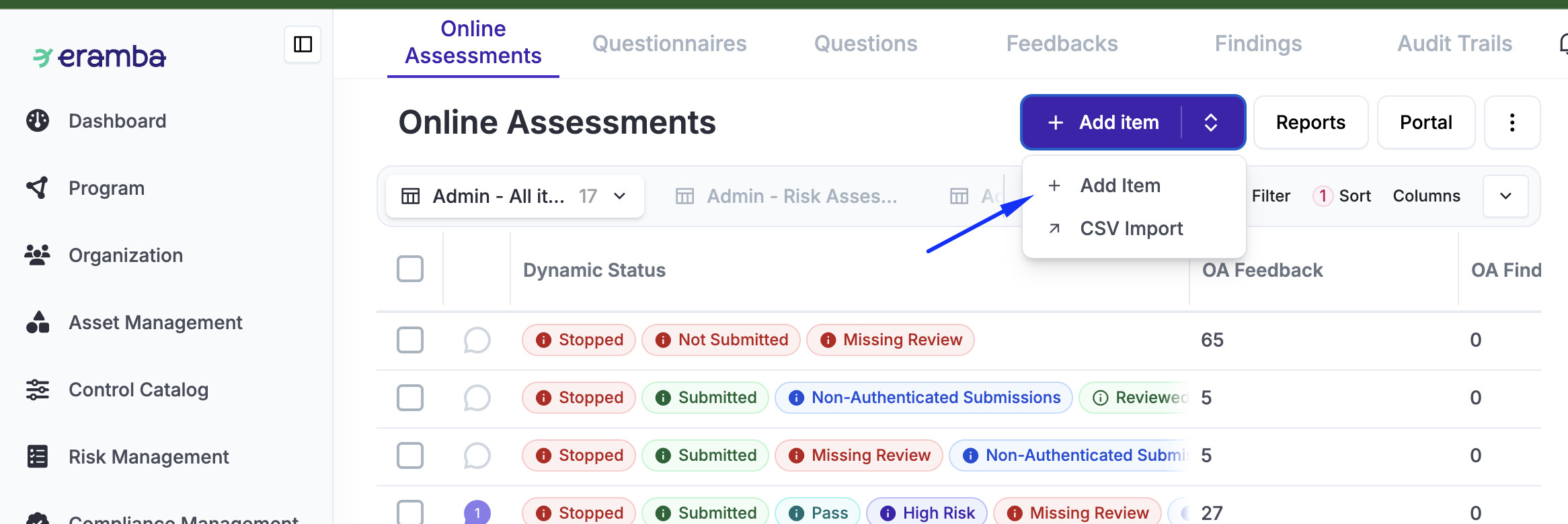
When you click on “Add / “ menu we need an additional option under Add called “Add from Template”, this option is only shown if there are templates created. The OAs created with templates (can not or can?) be modified on fields that where previously defined by the template setting. I think is safer can-not (TBD). User might have defined customfields, these fields should be editable anytime.
If that option is selected, we need a modal (we will call it internally “Create from Template) that loads the OA form and the fields which have been defined by the template are disabled and the ones that are not can be defined by the user. This might include custom fields.
- Template to be used
- Assessor
- Recipient
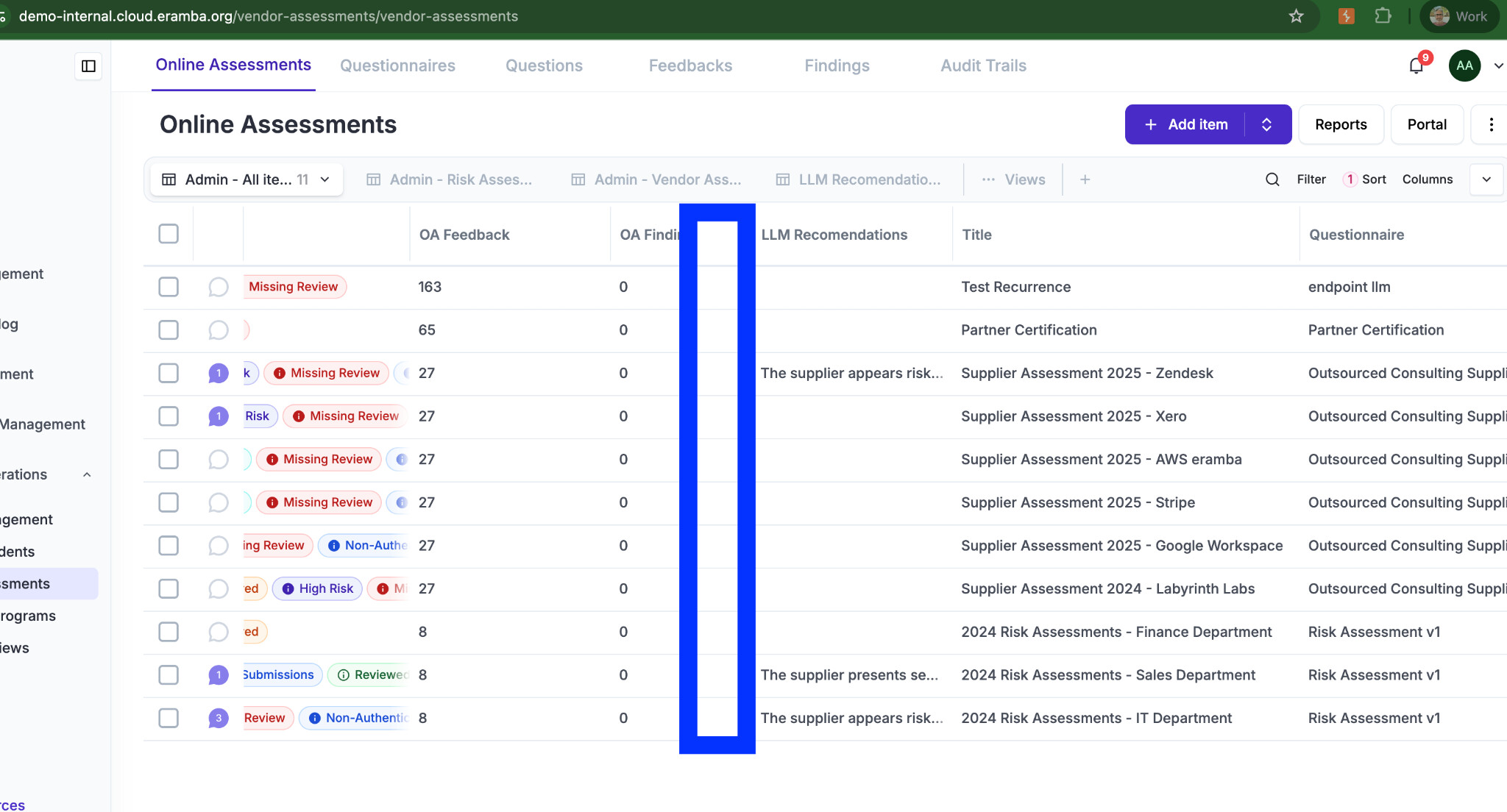
When a OA is created with a template we need an additional column on the table called “Template” and the name of the template used. The columns needs to be on every View we have set as default just before the “Tittle”
UI Improvements when “saving”
On demo-interal i run an automation on any OA submission, the automation takes a while to run but hte user has no clue what is going on .. we need a “wait we are doing something”. We could tell what we are doing “Loading Report”, “Running Automation”, “Saving”.
Score per Chapter
Add one more column on feedback for “Chapter Score” with a calculated value, this is useful to then do a report or a logic:
- Dynamic status triggers if:
- the “Chapter Score” > 5
- and “Chapter Name” is “Chapter 3 - Something”
- and “Qustionaire Name” is “Test”
The logic above should in theory match any created with that questionnaire and that chapter score?
references:
https://eramba.zendesk.com/agent/tickets/30934
https://eramba.zendesk.com/agent/tickets/26884
https://eramba.zendesk.com/agent/tickets/22640
https://eramba.zendesk.com/agent/tickets/21371
https://eramba.zendesk.com/agent/tickets/17087
https://eramba.zendesk.com/agent/tickets/30765
https://eramba.zendesk.com/agent/tickets/30818
https://eramba.zendesk.com/agent/tickets/26089
https://eramba.zendesk.com/agent/tickets/18914
https://discussions.eramba.org/t/feature-select-multiple-answers-in-online-assessments/1168
https://discussions.eramba.org/t/question-how-to-create-multiple-select-drop-downs-on-questionnaires/3340