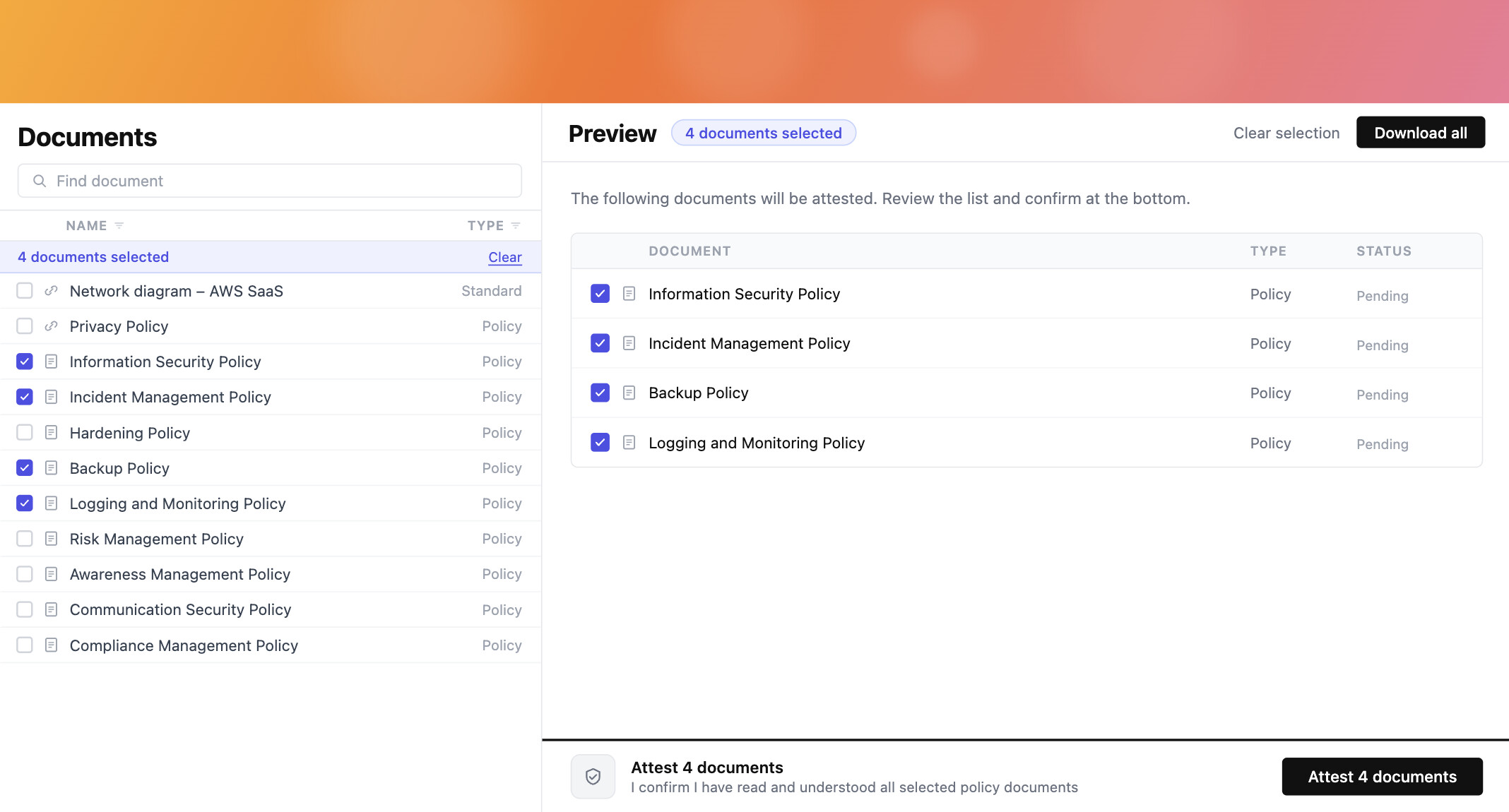
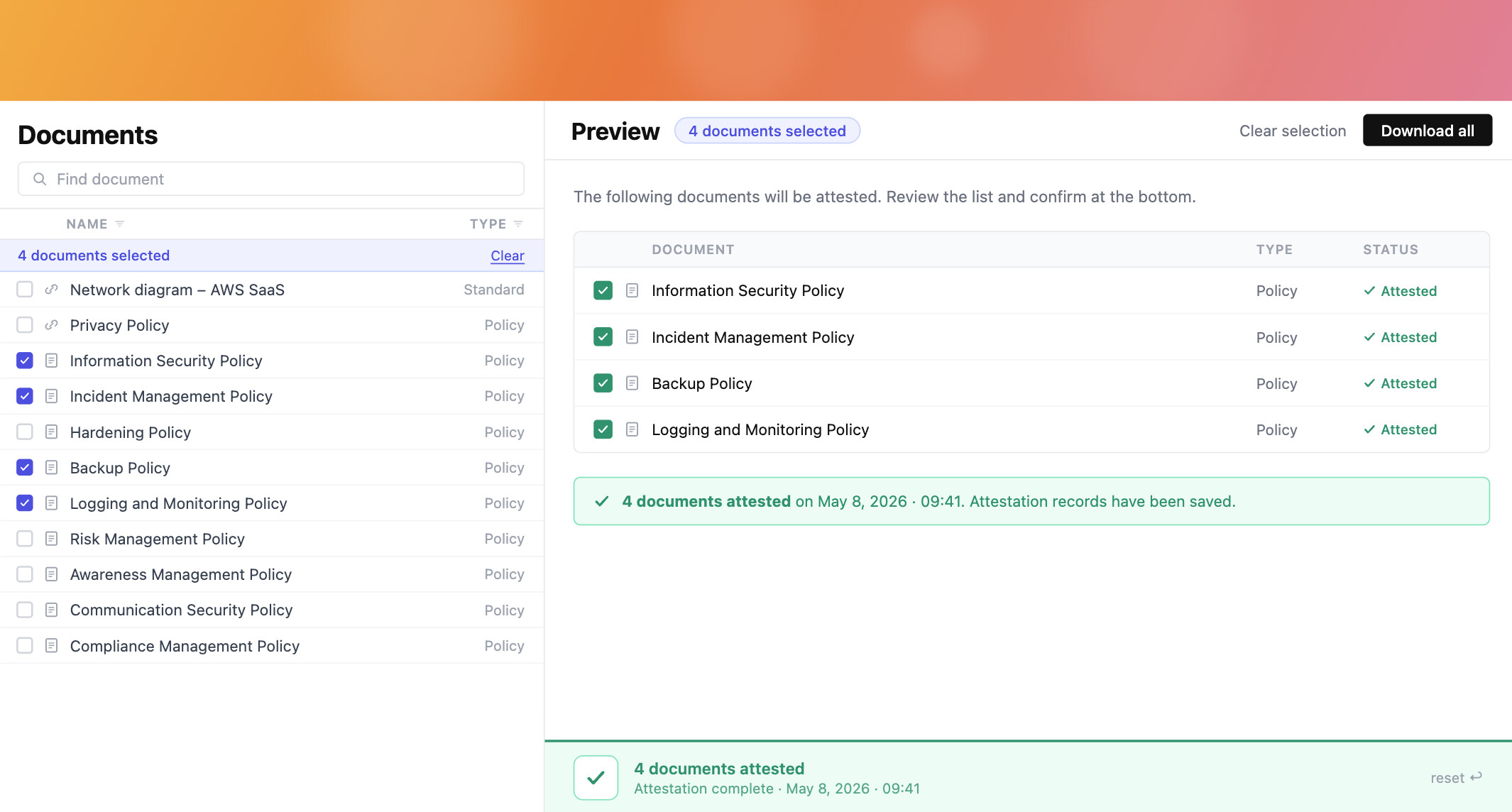
We introduced policy attestation in upgraded awareness portal, we would like to keep it as a lightweight option but there is still robust solution needed that will handle versioning, and the policy portal shows what they need to read and click.
When enabled, users in the audience see the policy in the portal with an explicit acknowledgement button, the click is recorded, and when a new version is published eramba user decides if a fresh round of attestation is needed.
This is built on top of the new policy workflow (versioning, draft → pending approval → published). Without that workflow there is no clean concept of “version” to attest against, so the two features are tied together.
Definitions
- Attestation: a recorded acknowledgement by a single user that they have read a specific version of a policy at a specific point in time
- Attestation cycle: the period a policy version is open for attestation - starts when the version is published, never closes (records stay associated with the version forever)
- Audience: the users or groups who must attest a given policy
- Re-attestation: a fresh attestation request triggered when a new version is published, only if the approver flagged it as material
Policy form (new tab: Attestation)
When workflows are enabled on the policy module, a new “Attestation” tab is added to the policy form.
Fields:
- Enable attestation: toggle, default off
- Audience: multiple-select on users and groups
- Button text: short string, default “Acknowledged”, customisable per policy (“Understood”, “Read and accepted”, whatever the customer wants)
- Deadline: integer + type (days, weeks, months) measured from the moment the version is published. Mandatory when attestation is enabled.
- Reminders: same logic as awareness reminders, two settings:
- After publish: N days after publish, if not yet attested
- Before deadline: N days before deadline, if not yet attested
When attestation is on, the audience field is mandatory. If the audience is empty the user can not save.
Questions:
- attestation will be per policy or section?
- deadline should be until new published version?
Approval workflow (changes)
The approval workflow itself is unchanged. We add one extra step on the approval modal when the policy already has at least one published version:
- A radio: “Does this version require re-attestation?” with two options:
- Yes - new attestation cycle starts when published, audience is prompted again. - major changes
- No - existing attestation records carry forward, no notifications, no prompts. - typos, small edits etc.
There is no default. The approver must actively pick one before the “Approve” button is enabled - we do not want anyone clicking through approval without thinking about whether the change is material.
The author can include a suggestion in the notes when submitting for approval (they know what they changed) but the approver is the one who decides (they hold the authority). For v1 of a brand new policy this question is not asked - the first publish always opens an attestation cycle.
Policy portal (user side)
The portal needs three changes:
-
Pending banner on portal homepage
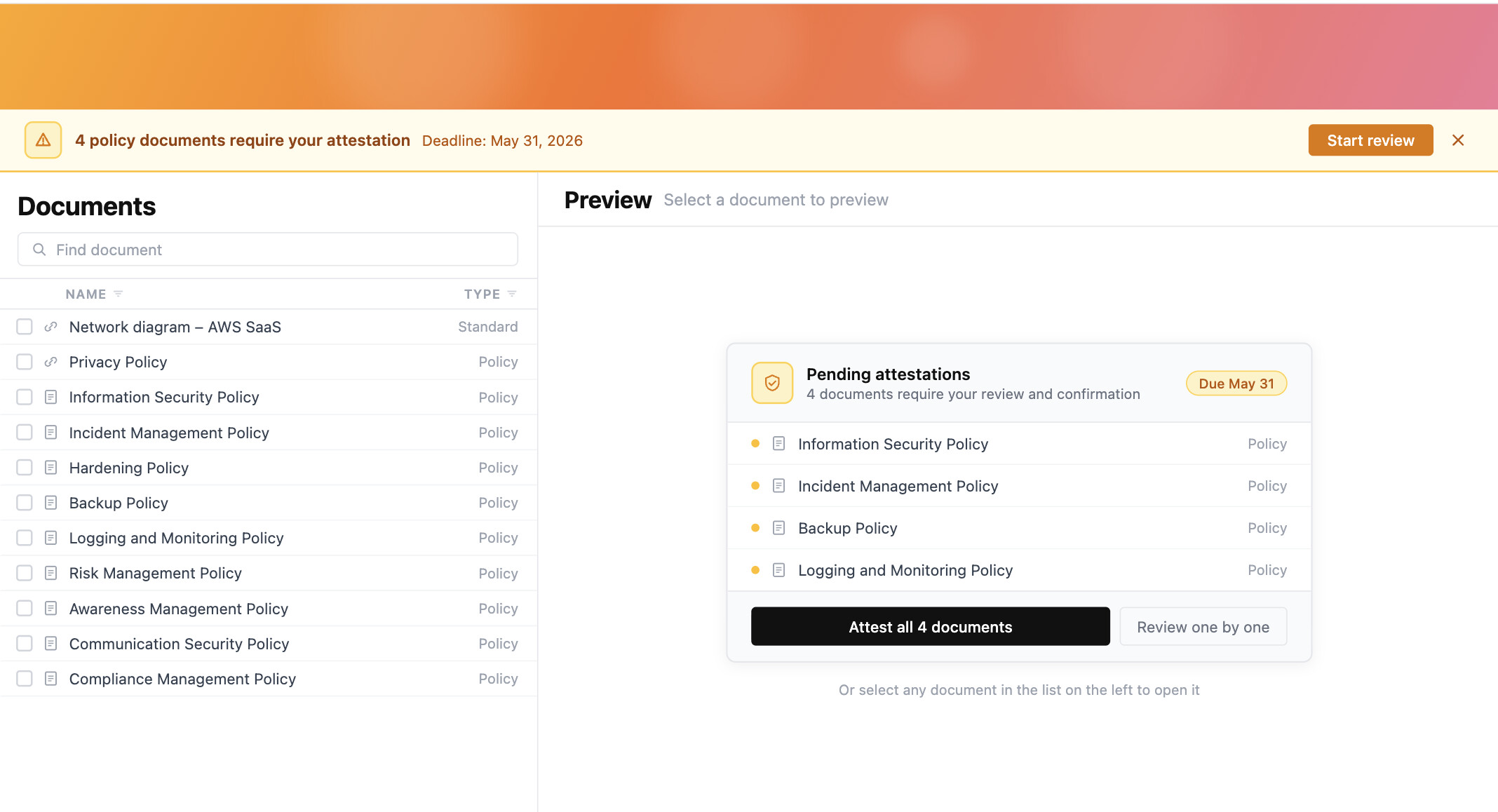
When a logged-in user has one or more policies waiting for attestation, the homepage shows a banner at the top: “You have N policies awaiting your acknowledgement”. Clicking the banner takes them to a filtered list of just those policies.
-
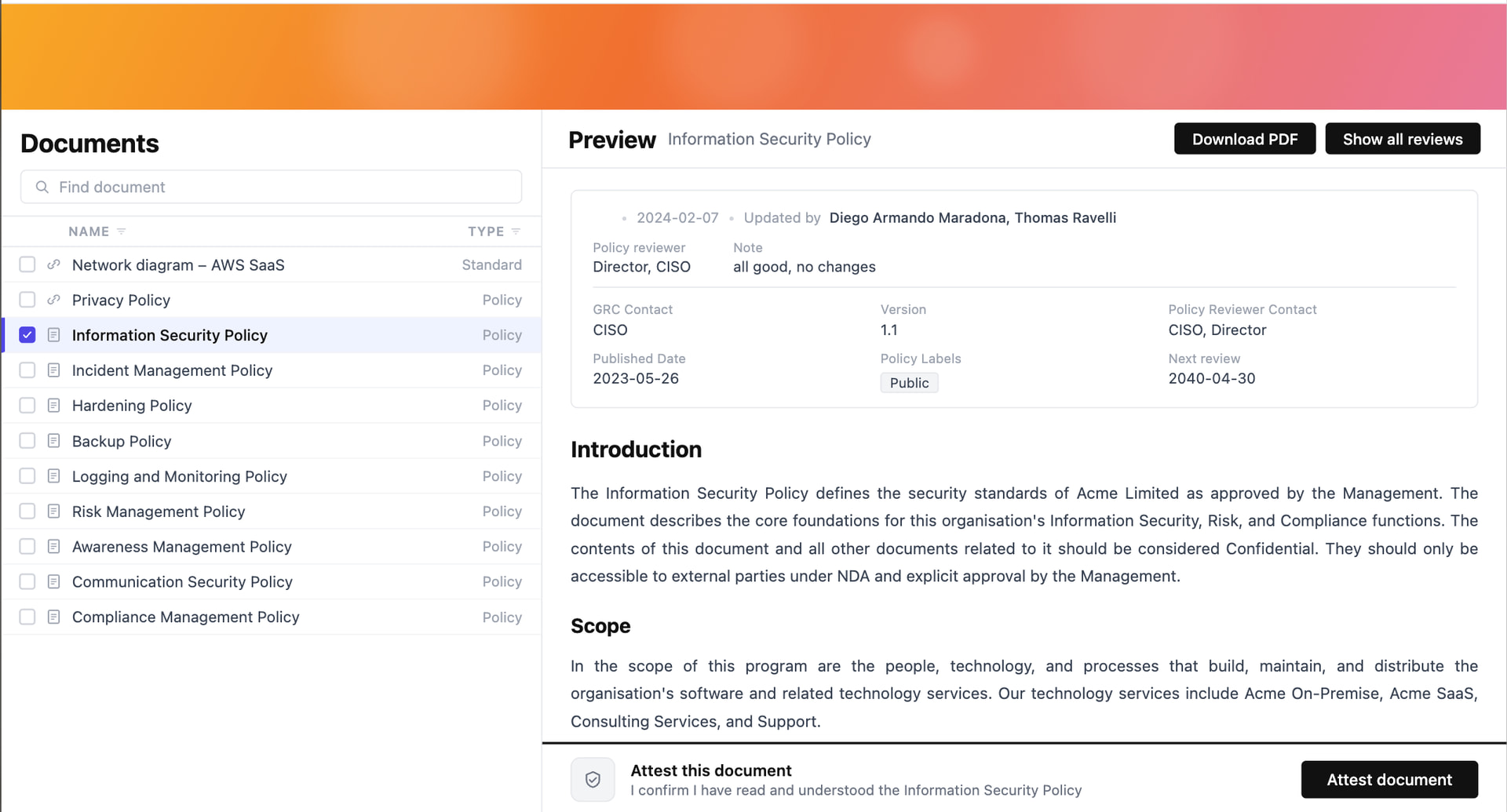
Attestation button on the policy view
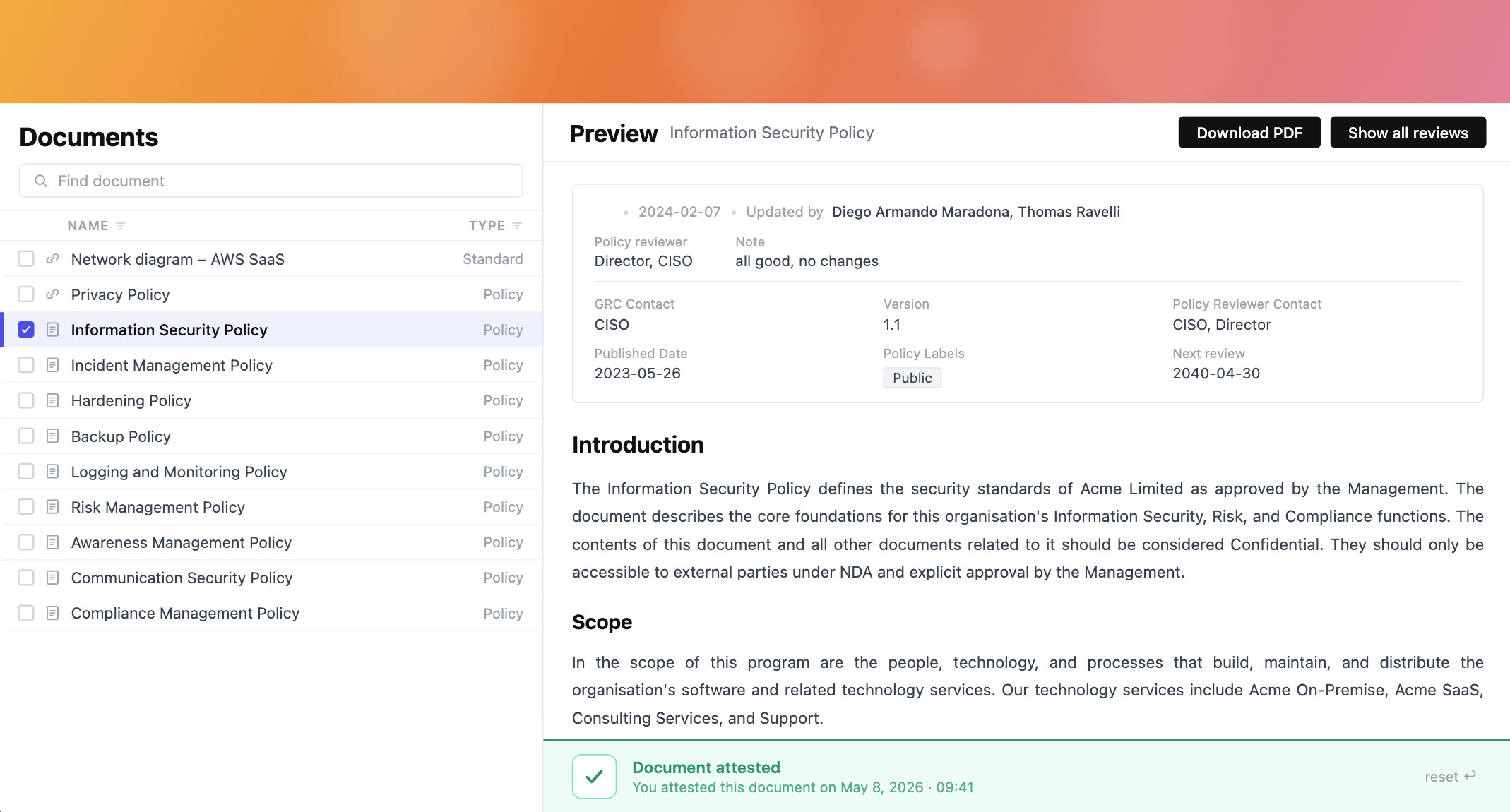
When a user opens a policy that requires their attestation, the policy renders as today, with a sticky bar at the bottom containing the customised button (“Acknowledged” by default). Click is single-action - no second confirmation modal, the click itself is the attestation. After clicking, the bar is replaced with a small confirmation: “Acknowledged on YYYY-MM-DD HH:MM”.
Policies that the user has already attested for the current version still show on the portal but without the attestation bar - just a discreet “Acknowledged on …” line at the bottom.
-
Bulk attestation from the pending list
On the filtered list of pending policies, the user can multi-select and click a single “Acknowledge selected” button. Each selected policy still gets its own individual attestation record (policy + version + user + timestamp), there is no shared row. The audit trail is the same as if the user had clicked each one in turn, this is just a UX shortcut.
Notifications
- On publish: sent to every audience member, includes a link to the policy portal
- After publish reminder: per the policy’s reminder setting
- Before deadline reminder: per the policy’s reminder setting
- Overdue: sent once when the deadline passes, to the audience member and to the policy GRC contact. Without this the deadline is just a colour on the index, the overdue notification is what makes it real.
Like other notifications in eramba, all of these can be enabled or disabled per user in their notification preferences.
Stored records
Each attestation is a row with:
- Policy ID
- Policy version
- User ID
- Timestamp
Statistics on the policy index
Two new columns on the main policy index, hidden by default and enabled per user from the column settings:
- Attestation %: x of y users in the audience have attested to the current published version.
- Attestation deadline: the deadline date for the current version, probably based on review date.
These columns should answer:
- which policies are attested by how many % of employees
- which policies missing attestation
Workflow
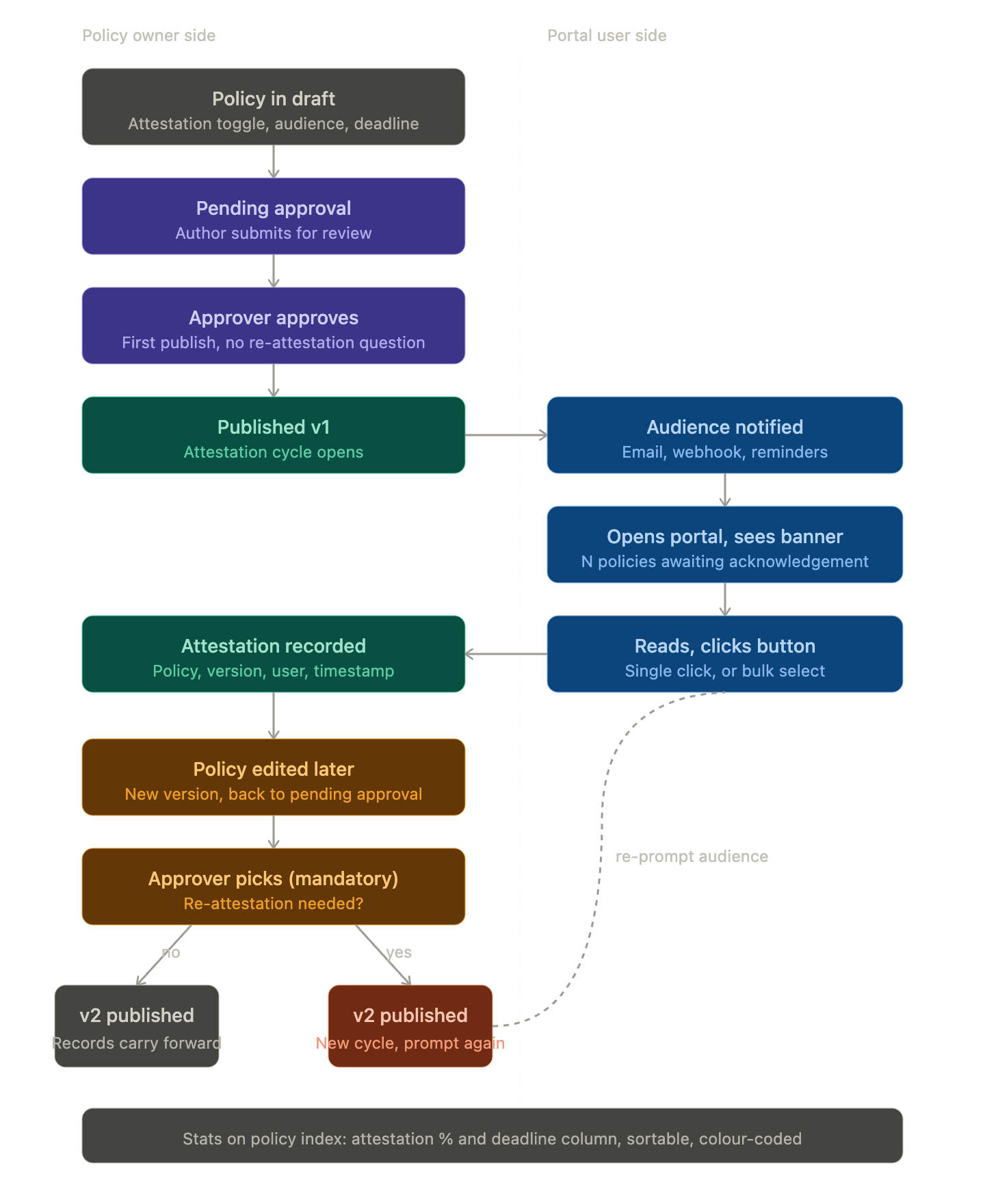
The full lifecycle:
- Policy in draft, attestation enabled, audience and deadline set
- Submit for approval
- Approver approves
- Policy published as v1, attestation cycle starts, audience notified
- User opens the policy portal, sees banner, opens the policy, clicks the button
- Attestation recorded
- Time passes, policy gets edited
- New version goes through approval. Approver must pick: requires re-attestation, yes or no.
- If yes, new cycle starts and the audience is re-prompted. If no, existing records carry forward against the new version.
FAQ
- What happens if a user is removed from the audience after they have attested? The attestation record stays. They are not counted into statistics anymore.
- What happens if a user is added to the audience after the version was published? They get a notification immediately (same template as the on-publish one) and the policy shows in their pending list.
- What happens to attestation records if the policy is deleted? They go with the policy.
- Does this work on the public portal (guest access)? No. Attestation requires an authenticated user. If a policy is set to “Public” and has attestation enabled, the portal will show the content but no attestation button to guest visitors. We should show a warning when this combination is set on the form.
- Can the same user attest the same version twice? No. Once recorded, the button is replaced with the “Acknowledged on …” line.
- Can attestation work without the new approval workflow? No. We need the workflow’s versioning to know what is being attested against. The Attestation tab is hidden if workflows are disabled on the policy module.
- What if the approver gets distracted and forgets to pick yes or no? The “Approve” button is disabled until they pick.
Migration
Nothing to migrate. This feature is additive.
Not implementing
- Attestation for guests
- Custom email templates per policy
- Standalone “my attestations” page in the portal. Status is shown directly on each policy.
- Section-level attestation. If a customer needs section-granularity they split the policy.
- Admin-side bulk import of historical attestation records.
UI
User access portal where 4 policies needs to be attested
Single document attestation
Bulk attestation