eramba exposes a standard SCIM 2.0 endpoint at https://<your-eramba>/scim/v2 (Users, Groups, discovery, Bulk, core schema only, nothing eramba-specific to configure on the IdP). Your IdP (Entra ID, Okta, …) is the source of truth: it creates, updates, deactivates and deletes users. Changes made in eramba to SCIM-managed attributes are overwritten on the next sync.
Setup
- Create a service user in eramba, add it to the built-in SCIM User Management group, and create a Personal Access Token for it. (Basic Auth works too, but a token doesn’t break when passwords rotate. The admin account cannot be used.)
- In Settings → Organization & Access → SCIM Connections, switch the connection ON and copy the endpoint URL.
- In your IdP, configure provisioning with the endpoint URL and the token, and assign groups to the app, not just individual users. Groups are the whole point: they are what carries permissions into eramba.
- Back in eramba, each group pushed by the IdP shows up as Pending in the SCIM group mapping table. For each one, map it to one or more eramba groups (or hit Create group to make one from the IdP group name) and toggle its portal/API access: Main, Vendor Assessments, Account Reviews, Awareness, Policy, REST API.
- Pick a deprovisioning action: Disable (default, user is deactivated and the record kept, reversible) or Delete. Delete first transfers the user’s ownerships and assignments to a user you select, then deletes the account. If the transfer or deletion can’t be completed, the user is kept and a SCIM error is returned and logged.
That’s it. From here on, adding and removing people in IdP groups drives their access in eramba automatically. Mapping or access changes re-apply to all existing members of that group, not just new ones.
How Users Come In
- Provisioned users are remote users (no local account, no user template), flagged SCIM Provisioned. Mapped fields:
userName→ Login, given/family name → Name/Surname, primary email → Email,active→ Status. If the IdP doesn’t send an email (Entra users without a mailbox have an emptymail),userNameis used instead. - SCIM users remain fully editable in eramba, there is no read-only lock. You can keep assigning them as owners, reviewers, auditors and so on like any other user. Just keep in mind that IdP-managed attributes (name, surname, email, login, active status) and mapping-derived group/portal access are re-applied on the next sync, so permanent changes to those belong in the IdP.
- A user in no mapped group (e.g. assigned directly to the app) is still created, active, in a minimal default state: No Allowed Permissions group, Policy and Awareness portals only. Nobody is rejected, so there are no IdP retry loops, and awareness/policy campaigns work for everyone out of the box.
- If the email matches an existing local user, that account is taken over as SCIM-managed instead of duplicated. Its current access is kept as a baseline and SCIM group access is added on top.
Behavior at a Glance
| You do this in the IdP | eramba does this |
|---|---|
| Assign a user directly to the app | Created active in the default state (Policy and Awareness portals only) |
| Change user attributes | Updated on next sync |
| Add user to a mapped group | Gains permissions and portal access of the mapped eramba group(s) |
| Remove user from a group (still in others) | Recalculated, stays active with remaining access |
| Remove user from all mapped groups | Stays active, falls back to the default state |
| Unassign / soft-delete / hard-delete a user | Deprovisioning action applies (Disable, or Delete with item transfer) |
| Push a new group | Appears as Pending, grants nothing until mapped |
| Rename a group | Name updated, mapping and members preserved |
| Delete / unassign a group | IdP group record and mapping removed, eramba groups untouched, members recalculated |
| User’s email matches an existing local user | Taken over as SCIM-managed, local access kept, SCIM access added |
Every SCIM request is logged (SCIM Connections → View logs): operation, resource, status, error type, payloads. That’s the first place to look when a user “didn’t show up”.
Notes for Entra ID
- Incremental cycles run roughly every 40 minutes, use Provision on demand for testing.
- Attributes eramba doesn’t support (
title,department,employeeId, …) are ignored, not rejected. You can leave Entra’s default attribute mappings as they are. - Nested groups are not flattened, use groups with direct members.
- On large tenants, scope provisioning to Sync only assigned users and groups.
- Toggling the connection OFF makes Entra error out (and eventually quarantine the app). Existing eramba data is untouched.
Out of scope: OAuth client-credentials, custom schema extensions, multiple SCIM connections per instance.
UI
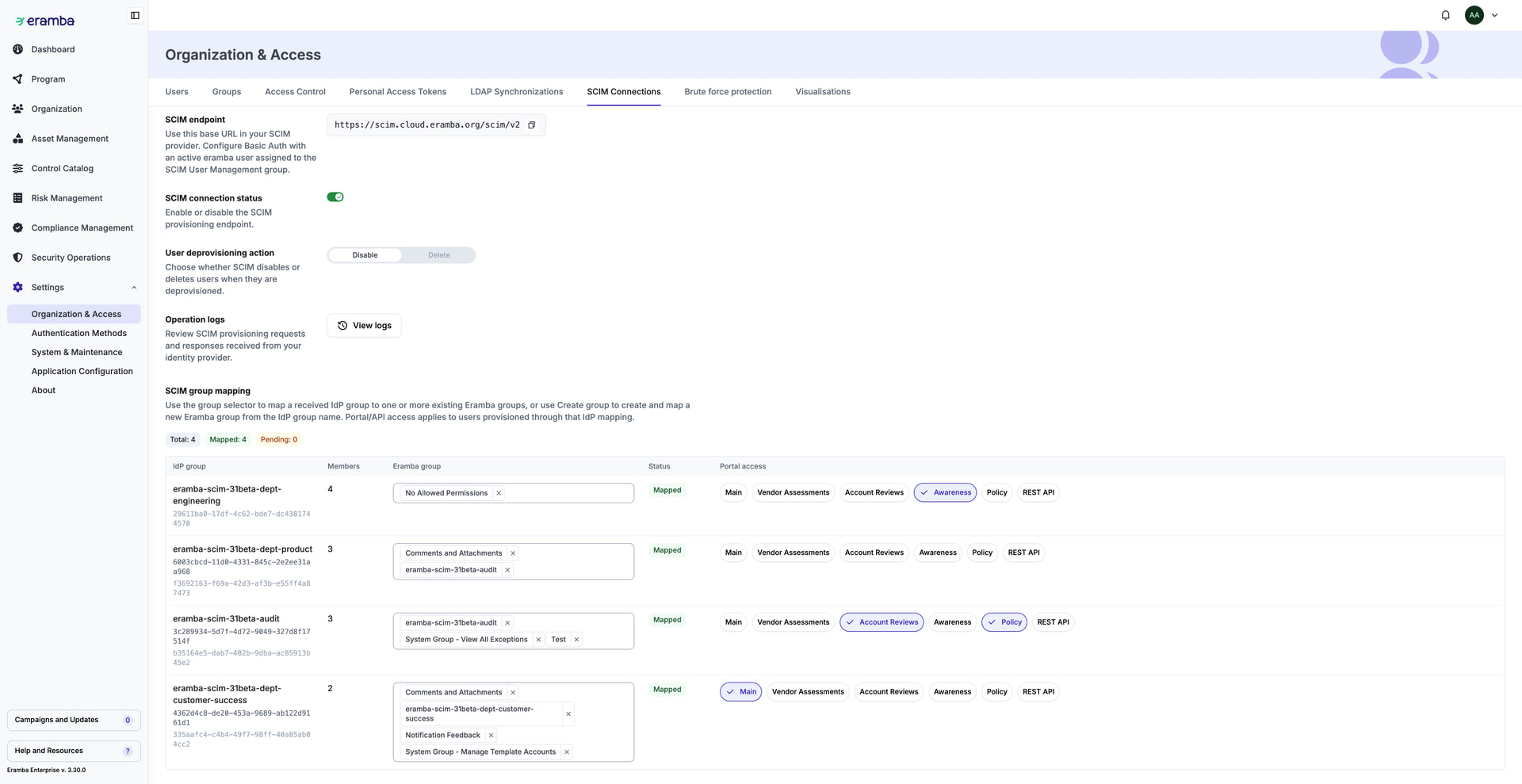
ref.: Question - Auto-Provisioning Users via SCIM
int. ref.: Jira