What’s New
MCP Server A new connector type that lets you query your eramba instance using natural language through your LLM of choice. Authorization respects eramba’s existing groups and visualisations - users can only query data they have permission to see.
Details here: Feature - LLM / Agentic
Awareness program The awareness portal has been migrated to the new UI. A new Policy Attestation content type lets users acknowledge selected eramba policies directly in the portal. Content can now be reordered via drag & drop, and questionnaires support a new question pool (a random subset of questions drawn per attempt). Programs run as Once or Cycles. Reminders are fully configurable - invitation, after-start and non-completion reminder for users who haven’t finished.
Details here: Feature - Awareness portal
Existing awareness programs are migrated as read-only historic evidence and stop running. To continue training, create a new program (content can be retrieved via Download Content).
SCIM Provisioning Your identity provider can now create, update, deactivate and delete eramba users/groups automatically.
Details here: Feature - SCIM Connector
ACL for Users settings and User Templates Settings → Users and User Templates have been migrated to the new UI as the foundation for the upcoming OA portal phase two. Full plan and follow-up phases here: Feature - Online Assessment Facelift
Details here: Feature - Access Management Updates
In-app notifications A lightweight internal messaging channel that lets us deliver release notes, new feature announcements and occasional tips directly inside eramba - no extra network setup required for on-prem installs, everything routes through support-v3. Only shown to admin users.
Details here: Feature - In app notifications
API v2 Reworked v2 API with Swagger documentation built into the eramba UI - try requests and inspect responses without leaving it. Nothing you send from there is saved. The v1 API stays available.
Details here: Feature - API v2
Tags Management A new “Manage tags” option is available in the form that supports tags. You can rename, edit, delete (single or bulk) and create tags directly from a bottom drawer. When deleting a tag in use, you get a prompt to remove it from all items first.
Details here: Feature - Tag management
Security Incidents & Projects - Section Migration The Security Incidents and Projects sections have been migrated to the new UI + new functionality Incident Management Playbook
Details here: Feature - Incident Management Playbook
Delete Action - Internal Migration No functional changes for users.
Macros Update - Internal Migration No functional changes for users.
On-Premise Update
Infrastructure changes in 3.31
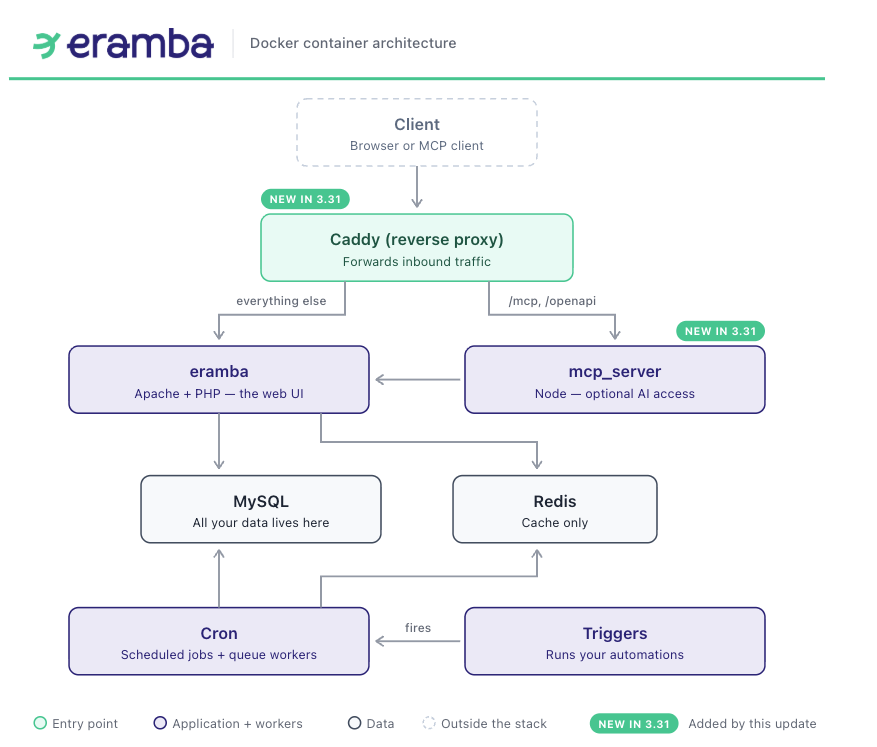
With the introduction of MCP, the eramba infrastructure changes. We are adding a Caddy reverse proxy that routes requests between the MCP server and the eramba application. The diagram below shows how eramba’s infrastructure look as of the 3.31 update.
Before you update
To update to version 3.31, your instance must first be on version 3.30.2. Once you are on 3.30.2 you will notice that the in-app update is blocked and you cannot update from the software itself. This is because, as we have just seen, the infrastructure is changing and that requires some work on the server side.
Eramba 3.31.0 needs eramba docker repository version 1.6.0 (Releases · eramba/docker).
Step 1 - Take a snapshot or backup of the server
You will need it if something goes wrong and you have to roll back.
No snapshot capability? Copy the install directory and take a database dump.
Step 2 - Get the new files
cd /path/to/docker
git stash
git fetch --tags
git pull
git stash pop
Expect a conflict in .env, almost every installation customises PUBLIC_ADDRESS, and there are new variables. You will also get a conflict in docker-compose.simple-install.yml if you changed anything there, such as the port.
Step 3 - Resolve .env
Keep your own PUBLIC_ADDRESS and delete the one from upstream, then keep the three new variables and remove the conflict markers (<<<<<<< Updated upstream, =======, >>>>>>> Stashed changes).
Change this:
<<<<<<< Updated upstream
PUBLIC_ADDRESS=https://localhost:8443
ERAMBA_MCP_IMAGE_TAG=latest
OAUTH2_INTROSPECTION_CLIENT_ID=eramba-mcp-introspect
OAUTH2_INTROSPECTION_CLIENT_SECRET=Replace-this-with-a-unique-secret
=======
PUBLIC_ADDRESS=https://grc.domain.com:9443
>>>>>>> Stashed changes
To this:
PUBLIC_ADDRESS=https://grc.domain.com:9443
ERAMBA_MCP_IMAGE_TAG=latest
OAUTH2_INTROSPECTION_CLIENT_ID=eramba-mcp-introspect
OAUTH2_INTROSPECTION_CLIENT_SECRET=Replace-this-with-a-unique-secret
Step 4 - Generate a secret
OAUTH2_INTROSPECTION_CLIENT_SECRET arrives with the placeholder value Replace-this-with-a-unique-secret. Generate a real one:
openssl rand -hex 32
And replace it in .env:
OAUTH2_INTROSPECTION_CLIENT_SECRET=<the value you just generated>
Step 5 - Move your published port
On docker-compose.simple-install.yml the port where eramba is exposed has changed location.
services:
  mysql:
  redis:
  eramba:              <-- the port used to be published here, remove it
  cron:
  triggers_caddy:
  mcp_server:
  public_proxy:        <-- new service at the end, the port goes here now
volumes:
networks:
5a. Remove the port from the eramba service
Scroll to eramba:, near the top of the file. Your conflict is inside it, a few lines below restart: always:
  eramba:
    container_name: eramba
    image: ghcr.io/eramba/eramba:latest
    restart: always
<<<<<<< Updated upstream
=======
    ports:
      - xxx:443
>>>>>>> Stashed changes
    volumes:
      - data:/var/www/eramba/app/upgrade/data
Delete the five conflict lines. The eramba service must end up with no ports: key at all:
  eramba:
    container_name: eramba
    image: ghcr.io/eramba/eramba:latest
    restart: always
    volumes:
      - data:/var/www/eramba/app/upgrade/data
5b. Set the port on the public_proxy service
Now scroll to the end of the same file, after mcp_server. public_proxy is new in 1.6.0, it arrives with the default port 8443 already set, replace 8443 with the port you were using:
  public_proxy:
    container_name: public_proxy
    image: caddy:2.8-alpine
    ports:
      - xxx:443
    volumes:
      - ./Caddyfile:/etc/caddy/Caddyfile:ro
Only the number on the left changes. The 443 on the right stays, that is the port Caddy listens on inside its own container, and it never changes.
5c. Check it
grep -n '443' docker-compose.simple-install.yml
Only one line should show a host port mapping, and it must be your port under public_proxy. The other matches are internal URLs like https://eramba:443, which are correct and should not be touched.
Your port must match PUBLIC_ADDRESS in .env. If they differ, the software will not work
Certificates
If you had replaced apache/ssl/mycert.crt and .key, there is nothing to do, public_proxy mounts those same two paths for TLS.
Step 6 - Image switch
Now perform the image switch. There are two guides depending on whether you are running Community or Enterprise:
Image switch procedure - Docker installation
The tag for 3.31 is
3.31.0-31
After the image switch you should be running 3.31. No UI update is needed.
Bugs
| Issue | Summary | Ref. |
|---|---|---|
| ERA-1801 | Bug - internal controls issues filter | https://eramba.zendesk.com/agent/tickets/36692 |
| ERA-1781 | Bug - Editing a IC will recalculate the audits | |
| ERA-1720 | Filters multiple conditions on same field FE part | |
| ERA-1705 | Adjust due date filters to have second condition to not include expired items | |
| ERA-1704 | Allow multiple conditions in filter on one field | |
| ERA-1702 | Quick add in any form on user field opens old cakephp form | |
| ERA-1698 | Feature - Make audits editable after close | |
| ERA-1687 | After login warnings | |
| ERA-1686 | Block Add action when license is expired does not work | |
| ERA-1682 | Internal Control item with periodical audit selected can’t be saved | |
| ERA-1669 | IC status issues | https://eramba.zendesk.com/agent/tickets/36356 |
| ERA-1667 | Bug - OA Portal Title doesn’t work | |
| ERA-1642 | Bug - Creating ad-hoc IC Audit does not save the roles | https://eramba.zendesk.com/agent/tickets/36355 |
| ERA-1636 | Compliance Package Notification recipient is missing | |
| ERA-1631 | OA clone does not work if what you are cloning has custom fields | |
| ERA-1628 | Bug - emails.log will show auth credentials if auth fails | |
| ERA-1621 | Bug - Error handling on database restore | |
| ERA-1586 | Bug - Doing an asset review marks new review and previous review as current | |
| ERA-1584 | Bug - Can’t create ad-hoc reviews on assets | |
| ERA-1581 | Email configuration message is shown when there is no authentication on SMTP | https://eramba.zendesk.com/agent/tickets/36186 |
| ERA-1580 | IC Issues csv import displays date as “-0001-11-30” when uploaded empty | https://eramba.zendesk.com/agent/tickets/36157 |
| ERA-1577 | Bug - User Settings are open twice | https://eramba.zendesk.com/agent/tickets/36102 |
| ERA-1569 | Can’t clone Report | https://eramba.zendesk.com/agent/tickets/36007 |
| ERA-1558 | OA import bug | |
| ERA-1549 | Bug - Add sorting by project name on project tasks | |
| ERA-1546 | Feature - MCP allowed to see dynamic status names | |
| ERA-1514 | Bug - Email sent to disabled users when using custom roles | |
| ERA-1450 | Bug - OA Number of questions does not take into account hidden questions | |
| ERA-1407 | Feature - Views changes | |
| ERA-1386 | Feature - Handle loading states on the buttons | |
| ERA-1376 | Bug - Can’t delete a connector, it’s always being used, even when authentication method is local | |
| ERA-1365 | Bug - Error handling of pdf generation when logo is unaccessible | https://eramba.zendesk.com/agent/tickets/35696 |
| ERA-1335 | Bug - Empty Liability magnifier causes internal errors | |
| ERA-1321 | Bug - Date empty filter crashes Internal Control Audits with quick search | |
| ERA-1314 | Feature - Delete emails on queue | https://eramba.zendesk.com/agent/tickets/35570 |
| ERA-1308 | Bug - Fields module relationship, need to be empty by default | |
| ERA-1307 | Classification labels bug in dynamic status config | |
| ERA-1301 | Bug - Can’t add attachment as Unauthenticated OA | https://eramba.zendesk.com/agent/tickets/35486 |
| ERA-1299 | Feature - Allow upload of .xlsm with password | https://eramba.zendesk.com/agent/tickets/35497 |
| ERA-1228 | Bug - Stages filter not working correctly | https://eramba.zendesk.com/agent/tickets/35104 |
| ERA-1231 | Bug - Note field a bit hidden on policy portal | https://discussions.eramba.org/t/feature-policy-portal-make-the-field-for-the-last-change-log-higher-or-allow-adjusting-its-size-manually/8441 |
| ERA-1189 | Bug - Wrong label on BU chart | https://eramba.zendesk.com/agent/tickets/34936 |
| ERA-1187 | ESC key should close only the active element in create / edit forms | |
| ERA-1182 | Feature - Issues when STRICT_TRANS_TABLES is enabled | https://eramba.zendesk.com/agent/tickets/34884 |
| ERA-1181 | Bug - Fields on Third Party API | |
| ERA-1134 | Bug - Timing out when uploading mapping / changing GRC contact on compliance | https://eramba.zendesk.com/agent/tickets/34577 |
| ERA-1114 | Inline edit testing | |
| ERA-1090 | Bug - API error adding a comment when notification is enabled | https://eramba.zendesk.com/agent/tickets/34533 |
| ERA-1086 | Feature - Allow more than 255 characters on the webhook url | https://eramba.zendesk.com/agent/tickets/34487 |
| ERA-1077 | Bug - Can’t delete incident stages in any way | |
| ERA-1051 | Feature - Improve first login loading time | https://eramba.zendesk.com/agent/tickets/34403 |
| ERA-990 | Feature - Add license expiration date on about page (saas) | https://eramba.zendesk.com/agent/tickets/34193 |
| ERA-958 | Bug - Can’t clone Compliance packages | https://eramba.zendesk.com/agent/tickets/34116 |
| ERA-933 | Bug - Accessing Risk appetite without setup calculation results in gray screen | |
| ERA-927 | Bug - Disabled dynamic statuses are still shown on reports | https://eramba.zendesk.com/agent/tickets/33672 |
| ERA-918 | Bug - Wrong label on notification custom role | |
| ERA-777 | Bug - OA Max Score is not achievable | |
| ERA-773 | Vulnerability/Bug - User can use api when disabled | |
| ERA-736 | Feature - Display time on user audit logs | |
| ERA-589 | Bug - Notification recipient doesn’t show custom roles - Goals | |
| ERA-529 | Activity logs only display foreign key |